


wolby2010
Members
-
Joined
-
Last visited
Everything posted by wolby2010
-
Thank you very much that was the solution. It never even occurred to me that there might be notification settings that would affect lspdfr. 👍
-
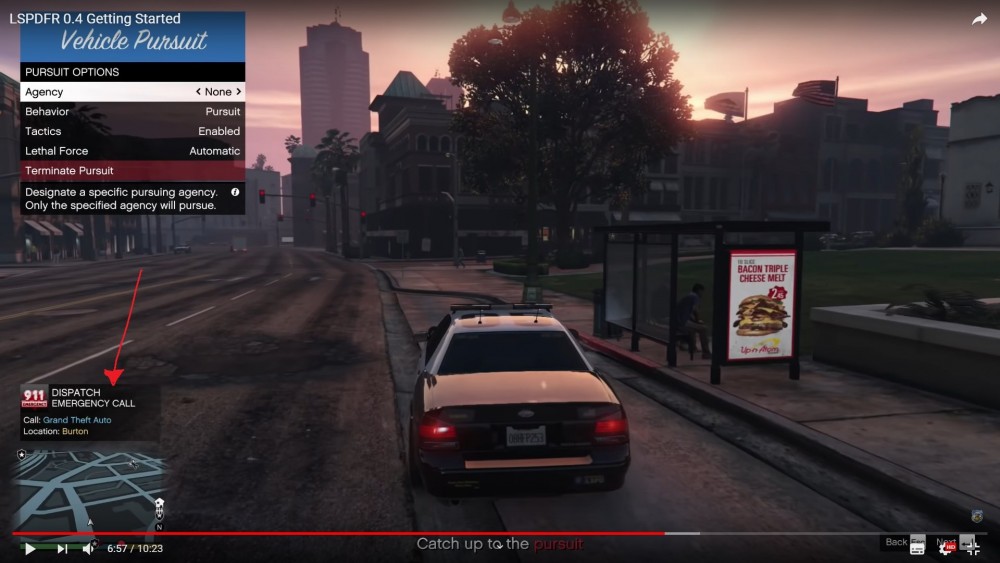
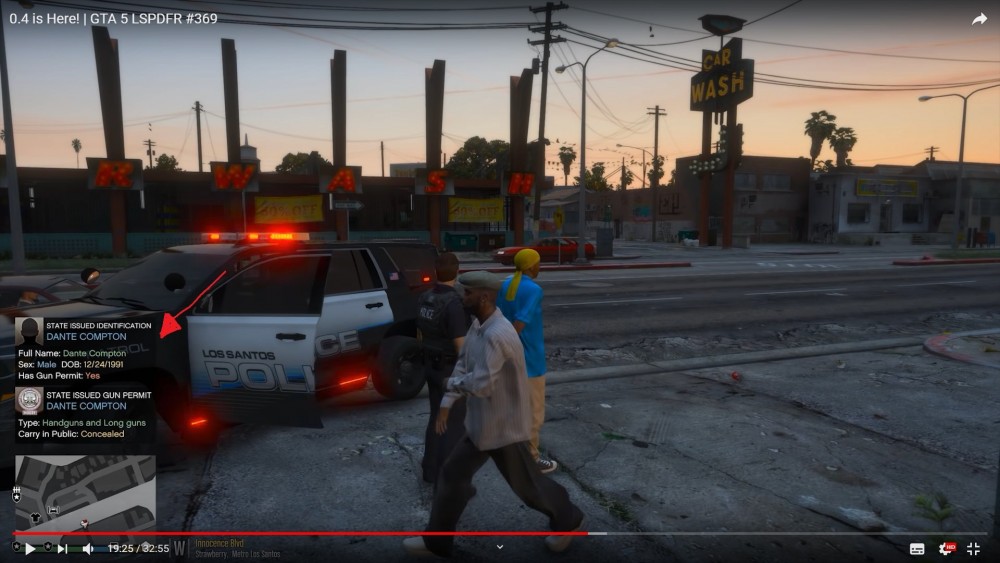
I was an avid player of 0.3 but when 0.4 came out I had problems with some of the display elements and so stopped playing. After a long time away and a completely fresh install of GTAV and the latest LSPDFR version I still have the same issue. The issue is that when you check a number plate on the police computer or you ask for ID usually a small box appears on the bottom left side of the screen with the returned information and yet for me absolutely nothing happens and no info box appears and this was the issue I was encountering when 0.4 first released. Does anyone know what might be preventing the game from displaying those little info windows when you check an id or plate or the results of a search. Could it be a firewall issue or something to do with visual runtime perhaps. I'm not so savvy with these things and can't think what it might be and was wondering if someone smarter might be able to come up with some possible fixes There is an example of the problem from a previous version of LSPDFR which I recorded which is still the same problem I am faced with
-
As far as I know you need to hit the key you would usually use for Horn in GTAV and then if you want lights only and no siren then hit J Key afterwards and to bring the siren back in again hit J again. For me my horn key is the G key or LeftThumb Button on my Steam Controller
-
Well tried that again from absolutely clean copy of GTAV with LSPDFR 0.4.1 using the installer. The result is the same. I've uploaded the RPH log from my short test and recorded the gameplay to highlight the issue with records check and frisking not resulting in anything other than the animation. This is interesting in the log... reverse text "at .() in E:\GTA V\LSPD First Response\LSPD First Response\Mod\TrafficStop.cs:line 1418 [4/1/2019 10:40:55 AM.426] at .() in E:\GTA V\LSPD First Response\LSPD First Response\Mod\TrafficStop.cs:line 388 [4/1/2019 10:40:55 AM.426] at .() in E:\GTA V\LSPD First Response\LSPD First Response\Engine\Scripting\ThreadedScriptComponent.cs:line 66 " Also this: Folder is D:\Program Files (x86)\Steam\steamapps\common\Grand Theft Auto V\plugins\lspdfr And yet in the log it is saying it is looking in E: ?? "E:\GTA V\LSPD First Response\LSPD First Response\Mod\Menus\MenuBase.cs:line" RagePluginHook.log
-
I had a similar problem and it was that I didn't notice it had stopped loading LSPDFR because the plugin had crashed but the little message in the corner continued displaying. When I changed the plugin threshold in RPH up to 60000 I stopped having that problem. You could also wait and only load LSPDFR through the console once the game world has loaded
-
I can get my game to run LSPDFR provided RPH forces Windowed Mode but nevertheless many LSPDFR features are broken such as the ability to search suspects (action performed with no result). I can do a license plate/ name search (nothing will result from it either. No overlay boxes that used to appear in 0.3). On occasion any attempt to arrest someone ends up with my character arresting a ghost and promptly getting inside an invisible vehicle and lodging itself permanently in the ground. I had installed LSPDFR 0.4 on a fresh GTA install. Afterwards I removed it and then tried 0.4.1 and found the exact same issues. It seems like although RPH is hooking into the game it's not able to access the LSPDFR's vehicle search database. Attempts to use Computer+ were also thwarted so it seems like some kind of problem with the LSPDFR frisk/search functions. I've tried with no plugins and also with plugins that might add the features that aren't working in the base game but they causes problems all by themselves I've highlighted what I am missing from my game in the two uploaded images. I'm currently completely redownloading GTAV again to see if that will help although it didn't last time.
-
I wonder if anyone knows what might be the root cause of my game not showing any of the LSPDFR overlay boxes (the ones that appear in the bottom left above the minimap to update you) e.g. when I type something into the police computer nothing pops up, when I frisk someone nothing pops up and nothing appears. I fear that whatever it is that is causing it is also messing with some of the other features of the game. I installed LSPDFR 0.4 in a completely clean game and then uninstalled it before installing LSPDFR 0.4.1 and the problem persisted.
-
I had the same issue where RPH wasn't saving my settings so I'm making sure I just click on the Plugins I want loaded each time I play the game
-
Well this was the date I predicted so I'm hoping I get proved correct and not embarrassed.
-
A month of anxiety? Don't know about you but I've been politely waiting for a year since it was announced waiting for any kind of reference to the release date. I'm glad I know which month it will be after all that uncertainty.
-
My money is on the 24th February
-
Well I personally had all sorts of junk installed which was clogging up the game and so I wanted to make sure that GTAV itself would run smoothly as and when .4 becomes available.
-
I didn't play LSPDFR for a whole year thinking it would have been released earlier so I'm beyond ready to play with all the features 0.4 has to offer.
-
Really impressive stuff. Rockstar is only in it for the money so only MP gets new features so we rely on the LSPDFR team to crank up SP to make the game continually playable in a fresh and exciting way. I take my hat off to you sirs.
-
Firstly dismount your high horse for a moment and take the time to read some of the previous comments. Now I haven't been the one making these comments; nevertheless, I have taken it upon myself to reply on their behalf. What the previous comments seem to be about is not the fact that they don't have their mod now but, it is a discussion as to why the devs would have chosen to reveal the news of 0.4 when they did. I'm sure everyone here especially those who have been fans since Liberty City can appreciate the incredible hard work that has gone into this mod as I hope you can appreciate that their antsy-ness is a compliment as to the achievements of aforementioned devs. What is extremely unhelpful here is to turn a forum intended for a community of fans of LSPDFR into a sour place that allows personal insults levied amongst one another instead of calm carefully-worded discourse on any of the issues/praise they have regarding this mod. It's hard not to reflect onto you the common trend of recent society which is to find something for which to be outraged about, however it seems your dressing-down in this matter is more than a little unwarranted especially considering other users have already made a similar point in a far less attacking manner. I can appreciate your intentions were probably to protect the developers' reputation however, there are community moderators who are perfectly capable of doing so.
-
Rockstar should have done the whole DayZ thing and created a stand-alone game for LSPDFR using GTA5 base game with official support because there is certainly enough fans to justify it. About a month and a half after an update I start getting a bit salty ('why did they say the wait is over in the first bit of news 8 months ago') but then when the next preview drops and I read the additional features and I see how much time must have been put into this mod I begin to relax again for a while at least 😀


