againstallodds
Members
-
Joined
-
Last visited
Everything posted by againstallodds
-
Upload your crash file. RagePluginHook.log
-
For Traffic Policer, Download -Traffic Policer 6.15.0.0 by Albo1125 - MinRPH 0.51.zip For Police Smart Radio, Download -PoliceSmartRadio 1.2.0.0 by Albo1125 RPH0.51orhigher.zip Typically you want to download the one that is the highest number.
-
It looks like one of the most recent things happening before the crash is a PeterUCallout's Unauthorized Camping callout. Looks like a vehicle was not able to be spawned. I think you are able to remove that callout from playing through the .ini. I would do that first, see if it crashes, and if the problem continues then remove the entire callout for now. If you are still crashing then I would try a fresh install of rageplugin and LSPDFR. Note: I use PeterUCallout and have zero problems, I also have the camping call disabled.
-
Traffic Policer offers a mimic feature where you can tell the person you pulled over where exactly to pull over. It is a lot better than the built in option and gives you more freedom in choosing exactly where you want the person to move.
-
I'm guessing it is just how the mod has the dirt effect set. I would find a new mod, lucky for you the LAPD Crown Vic is one of the most common. Or you can head into the texture file and replace it yourself. Here's an idea on how to do that.
-
ELS works by enabling and disabling components, make sure all of the components are set to off (trainerV mod allows you to do this) and try again. If the problem still exists then it has to be your installation.
-
devs, you should make some stuff open source so that others can go and create a LSPDFR multiplayer/co-op if you're not going to shame an entire portion of the mod is missing because of the fear of big bad wolf take2 coming for you you have created an entire mod website dedicated to distributing mods, i think working toward a multiplayer wont make a difference
-
-
 Fixed, thanks a lot. I downloaded the recent ELS and just dragged over everything keeping it default.
- 783 comments
- 86 reviews
-
[1/14/2018 2:35:29 PM.394] LSPD First Response: [Better EMS]: User requested response with default first responder settings [1/14/2018 2:35:29 PM.395] LSPD First Response: [Better EMS]: Loading response manager [1/14/2018 2:35:29 PM.397] LSPD First Response: [Better EMS]: Responding to X:-847.9778 Y:200.9433 Z:73.79723 [1/14/2018 2:35:29 PM.399] LSPD First Response: Assembly is requesting an LSPDFR+ SecurityGuid: BetterEMS [1/14/2018 2:35:29 PM.401] LSPD First Response: LSPDFR+ SecurityGuid validated & issued successfully. [1/14/2018 2:35:29 PM.405] LSPD First Response: LSPDFR+ API: Plugin: Better EMS is increasing statistic: EMS Calls [1/14/2018 2:35:29 PM.899] LSPD First Response: [Better EMS]: First responder not specified by API; will be decided by settings. [1/14/2018 2:35:29 PM.900] LSPD First Response: [Better EMS]: Initiating response unit for FIRE [1/14/2018 2:35:29 PM.918] LSPD First Response: Chose vehicle FBI2 [1/14/2018 2:35:29 PM.919] LSPD First Response: Choose between 2 and 2 peds [1/14/2018 2:35:29 PM.919] LSPD First Response: Choosing 2 peds [1/14/2018 2:35:29 PM.919] LSPD First Response: Chosen ped 1: S_M_M_PARAMEDIC_01 [1/14/2018 2:35:29 PM.919] LSPD First Response: Chosen ped 0: S_M_Y_FIREMAN_01 [1/14/2018 2:35:29 PM.919] LSPD First Response: Choosing spawn radius between 50 and 100 [1/14/2018 2:35:29 PM.920] LSPD First Response: Chose spawn radius of 72 [1/14/2018 2:35:30 PM.383] LSPD First Response: Found vehicle color: Red (-65536) [1/14/2018 2:35:30 PM.387] LSPD First Response: Configuring extras on vehicle [1/14/2018 2:35:30 PM.388] LSPD First Response: Setting extra 1 to True [1/14/2018 2:35:30 PM.393] LSPD First Response: Configuring extras on vehicle [1/14/2018 2:35:30 PM.512] LSPD First Response: Setting up ped components for S_M_M_PARAMEDIC_01 [1/14/2018 2:35:30 PM.630] LSPD First Response: Setting up ped components for S_M_Y_FIREMAN_01 [1/14/2018 2:35:30 PM.636] LSPD First Response: Current ped variations: 8, 2, 0 [1/14/2018 2:35:30 PM.636] LSPD First Response: Max ped variations: 8, 2, 0 [1/14/2018 2:35:30 PM.636] LSPD First Response: Setting ped variation: 8, 0, 0 [1/14/2018 2:35:30 PM.636] LSPD First Response: Setting ped head/hat prop to 0 [1/14/2018 2:35:30 PM.668] LSPD First Response: [1/14/2018 2:35:30 PM.668] LSPD First Response: ============================== [1/14/2018 2:35:30 PM.668] LSPD First Response: UNHANDLED EXCEPTION DURING GAME FIBER TICK [1/14/2018 2:35:30 PM.668] LSPD First Response: ------------------------------ [1/14/2018 2:35:30 PM.668] LSPD First Response: Origin: Game fiber "ResponseManager Respond". [1/14/2018 2:35:30 PM.668] LSPD First Response: ------------------------------ [1/14/2018 2:35:30 PM.668] LSPD First Response: Exception type: System.TypeInitializationException [1/14/2018 2:35:30 PM.669] LSPD First Response: Exception message: The type initializer for 'ParksCommon.ELS.ELSCompatabilityCheck' threw an exception. [1/14/2018 2:35:30 PM.669] LSPD First Response: ------------------------------ [1/14/2018 2:35:30 PM.669] LSPD First Response: Inner exceptions: [1/14/2018 2:35:30 PM.669] LSPD First Response: Exception type: System.OverflowException [1/14/2018 2:35:30 PM.669] LSPD First Response: Exception message: Value was either too large or too small for an Int32. [1/14/2018 2:35:30 PM.669] LSPD First Response: ------------------------------ [1/14/2018 2:35:30 PM.669] LSPD First Response: Stack trace: [1/14/2018 2:35:30 PM.669] LSPD First Response: at System.Number.ParseInt32(String s, NumberStyles style, NumberFormatInfo info) [1/14/2018 2:35:30 PM.669] at Rage.InitializationFile.ReadInt32(String sectionName, String keyName, Int32 defaultValue) [1/14/2018 2:35:30 PM.670] at ParksCommon.ELS.ELSCompatabilityCheck..cctor() [1/14/2018 2:35:30 PM.670] LSPD First Response: ============================== [1/14/2018 2:35:30 PM.670] LSPD First Response: [1/14/2018 2:35:30 PM.670] LSPD First Response: ------------------------------ [1/14/2018 2:35:30 PM.670] LSPD First Response: Stack trace: [1/14/2018 2:35:30 PM.670] LSPD First Response: at ParksCommon.ELS.ELSCompatabilityCheck.CheckVehiclePromptUser(Vehicle vehicle, Boolean reShow) [1/14/2018 2:35:30 PM.670] at ?????????????????????????????????????????.?????????????????????????????????????????() [1/14/2018 2:35:30 PM.670] at ?????????????????????????????????????????.?????????????????????????????????????????.?????????????????????????????????????????() [1/14/2018 2:35:30 PM.670] at Rage.GameFiber.Main() [1/14/2018 2:35:30 PM.670] LSPD First Response: ============================== [1/14/2018 2:35:30 PM.670] LSPD First Response: [1/14/2018 2:35:30 PM.975] LSPD First Response: All signs removed Better EMS is crashing my LSPDFR whenever I use ; to activate it, I added the crash info above. Thanks for the help!
- 783 comments
- 86 reviews
-
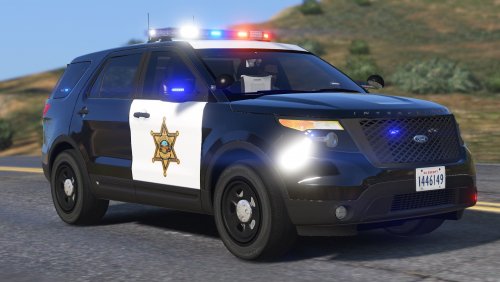
.thumb.jpg.bfad1c193dd40b9d539eefd7c5187a5a.jpg) Tried to add this car to police4, everything is fine except the multiple livery's don't work. Anyone have a fix?
Tried to add this car to police4, everything is fine except the multiple livery's don't work. Anyone have a fix?- 157 comments
- 46 reviews
-
This mod causes my character to keep falling under the map upon death. Any suggestions?
-
 not sure if its the update or just me but i literally tried everything to make this mod work (as sheriff2) and nothing i changed around the carvar and vehicles files however the bar on top was still cover by some dark tint that i could remove via the trainer + the car was flipping like crazy i think that its not finding the vehicles.meta file because this lines you provided should have fixed the tint and flipping if anyone has any ideas on how to get this work as sheriff2 pls let me know, thanks (i already watched that video and tried doing it EXACTLY like that but it still didn't work)
- 117 comments
- 28 reviews
-
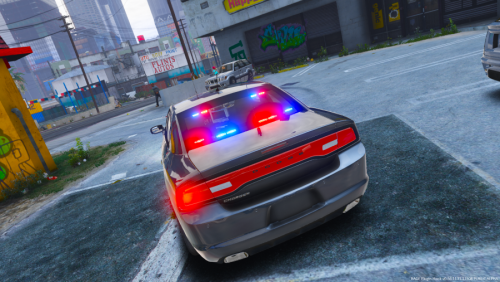
.thumb.png.e88f1892e13ddb98db35e668d465c34b.png) How would you go about making this all blue lighting? I changed the texture and lights show up as blue but those actual flashing lights you added remain red. I even tried changing siren settings around but nothing. Thanks.
How would you go about making this all blue lighting? I changed the texture and lights show up as blue but those actual flashing lights you added remain red. I even tried changing siren settings around but nothing. Thanks.- 182 comments
- 44 reviews
-
-
Thanks for the help. Answer It depends. Most of the vanilla cars don't have accessible carvariation.meta files, the lines have to be added manually in existing ones. Most people place the carvariation.meta lines in the one located in the mpchristmas2 DLC folder, located at the same location as the others. The vehicle.meta file however is accessible in update/update.rpf/common/data/level/gta5.
-
So I'm installing a mod for my police3 and im trying to edit the siren settings and I can't find the carvariations or meta file for it. So my question is a bit broader than that, does each police, police2, police3 mod have its own locations for these files or can I just place them in the latest data location possible thanks
-
 How do i go about adding my own skins into this? Since EUP has its own folder in DLC packs, does that mean it overrides all the prior ones? Thanks!
- 2,346 comments
- 236 reviews
-
-
 Hey can someone help me out I put this vehicle on police3 and now the front lightbar lights fly off the vehicle when the siren/lights are on. Do I need some custom carvariations or something? If so can someone link me theirs. Thanks.
- 148 comments
- 34 reviews
-

.thumb.jpg.bfad1c193dd40b9d539eefd7c5187a5a.jpg)
.thumb.png.e88f1892e13ddb98db35e668d465c34b.png)