


Unnamed for a reason
Members
-
Joined
-
Last visited
Everything posted by Unnamed for a reason
-
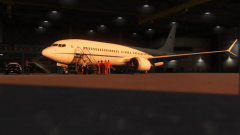 It's not a public file. I made it for myself, but I can post it if you want.
 -
A quick skin for Skyline's 737 Max 9, inspired by one of the JPATS (U.S Marshals) operated aircrafts used for convict transport.
-
Hey guys, I'd need to quickly convert something to gta V from gta IV, and tbh I'm not a big fan of paying 22 bucks for one small convert. So I'm asking the community, if anyone would be feeling so exeptionally generous would pass me his/her's license for like a day or two, that'd be truly wonderful!
-
Okay so, not only that these were the issues, but there was also a supplemental </sirens> that was making it do some crazy stuff. Everything works fine now! @Aquamenti, @NeulandInternet you guys are the governors! Aitäh! Vielen Dank!
-
Yes I did (only to my add-on carcols though), here are the files (cvpi2) carcols.meta carvariations.meta
-
My main question here is, since I made the car an add-on, I wanted to make its siren setting a custom one (E.g: id:"15"), so it does not change the original sirensetting 13, kinda like Captain 14 made it for his ELS style vehicles wich some are add-ons. So how comes that he managed to make the carcols work for those cars without touching to the original file and I can't for Lundys, and I'm using a proper add-on dlc file, no bugs with that. (Btw everything is corresponding in the carvariations) P.s: I'm sorry if my request might seem basic, but I've went trough the Carcols dedicated topic and I couldn't find any proper explanation to my issue so that's why I'm here:P
-
Everything works fine, just when I activate the siren, no lights appear. So like, I've been wondering if maybe my game does not recognize the name I have given to the custom siren setting, like am I supposed to add that sirensetting name to some siren list, as you would do when you add a new dlc?
-
No worries, you've already done enough. Danke!
-
Oh okay I see Btw do you have an idea about what could be the source of the carcols issue, like the sirensetting not working when creating a cutom carcols. Like the lightbar does not function at all, no flashing, rotating and so on
-
Fascinating, it wasn't set in the original file I used, that had to be the issue. Thanks a lot ;)
-
Hey I've tried to make Lundy's 1999 P71 Ford Crown Victoria an add-on, configured everything as it should be, but when I spawned the car in, I couldn't hear the sound of the engine and same goes for the siren, oh and I couldn't see neither. So my guess is that it's something to do with the carvaritions or the carcols. Anyone can help? For info, the vehicles.meta was taken from the original police1 and renamed, the carcols is Lundy's that comes with the vehicle. Here are the files if you're wondering. (Lundy's vehicle is named "Cvpi2")
-
Well I guess so, I used the normal FBI2 carvaritons.meta Here's the file if you want to take a look carvariations.meta
-
Okay soo I'm trying to make my headlights flash on a vehicle using the same siren settings as FBI2, I've tried to change the values of the left an right headlight sequencer, but nothing seems to work. Anyone has an idea to why is this happening? Here's the carcols file. carcols.meta
-
Hello, I'm searching someone who is a fan of the show and who has some minimal knowledge on the subject for some adequate skin testing and feedback. Pm me if you're interested. The skin is supposed to be for Captain 14's Impala. Thank you.
-
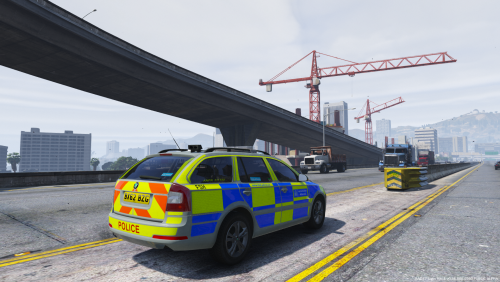 Dude finally! Seeing these all over Prague had me wanted to see one in GTA for so long (even if this one is from the British Police), good job (Just that suspension, idk why it kinda feels like a Passat or a Scout version XD)
- 2 comments
- 3 reviews
-
-

- 1
-
-
Oh yes! The back suspension might be a tad bit high, but overall a fantastic model.
- 2 comments
- 3 reviews
-
-
- 1
-
-
Thanks mate ;)
-
Okay so here are some more vehicles to your beautiful pack. https://fr.gta5-mods.com/vehicles/1996-fbi-detective-crown-victoria https://fr.gta5-mods.com/vehicles/1998-fbi-detective-crown-victoria-2-models
-
-
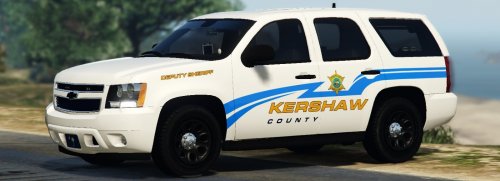 FFS.... [FOR EVERYONE NOOBY OR STUPID] The vehicles.meta is at GTA V\mods\update\update.rpf\common\data\levels\gta5\vehicles.meta If you're having issues for some reason install wise, use this beauty:
- 31 comments
- 8 reviews
-
From the album: Patroling n Stuff
-
-
-
Here you go <Item> <modelName>tahoe16</modelName> <txdName>tahoe16</txdName> <handlingId>BALLER</handlingId> <gameName>FBI2</gameName> <vehicleMakeName /> <expressionDictName>null</expressionDictName> <expressionName>null</expressionName> <animConvRoofDictName>null</animConvRoofDictName> <animConvRoofName>null</animConvRoofName> <animConvRoofWindowsAffected /> <ptfxAssetName>null</ptfxAssetName> <audioNameHash>fbi2</audioNameHash> <layout>LAYOUT_STANDARD</layout> <coverBoundOffsets>FBI2_COVER_OFFSET_INFO</coverBoundOffsets> <explosionInfo>EXPLOSION_INFO_DEFAULT</explosionInfo> <scenarioLayout /> <cameraName>DEFAULT_FOLLOW_VEHICLE_CAMERA</cameraName> <aimCameraName>BOX_VEHICLE_AIM_CAMERA</aimCameraName> <bonnetCameraName>VEHICLE_BONNET_CAMERA_HIGH</bonnetCameraName> <povCameraName>DEFAULT_POV_CAMERA_LOOKAROUND</povCameraName> <FirstPersonDriveByIKOffset x="0.000000" y="-0.050000" z="-0.030000" /> <FirstPersonDriveByUnarmedIKOffset x="0.000000" y="0.000000" z="0.000000" /> <FirstPersonProjectileDriveByIKOffset x="0.000000" y="-0.088000" z="0.093000" /> <FirstPersonProjectileDriveByPassengerIKOffset x="0.020000" y="0.060000" z="-0.090000" /> <FirstPersonProjectileDriveByRearLeftIKOffset x="0.000000" y="0.000000" z="-0.055000" /> <FirstPersonProjectileDriveByRearRightIKOffset x="0.000000" y="0.000000" z="-0.055000" /> <FirstPersonDriveByLeftPassengerIKOffset x="0.000000" y="0.000000" z="-0.040000" /> <FirstPersonDriveByRightPassengerIKOffset x="-0.045000" y="-0.048000" z="-0.040000" /> <FirstPersonDriveByRightRearPassengerIKOffset x="0.000000" y="0.000000" z="-0.040000" /> <FirstPersonDriveByLeftPassengerUnarmedIKOffset x="0.000000" y="0.000000" z="0.000000" /> <FirstPersonDriveByRightPassengerUnarmedIKOffset x="0.000000" y="0.000000" z="0.000000" /> <FirstPersonMobilePhoneOffset x="0.150000" y="0.288000" z="0.503000" /> <FirstPersonPassengerMobilePhoneOffset x="0.136000" y="0.223000" z="0.425000" /> <FirstPersonMobilePhoneSeatIKOffset> <Item> <Offset x="0.136000" y="0.223000" z="0.475000" /> <SeatIndex value="2" /> </Item> <Item> <Offset x="0.136000" y="0.223000" z="0.475000" /> <SeatIndex value="3" /> </Item> </FirstPersonMobilePhoneSeatIKOffset> <PovCameraOffset x="0.000000" y="-0.138000" z="0.645000" /> <PovCameraVerticalAdjustmentForRollCage value="0.000000" /> <PovPassengerCameraOffset x="0.000000" y="0.000000" z="0.030000" /> <PovRearPassengerCameraOffset x="0.000000" y="0.000000" z="0.070000" /> <vfxInfoName>VFXVEHICLEINFO_CAR_GENERIC</vfxInfoName> <shouldUseCinematicViewMode value="true" /> <shouldCameraTransitionOnClimbUpDown value="false" /> <shouldCameraIgnoreExiting value="false" /> <AllowPretendOccupants value="true" /> <AllowJoyriding value="false" /> <AllowSundayDriving value="false" /> <AllowBodyColorMapping value="true" /> <wheelScale value="0.268600" /> <wheelScaleRear value="0.268600" /> <dirtLevelMin value="0.000000" /> <dirtLevelMax value="0.850000" /> <envEffScaleMin value="0.000000" /> <envEffScaleMax value="1.000000" /> <envEffScaleMin2 value="0.000000" /> <envEffScaleMax2 value="1.000000" /> <damageMapScale value="0.600000" /> <damageOffsetScale value="1.000000" /> <diffuseTint value="0x00FFFFFF" /> <steerWheelMult value="1.000000" /> <HDTextureDist value="5.000000" /> <lodDistances content="float_array"> 15.000000 40.000000 90.000000 180.000000 500.000000 500.000000 </lodDistances> <minSeatHeight value="0.966" /> <identicalModelSpawnDistance value="20" /> <maxNumOfSameColor value="10" /> <defaultBodyHealth value="1000.000000" /> <pretendOccupantsScale value="1.000000" /> <visibleSpawnDistScale value="1.000000" /> <trackerPathWidth value="2.000000" /> <weaponForceMult value="1.000000" /> <frequency value="100" /> <swankness>SWANKNESS_1</swankness> <maxNum value="999" /> <flags>FLAG_HAS_LIVERY FLAG_LAW_ENFORCEMENT FLAG_EXTRAS_REQUIRE FLAG_EXTRAS_STRONG FLAG_DONT_SPAWN_IN_CARGEN FLAG_IS_OFFROAD_VEHICLE FLAG_HAS_INTERIOR_EXTRAS FLAG_REPORT_CRIME_IF_STANDING_ON FLAG_IS_BULKY FLAG_RECESSED_HEADLIGHT_CORONAS FLAG_HAS_INTERIOR_EXTRAS</flags> <type>VEHICLE_TYPE_CAR</type> <plateType>VPT_FRONT_AND_BACK_PLATES</plateType> <dashboardType>VDT_GENTAXI</dashboardType> <vehicleClass>VC_EMERGENCY</vehicleClass> <wheelType>VWT_SUV</wheelType> <trailers /> <additionalTrailers /> <drivers> <Item> <driverName>S_M_M_FIBOffice_01</driverName> <npcName /> </Item> <Item> <driverName>S_M_M_FIBOffice_02</driverName> <npcName /> </Item> </drivers> <extraIncludes /> <doorsWithCollisionWhenClosed /> <driveableDoors /> <bumpersNeedToCollideWithMap value="false" /> <needsRopeTexture value="false" /> <requiredExtras /> <rewards> <Item>REWARD_WEAPON_CARBINERIFLE</Item> <Item>REWARD_AMMO_CARBINERIFLE</Item> <Item>REWARD_STAT_WEAPON</Item> </rewards> <cinematicPartCamera> <Item>WHEEL_FRONT_RIGHT_CAMERA</Item> <Item>WHEEL_FRONT_LEFT_CAMERA</Item> <Item>WHEEL_REAR_RIGHT_CAMERA</Item> <Item>WHEEL_REAR_LEFT_CAMERA</Item> </cinematicPartCamera> <NmBraceOverrideSet /> <buoyancySphereOffset x="0.000000" y="0.000000" z="0.000000" /> <buoyancySphereSizeScale value="1.000000" /> <pOverrideRagdollThreshold type="NULL" /> <firstPersonDrivebyData> <Item>RANGER_CAVALCADE_FRONT_LEFT</Item> <Item>RANGER_FRONT_RIGHT</Item> <Item>RANGER_PRANGER_REAR_LEFT</Item> <Item>RANGER_PRANGER_REAR_RIGHT</Item> </firstPersonDrivebyData> </Item>
- 31 comments
- 8 reviews
-
-
- 1
-
-
You're welcome bud' , though If I may, I really recommend you that trainer, it's by far the best (Just so you don't struggle with other stuff :P). Oh and if you need other help, message me :) Go in vehicles.meta, export the file, open with notepad, change the handling to BALLER or BALLER2, save it and use that to replace the original vehicles.meta
- 31 comments
- 8 reviews
