


Unnamed for a reason
Members
-
Joined
-
Last visited
Everything posted by Unnamed for a reason
-
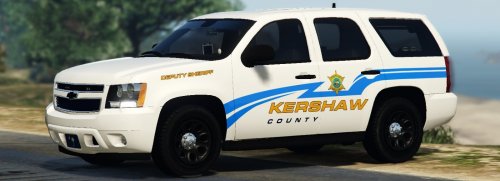 Well, you simply have to change liveries. I'd recommend you to download a trainer, which is if you don't know what it is, a menu that permits you to spawn vehicles, objects and adds a ton of features to the overall game. If you download the trainer linked down below, install it, press F3 and then once you're in the Tahoe, simply go to vehicle options, then to liveries and then you can easily change it. https://fr.gta5-mods.com/scripts/simple-trainer-for-gtav If you want to have the Tahoe in that ''Heat'' livery, and you totally hate that Kershaw County livery, the go to OPEN IV, select the Tahoe file that ends by .ytd, then once it is opened, and Open IV is in Edition mode, you go the ''police_sign_'' texture (simply scroll down and you'll find it) and erase the Kershaw County livery (I'd recommend you to export it to some folder in case you want it back for some reason).
- 31 comments
- 8 reviews
-
-

- 1
-
-
-
 @GumpThere's an issue with the searchlight glass appearing when on the side of the vehicle. You can see the transparent semi circle on the wind shield.
- 74 comments
- 23 reviews
-
-
- 1
-
-
 Very interesting model, for sure love the quality of it, though I wanted to know if it is planned to have red lights in the back or you'll just keep the current ones?
- 51 comments
- 21 reviews
