


Creators: Due to background reprocessing of files, approvals and file security checks may be delayed. Thanks for your patience.


Joe C Wilson
Members
-
Joined
Everything posted by Joe C Wilson
-
 You can edit the Custom Regions file to change the police agency assigned to Mirror Park (MIRR) to a different one. Additionally, you can modify the regions.xml file located in the LSPDFR folder to make the same changes. I have assigned park rangers to Mirror Park to utilize EUP, as there are limited park areas in the city where they can patrol. The goal of this project is to incorporate as much as possible into EUP for single-player use. While I could set them up as special backup units instead of local patrol backup, doing so would require a significant amount of time. Therefore, I am unlikely to make extensive changes to this mod unless absolutely necessary. I have also left instructions just under the vehicle information tab regarding which file to edit and where to make the changes.
- 942 comments
- 23 reviews
-
-
-
-
-
-
-
Rich's Police Enhancements does almost exactly what you described. It works when AI pits the vehicle as well.
-
GTA 4 LCPDFR #32 - Stabbing In Hove Beach | LCPD '12 Charger via @YouTube
-
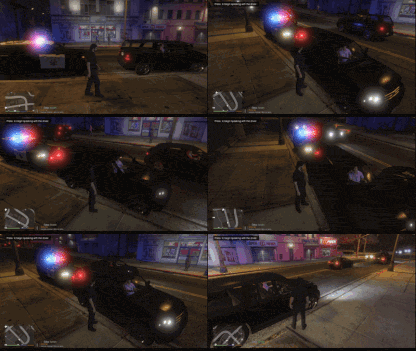
GTA 5 LSPDFR #98 - Hit-and-Run | DPPD '16 Charger via @YouTube
-
Del Perro PD and a few other departments do not have hats, so I haven't removed them from the configurations of other departments yet, although it is very unlikely that they will be removed. The process of making these changes is extremely tedious and time-consuming. You might prefer the patrol vest with antenna folders, as those still include hats. I haven't created a no-hats version for the patrol vest configurations yet, but perhaps I will get around to it in the future.
- 942 comments
- 23 reviews
-
-
-
-
-
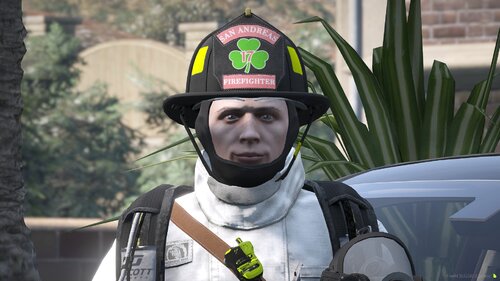 I’ve put together a mini texture pack for EUP that features the first-ever "Luck of the Irish" themed shamrock textures for the Traditional MSA N6A Helmet by JA Designs. This pack covers roles like CHIEF, CAPTAIN, LIEUTENANT, ENGINEER, FIREFIGHTER, EMS, and APPRENTICE. These textures are FiveM-Ready and LSPDFR compatible. These textures draw inspiration from the traditions of my local fire department and are proudly worn by many firefighters throughout the United States. They celebrate Irish-American heritage and emphasize that the fire service is an inclusive environment for all, regardless of religious beliefs.
 -
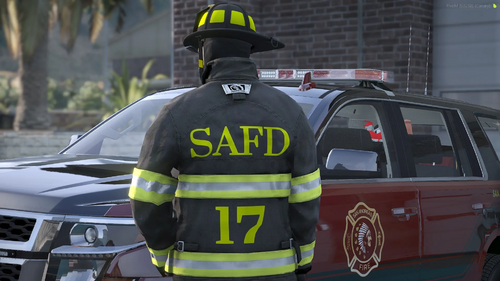 I have created a small texture pack for EUP that includes tan, black, and white SAFD lettering for the bunker gear. The name of the department is SAFD, which stands for San Andreas Fire Department. The station number is influenced by my local fire department, which in turn draws inspiration from the Luck of the Irish shamrocks worn by them.
 -
 RPH recently started throwing me an error saying a dependency that runs this plugin can't be loaded, but doesn't specify what exactly that is. Any tips? I love this plugin; it works great, but I can't get it to load upon startup anymore. Thank you!
- 26 comments
- 3 reviews
-
We don't need constant reminders of this in every forum thread we browse. For goodness' sake, please let us be without all this PR boasting.
-
-
The new DLC police car liveries won't work with Ultimate Backup, but they should with the default backup menu. Because of that, I haven't bothered to add them to the config.
- 942 comments
- 23 reviews
-
-

- 1
-
-
I don't set liveries because most people, including myself, change their cars in the long run, and I personally rotate out my car packs every 3 to 6 months.
- 942 comments
- 23 reviews
-
-
- 1
-
-
I think as many as you want, but you have to make sure all the vehicle chances together equal no more than 100%. I recommend setting each number to an even number so that you can make it easier to ensure each car spawns fairly. So if you only want 4 cars to spawn, I suggest setting the number to 25% and so on.
-
Off the bat, I can tell you that two out of the three clothing packs you linked are not EUP uniforms. Additionally, my EUP Backup Config does not depend on replacement peds, such as s_m_y_sheriff01 or s_m_y_cop_01. You will need to utilize the default Ultimate Backup or modify my configs if you want to use those specific peds and adjust the component settings accordingly. I suggest sticking with the original Ultimate Backup since it requires fewer files to edit for your intended use. There's no reason to install EUP Backup Configurations if your only intention is to use RCMP and VCPD. I haven't used replacement peds in quite some time, but it should appear like this; <Ped chance="25" comp_shirt="2" comp_accessories="3" prop_hats="1" prop_glasses="4">S_M_Y_COP_01</Ped> If you want to enable props like sunglasses or watches, simply add this line below the previous one: <Ped chance="25" random_props="True">S_M_Y_COP_01</Ped> That being said, I am not aware of which slots are assigned to which specific uniform parts from the clothing packs you mentioned. You can utilize simple trainer and access the clothes menu to locate the number you require, which is usually found under accessories 2. Lastly, if you plan to change the default backup menu settings, locate the agency_eup.xml file. I hope this guides you in the right direction.
-
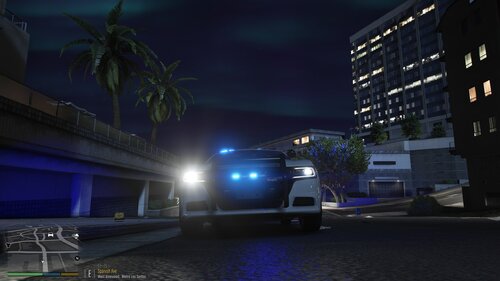 If you have installed a car model or car pack and noticed that the vehicle's headlights shut off when you activate the emergency lights, you can resolve this issue by following these steps: 1. Locate the carvariations.meta file. 2. Change the light settings value to 1. For added compatibility, especially if it is a replacement vehicle slot (like police or police2), you may also want to set the siren settings to 13. The most common carvariations.meta file can be found in the following directory: mods/update/x64/dlcpacks/mpchristmas2/dlc/common/data In the carvariations.meta file, make sure to include the following lines: ```xml <lightSettings value="1" /> <sirenSettings value="13" /> ``` This should fix the issue with the headlights turning off. Note that the police and police2 car variations are hard-coded and cannot be changed unless you manually add them to a new DLC Pack folder, such as mpchristmas2. An example for the police car slot is as follows: [Click to reveal spoiler tag]: Pasted content


.png.3a9d6b50fcf935dc0af44b3c196be709.png)
.png.0d892d353bfab77940a800189cbce73e.png)
.png.fa61d2927d72723fb99b6cce5f2b79f0.png)

