



Scottvdken
Members
-
Joined
-
Last visited
Everything posted by Scottvdken
-
Police Pursuits Disabler doesn't seem to be working anymore. Any alternatives? Tired of getting rear ended by an ambient chase as I'm performing a traffic stop.... :)
-
 Great pack! The only issue I'm having is the lightbar on the Explorer doesn't work. Any ideas why? The other lights work fine, just not the lightbar itself.
- 208 comments
- 59 reviews
-
Maybe someone can help me here. Fresh install after not playing for a few months. Installed just RageHook and game loaded up fine running from the rage exe. Installed LSPDFR and now Rage just runs through it's dependencies and nothing else happens after that. Even if I fire up GTA first and then try to run it, same issue. Tried running as Admin, tried running in compatibility mode, restarted the PC, reinstalled LSPDFR - nothing. Any ideas? EDIT: I forgot, I had also installed RDE and configured OpenIV with a mods folder BEFORE installing LSPDFR and GTA loaded just fine via Ragehook.
-
 Hi! This is a fantastic model. Just one question: Do you know why my lights would be dim? The siderunner lights up at normal brightness, but all the other lights are extremely dim. Using Radiance V. Thanks!
- 85 comments
- 45 reviews
-
Ah, I was using police radio to call backup on a traffic stop. I'll try the default instead.
-
Several months ago I (thought) I had a mod that made AI backup responding Code 2 do so without sirens, lights only. I cannot find it; anyone know what I'm talking about?
-
-
EDITED because I fixed my Sheriff issues, but still have the below problem. I am replacing RDE vehicles and I have an issue where police3 spawns in a blank vehicle (avatar just sits in midair), but I know this car usually works because I successfully added before my fresh install and worked great (gump slicktop charger). Anyone know why? EDIT #2 So, I've done some more testing, and ANY vehicle I put in the police3 spot spawns invisible. Help??
-
Gotcha, I feel like I figured it out last time I played (8 months ago or so) so I'll figure it out again. Thanks!
-
Correct, I am looking for addon cars to both respond and patrol. So can you confirm that RDE does this, before I get into it?
-
So I understand the process for adding standalone police cars; what I would like to know is whether there is a way to add in more police cars that will patrol and respond to calls just like the vanilla ones. I seem to remember that RDE would do this, but I see nothing in the documentation indicating so. Can anyone shed any light?
-
That worked perfectly. Thanks!
-
Can someone point me to an Auto Brake Lights script that is actually working? Tried MoreControl and a generic AutoBrake script mod and neither seem to work for me. Thanks!
-
I am having a helluva time trying to get set up again after not playing for awhile. Fresh install with TrafficPolicer, PoliceRadio and ELS only enabled. However, I cannot for the life of me get keybindings to play together. I cannot get ELS to recognize any custom keys in the .ini file, it just stays at default. I play with a controller and honestly would like to disable ALL ELS keyboard inputs, if possible. I have tried leaving the fields blank, changing to "none", and assigning all keys the same key, as well as using different assorted keys but it always stays at the default keyboard configuration. My problem specifically is with the vanilla LSPDFR police computer. It is bound to the "E" key, which is also the key for ELS's horn. Can someone help? EDIT: Ignore me. "E" is the binding for GTA's horn. Changed that and I'm all good. Still, is there any kind of tool or utility to help manage keybindings a little better than customizing each mod indivually? Just curious.....
-
This. I'm using RDE solely for this purpose. All I did was do the manual install option, and only installed the SAHP squad, and the popgroups and popcycle. You can then edit the both the hwaycar slots, and the popgroups to spawn whatever you want, wherever you want.
-
Could be..... Bugs' CVPI is one that I haven't tried, since I hate the OIV installers.
-
 I can confirm that all of these, except for Allthings (don't use it) work fine for me.
- 3,646 comments
- 306 reviews
-
-

- 2
-
-
-
-
.thumb.jpg.4066677156985e22489bfecddc2f6c45.jpg) Bugs, I'm on my knees here. Can we please get a manual install option? Pretty please?
Bugs, I'm on my knees here. Can we please get a manual install option? Pretty please?- 376 comments
- 81 reviews
-
-
- 2
-
-
-
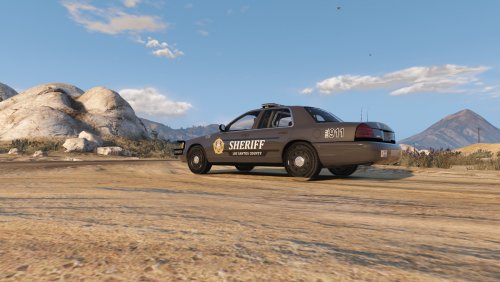 That's BxBugs' charger - the first link posted.
 -
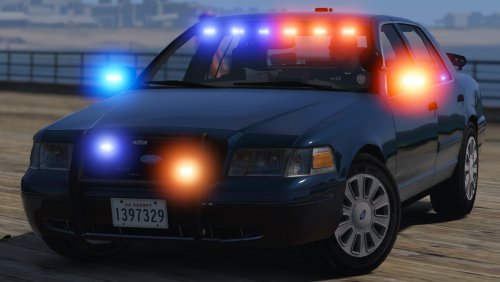 Praise Jesus, this is sweet. If only it could have ALPR scanners, but you said no extras, so I won't complain.
- 70 comments
- 26 reviews
-
https://www.gta5-mods.com/scripts/skin-control I use the above and EUP religiously. However that is only for changing your own character. I'm not sure how you would get them to spawn on the AI.
-
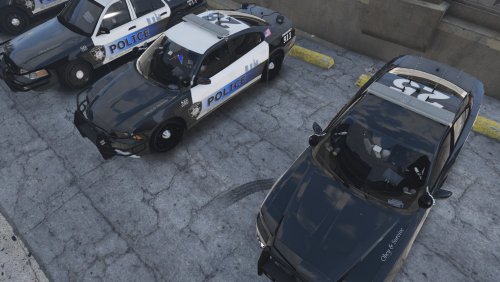 It was intentional. I'm on the fence about it, so we'll see. I might take it off, but I also think adds a little something. I dunno. I'm not great at original designs so I just kinda throw whatever together and hope it works
- 6 comments
- 2 reviews
-
-
- 1
-



.thumb.png.51baaeb139dc5d77c38ef43af920797b.png)
.thumb.jpg.4066677156985e22489bfecddc2f6c45.jpg)

