Skip to content
View in the app

A better way to browse. Learn more.

LCPDFR.com

A full-screen app on your home screen with push notifications, badges and more.

To install this app on iOS and iPadOS
  1. Tap the Share icon in Safari
  2. Scroll the menu and tap Add to Home Screen.
  3. Tap Add in the top-right corner.
To install this app on Android
  1. Tap the 3-dot menu (⋮) in the top-right corner of the browser.
  2. Tap Add to Home screen or Install app.
  3. Confirm by tapping Install.

Another LSPD Re-Skin 1.0.4

(2 reviews)

22 Screenshots

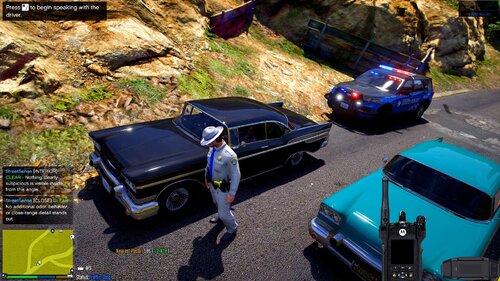
LSPD needed a facelift (among the many others out there), so I decided to try my hand at it. Here are the results.

I only have 2-4 variations for each car currently, but I'll add keep adding more, enough to fill out the roster for each eventually, I hope. Original cars can be found below, all credit should go to these guys, since the cars are just amazing. I'm merely adding my tiny two cents. Skins will obviously fit all below cars, and any that use the same template. Charger has additional Supervisor, Stealth, and black patrol versions, and the Explorer has an additional black K-9 texture, all others are just the white, black & blue patrol skins.

I'm really new at this, so any constructive criticism / pointing out issues in the comments, would be great! :thumbsup:


What's New in Version 1.0.4

Released

Added a stealth skin to the charger and a few more patrol numbers.


User Feedback

Recommended Comments

chnnls823

Members

The link to the cvpi for the skin is not the same cvpi your using in the screenshots. Where can I get the model your using?

Scottvdken

Members Author

(edited)

On 4/2/2016 at 3:05 AM, chnnls823 said:

The link to the cvpi for the skin is not the same cvpi your using in the screenshots. Where can I get the model your using?

Found it! I've been through so many CVPI's, it's hard to keep track of them.

I believe this is the one:


Edited by Scottvdken

chnnls823

Members

4 hours ago, Scottvdken said:

Found it! I've been through so many CVPI's, it's hard to keep track of them.

I believe this is the one:


do you know if that car works fine in the police1 slot or only sheriff slot?

Scottvdken

Members Author

I was using it in Police1, so you should be fine. Just rename the .ytd's.

chnnls823

Members

On 4/5/2016 at 1:47 PM, Scottvdken said:

I was using it in Police1, so you should be fine. Just rename the .ytd's.

Thanks for the info..skins look great..there's only 1 thing I'd change. Not sure if it's intentional but the bottom of the front bumper on the chargers look funny with the white on the bottom. Other than that the rest look great!!

Scottvdken

Members Author

2 minutes ago, chnnls823 said:

 Not sure if it's intentional but the bottom of the front bumper on the chargers look funny with the white on the bottom. Other than that the rest look great!!

It was intentional. I'm on the fence about it, so we'll see. I might take it off, but I also think adds a little something. I dunno. I'm not great at original designs so I just kinda throw whatever together and hope it works :wink:

Create an account or sign in to comment

Latest Mods

Account

Navigation

Search

Search

Configure browser push notifications

Chrome (Android)
  1. Tap the lock icon next to the address bar.
  2. Tap Permissions → Notifications.
  3. Adjust your preference.
Chrome (Desktop)
  1. Click the padlock icon in the address bar.
  2. Select Site settings.
  3. Find Notifications and adjust your preference.