


SoarHawk
Members
-
Joined
-
Last visited
Everything posted by SoarHawk
-
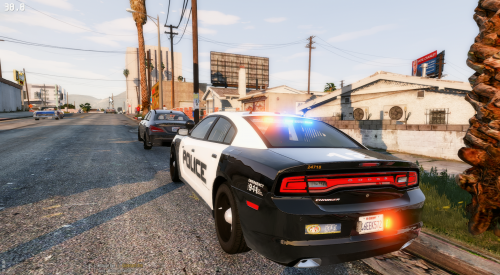 If anyone wants to get rid of the blue and red texture on the rambar, in the ytd files there is a file called "rambar_text" and at the bottom of that texture there is a blue and red light texture that is causing the texture to appear on the rambar. I made that area grey, and the blue and red portion on the ram bar was gone, also there were no noticeable issues with the lights.
- 4 comments
- 7 reviews
-
-

- 1
-
-
I must have misread the question, and I saw the statement "How do I got into the carvariations.meta file and edit it to allow me to use multiple liveries?", which is what I was responding to.
-
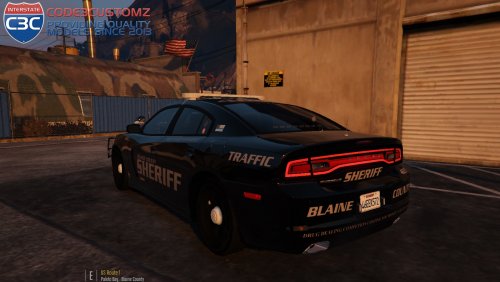 Really love your cars, Gump. But is there any way you can make a version with red/blue lights where the coronas are not hidden??
- 34 comments
- 17 reviews
-
-
- 1
-
-
Someone correct me if I'm wrong, but I'm pretty sure the creator of the modded car needs to enable multiple liveries, and it's not really possible for a user to.
-
I believe the middle portion is for the top of the car, so yes I wouldn't use it for the doors, I would use the two sections above and below the middle section. However, like I said in my PM you should play around with the texture and keep opening the YTD to see where the paint is going on the actual car.
-
Sometimes modders hide the coronas of their cars either because that's how they do their lighting or because they want users to be able to have the option to make the lights all blue. So, by hiding the red and blue coronas, the user can use just blue lights without having it look weird with the red coronas. I agree with you 100%, it's more than frustrating to see an extremely nice car that doesn't have any coronas and is just... kinda dull, but it's how the modders make their cars in some cases.
-
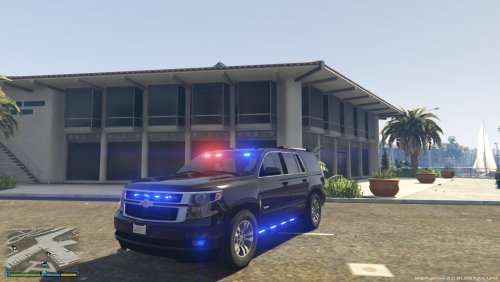 Love this vehicle a lot, but is there any way the siderunners could become an extra??
- 27 comments
- 15 reviews
-
Glad I could help :)
-
The texture has 4 main portions. The top portion which is highlighted in blue the part under that which is a side of the car, the part under that which is the top of the car and the part under that which is the other side of the car. The middle portion I was considering to be the top of the car in between the two sides.
-
The only thing I can think of is when you're doing the side doors don't use the middle portion if that's what you're doing, use the separate sections for the sides. Not sure if you did that, but that could be an issue. Also if you want the car black, just make the background black.
-
I would, yes. If it is outside of the lines, it's not going to align correctly with the car. The lines show where your skin is going to show on the car, so if you want it on the door, put it exactly where you want on the door.
-
No it's okay I believe you haha. The reason I ask is the only reason the paint would be distorted like that is a template issue. I would just make sure you're using the correct one from the original author of the car and just line it up correctly. I'm guessing it's the wrong template or the author screwed up on making the template.
-
It looks like you're not matching up with the template. Make sure you're using the right template and when you're editing your skin, set the template as another layer and lower it's opacity. This way you'll see what you're doing and where the skin will show on the parts of the car.
-
No problem. If it doesn't work let me know and I'll see if I can help you out.
-
Yes, replace that line with <audioNameHash>FBI</audioNameHash>
-
That's extremely odd. AgentDaquan does have a point because some of my vehicles come with a strong corona and others hide the coronas under the car. I would try with another car and see if you are experiencing the issue still. If your shader and post FX settings are on high or above and you have Radiance V installed, that's extremely odd that you are not seeing brighter lights. I'm thinking it's the model.
-
Checked everything over and I did find a couple errors, but this wouldn't cause the vehicle not to spawn. - Make sure you edit the audio hash line like I mentioned in my post - I don't know if I would make the handling Entity, it may not work well with modded cars. Maybe try police or police or police4 if it doesn't work with entity. As for the car not spawning, I would try a mods folder because that's how I add all my cars. Also make sure you're spawning them like how I suggested, they won't spawn like models that are already in the game. If you want to reverse what you've done to preserve your original game files, just delete the lines of code you added to vehicles and carvar and delete the vehicle files from where you added them.
-
Are you spawning it correctly? Try opening the Rage console menu and typing "spawn fbi3".... If not, spawn it with a trainer by model name. You can't spawn it the way you would if you were spawning a police vehicle that wasn't an add on because the game won't be able to find it. You need to spawn it by it's model name or type it into the rage menu as stated. Also, double check the the vehicles.meta's model name, txt ID, game name, the carvar model name, and the vehicle files all have the exact name "fbi3".
-
When you're adding the carvariations lines make sure the beginning of the lines has "<Item>" and the end of the lines has "</Item>". Also, make sure you didn't delete anything from the top of the file. The top of the carvar file should look like this, or something similar: <?xml version="1.0" encoding="UTF-8"?> <CVehicleModelInfoVariation> <variationData> <Item> That would be my guess on why your game is crashing. As for the lights, I would try making sure light and siren settings are set to 1 in the carvar file? Have you tried this? <lightSettings value="1" /> <sirenSettings value="1" />
-
- Make sure you have Radiance V installed -Make sure your Post FX setting is High or above -Make sure your Shader setting is High or above
-
Did you try cleaning it? I know this may seem stupid but many of my cars spawn with dirt on them and can make the black seem greyish. I thought my Silverado was completely glitched because it would always spawn grey, cleaning it was the only thing that made it black.
-
 One of the finest cars currently released on LSPDFR. The lighting set up is absolutely flawless and realistic, yet there are so many customizations available. Not enough cars allow for the player to create their ideal set up the way your cars do. Great job. Only complaint I would have (which has been said previously) is that it is substantially smaller than other Explorers I have. Although, this is not a major issue at all and I understand that it probably cannot be corrected at this stage.
- 269 comments
- 67 reviews
-
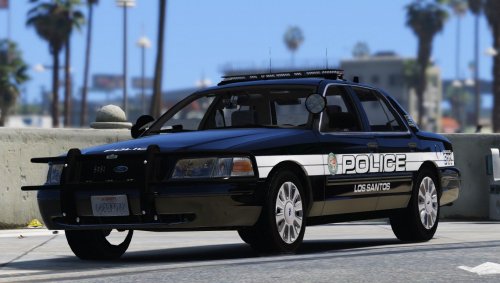 I have to say, this is one of my favorite skin packs. I absolutely love the white on black contrast. Having a fleet of black cop cars is way more satisfying in my opinion than white. The graphics on the vehicle are perfect. Not too big, not too busy, but can be seen from a distance clearly. Also love the idea that there are distinct custom unit types that you can assign to different cars. I currently have this pack on all of my Los Santos units and couldn't be happier with them. Please keep updating this file to include the new cars that are released.
- 33 comments
- 14 reviews
-
Yes, there is a way to add it. I have about 8 add on cars. Before you start this method, BACK UP EITHER YOUR MOD FOLDER OR WHATEVER YOU ARE EDITING. If the mod does not come with a vehicles.meta file, just go to Open IV, your mods folder (if you have one)> update> update.rpf>common>data>levels>gta5>vehicles.meta. Extract vehicles.meta and search for whatever vehicle the file calls to replace. For example, if the modded car wants to replace police3, find police3 in that vehicle.meta. Copy that whole section. Now, once you have that, go to a place where it can be installed. Personally, I use Update>X64>Dlcpacks>MPChristmas2>dlc.rpf>common>data>levels>gta5>vehicles.meta. Now, extract that vehicles.meta and copy and paste the lines you got for the car you're supposed to replace. However now, once you past those lines in, go to model name, txt ID, and game name and change it to whatever name you'd like. Also, make sure you copy and past this line <audioNameHash>POLICE</audioNameHash> and replace the audionamehash line or the car will not have sirens, or make noise. Delete the old vehicles.meta file in OpenIV and replace it with the one you edited. The vehicle files that you downloaded must also be changed to this name you chose in this vehicles.meta file. As for carvariations, I just use carvar's from other files because mostly they'll be the same as long as Light and Siren settings are 1. This isn't always the case, though. I've included the general format I use for carvar's for my add ons. Once you have the lines for carvar, you'll be going to a similar path, Update>X64>Dlcpacks>MPChristmas2>dlc.rpf>common>data, extracting carvariation, adding the lines of code, and replacing the original carvar. Notice, the modelname, for mine, is police6, which is the name I chose and it corresponds to the vehicle.meta file and the car files. Make sure your chosen name applies to all of these files. To install the car files, I use the path: mods\update\x64\dlcpacks\mpchristmas2\dlc.rpf\x64\levels\gta5\vehicles\xmas2vehicles.rpf\ Sample Carvariation I use: (MAKE SURE you always open a section with <Item> and close a section with </Item> or your game will crash.) <Item> <modelName>police6</modelName> <colors> <Item> <indices content="char_array"> 134 134 156 156 </indices> <liveries> <Item value="true" /> <Item value="false" /> <Item value="false" /> <Item value="false" /> <Item value="false" /> <Item value="false" /> <Item value="false" /> <Item value="false" /> </liveries> </Item> <Item> <indices content="char_array"> 134 134 156 156 </indices> <liveries> <Item value="false" /> <Item value="true" /> <Item value="false" /> <Item value="false" /> <Item value="false" /> <Item value="false" /> <Item value="false" /> <Item value="false" /> </liveries> </Item> <Item> <indices content="char_array"> 134 134 156 156 </indices> <liveries> <Item value="false" /> <Item value="false" /> <Item value="false" /> <Item value="false" /> <Item value="true" /> <Item value="false" /> <Item value="false" /> <Item value="false" /> </liveries> </Item> <Item> <indices content="char_array"> 134 134 156 156 </indices> <liveries> <Item value="false" /> <Item value="false" /> <Item value="true" /> <Item value="false" /> <Item value="false" /> <Item value="false" /> <Item value="false" /> <Item value="false" /> </liveries> </Item> <Item> <indices content="char_array"> 134 134 156 156 </indices> <liveries> <Item value="false" /> <Item value="false" /> <Item value="false" /> <Item value="true" /> <Item value="false" /> <Item value="false" /> <Item value="false" /> <Item value="false" /> </liveries> </Item> </colors> <kits> <Item>157_massacaro2_modkit</Item> </kits> <windowsWithExposedEdges /> <plateProbabilities> <Probabilities /> </plateProbabilities> <lightSettings value="1" /> <sirenSettings value="1" /> </Item>
-
Not a problem. And trust me I know. When I first started playing LSPDFR, it took me probably 20 hours just to set everything up without having glitches and things that just didn't look right. Certainly takes a lot of time, and patience.

