
Brad Philips Townley
Members
-
Joined
-
Last visited
Everything posted by Brad Philips Townley
-
First off, not all mods are going to replace files. They may replace vehicles, but usually they just overwrite the files instead of replacing them. Also, the green plus button is an import button. Second, any vehicle that is installed into the folder "rde" requires you to first install Realism Dispatch Enhanced. Third, just place all all all vehicle files in Patchday12 in your mods folder. If you don't have a mods folder, that's part of your issue. If you haven't got a mods folder, create one inside your gta v directory (the place where the launcher is located), and copy the folders "Update" (for vehicle/weapon models) and "x64" (for sound mods) into that folder. If you still have issues after reading all the above please message me, and ask for help with one specific vehicle at a time.
-
Don't own a car at the moment but lookin' into lots of used pickup trucks.
-
Make sure you actually go on duty when you want to use LSPDFR. Go to a station and hit the button when prompted or press F4 and then type ForceDuty. As for the vehicle mods, make sure you use a mods folder.
-
 I deleted the Parks Tool from my directory and re-downloaded. Custom Backup is also on latest version. I'm still, however, getting the outdated version message.
- 781 comments
- 85 reviews
-
I just installed the brand new version of Better EMS but it keeps telling me that I have an outdated Parks Tool file.
- 781 comments
- 85 reviews
-
Did the entire game crash? Did LSPDFR by itself crash? You have to tell us what crashed. Just saying "crash" is like saying your cat ran up a tree without saying which tree it ran up. How do we rescue the cat if we don't know what tree it's in? Do you follow what I'm saying? Most likely you installed Better EMS incorrectly. Try reinstalling it.
-
Something's wrong with my game. It just started happening this morning. No matter what I do, the game will not go to fullscreen. I've tried playing with the settings (which say it's in fullscreen even though it isn't) by changing to windowed mode, then changing resolution and to fullscreen. However, whenever I try to change to fullscreen, the screen goes black, then flashes a bunch of times, and returns to its windowed state.
-
You posted in the forums for LSPDFR. Vehicles aren't an LSPDFR problem, so post in the GTA V forums next time. As for your issue, you installed the vehicle incorrectly. Put in backups if you made them. If you didn't make any backups, delete and remake your mods folder. If you didn't use a mods folder, and you're using the Retail Version (not the Steam version), you'll have to reinstall the whole game.
-
You posted in the forums for Los Santos Police Department First Response (LSPDFR) (GTA 5), but you say you need help with Liberty City Police Department First Response (LCPDFR) (GTA 4). Which game/mod is it??
-
I understand that, I was just curious if that position had an actual title (probably should have reworded my question).
-
@Sam what Community positions are open? Not saying I'm applying for any of them, but I'd like to know what's open just in case I decide to.
-
 So there is no way to edit Custom Backup so that it can replace the actual backup.xml file in the lspdfr folder?
- 378 comments
- 23 reviews
-
@PNWParksFan the .ini file doesn't always keep the default backup from appearing when pressing B or RightThumb on a controller. Is there someway to just completely rip out the old backup and completely replace it with this? Sort of like how could I edit this so that I could put it in my LSPDFR folder as backup.xml?
- 378 comments
- 23 reviews
-
Reinstall your game.
-
-
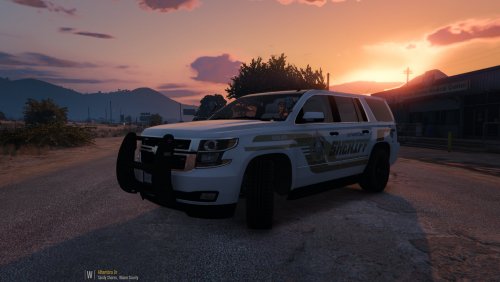 I'm pretty sure someone else has already done this skin for the same car.
 -
Please upload a screenshot, it will be easier to determine the issue.
-
I believe it's a carvariations file thing.
-
It's called ELS V, but it's slated for months more of development.
-
Just a particular portion of the lightbar? There's already a mod being worked on for that, but nobody's really sure when it's coming out.
-
-
-
 Nah, I meant add those two to another version. I need a lot more than just those removed :)
- 161 comments
- 23 reviews
-
I used that pack for all my current addons, but some of the vehicles I want to add have no similar versions in that pack or I've already used their similar .meta files.
-
I've looked all over the internet but haven't found anything. I'm trying to make some cars addons, but I have no idea how to write entries for carvariations/vehicles.meta. I've tried studying .metas from vehicles that I have already installed, but they all vary in one way or another, so it's not much help. Could someone please point me in the right direction?