


seve
Members
-
Joined
-
Last visited
Everything posted by seve
-
Will anyone make that for police car? Link to it http://www.newcarreleasedates.com/2016-new-car-release-dates-reviews-photos-price/2016-ford-crown-victoria-review-ratings-specs-prices-and-photos Picture
-
Hey guys, it's LIVE now!! Go watch on SpaceX youtube channel now. Im so excited right now.
-
.thumb.png.e88f1892e13ddb98db35e668d465c34b.png) @Bxbugs123can you please share a transparent light bar texture for roof lights? Im a newbie at texture, so i got no clue how i make it. Please.
@Bxbugs123can you please share a transparent light bar texture for roof lights? Im a newbie at texture, so i got no clue how i make it. Please.- 182 comments
- 44 reviews
-
 Ahh, that explains it. Thanks, tho i did say i also had those issues and ingame there was no errors :P You guys should see my new screenshots of my own skins to this badboy.
- 158 comments
- 54 reviews
-
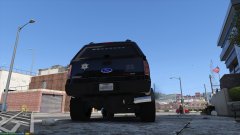
From the album: My own F350 skins
© 2016 seve
-
Just showing my own skins i made to F350.
-
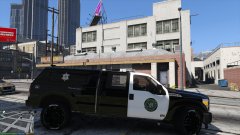
From the album: My own F350 skins
© 2016 seve
-
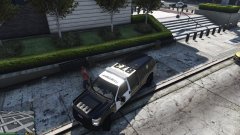
From the album: My own F350 skins
© 2016 seve
-
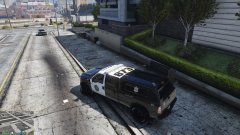
From the album: My own F350 skins
© 2016 seve
-
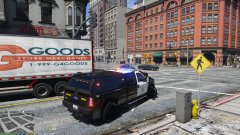
From the album: My own F350 skins
© 2016 seve
-
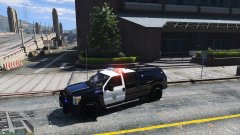
From the album: My own F350 skins
© 2016 seve
-
It looks like that on mine too in the openIV, but, in the game there is no bugs. I think it's a problem with openIV. @Thehurk Thanks for the reply. nvm on the texture i wrote before. I found out how to make it work.
- 158 comments
- 54 reviews
-
He already said there is a bug on the skins. Think you have to wait for an update.
- 158 comments
- 54 reviews
-
Hi, what about a Valor lightbar?
-
Before i ask, i like to say, that is one amazing car mod :) If you dont know what mod it is, then look at this screenshot. Before anyone complains about skin. I made an edit of a skin from "4K Blaine County Sheriff Skin Pack" for personal use. Only me has it. Had to make myself a Sherif skin since there was none. Okey, back to why i made the topic. I like to ask, when i try to go behind truck and search "trunk", my ped does nothing, he cannot do anything back there. How can i fix that, or is it the car model that blocks the search script for getting my police gear from trunk? All other cars works, when getting gear from trunks.
-
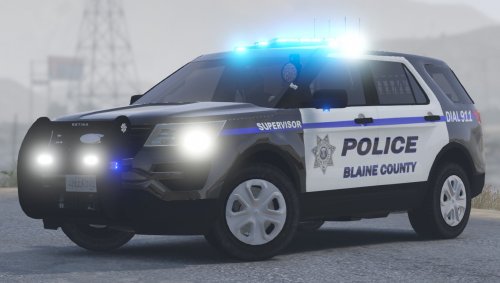 Looks nice and thanks. I like to ask. Optimized for what slot? only use on sheriff2? Could it be used for addon? If so, should i just copy the meta files for sheriff2 and rename it to what i call the car files for? Could that be done?
- 35 comments
- 14 reviews
-
-
@Thehurk any chance you could just show what part of the vehicles meta we need? Cause i got so many other vehicles installed that is already put into my meta file and copy paste your file would just remove those. You write :OPTIMIZED FOR: ANY (Handling acts like sadler/gresley) So if i replace any other model i have to rename this in the meta file to the model i picked? <modelName>sheriff2</modelName>to my car model name? <gameName>SHERIFF2</gameName> to my car model name? The car looks good and thank you for sharing it. Hope you or someone else makes some Sheriff skins like those from 4K Blaine County Sheriff Skin Pack. Would look amazing on this baby.
- 158 comments
- 54 reviews
-
Will people STOP saying do a revert in RPH! It does NOT work! I tryed and nope RPH cannot do this. If you can do this, then it's prolly because you own a copy from STEAM!
-
OMG OMG! That worked! It was the flag i was missing. Thank you so much for this.
-
Hi, im not good at modding files for this and im searching for someone to tell me how i enable multiple liveries in carvariations.meta for FBI2? And where to i find this carvariations.meta? Thank you for reading and please help. I tryed to add this: <Item> <modelName>fbi2</modelName> <colors> <Item> <indices content="char_array"> 134 134 156 156 </indices> <liveries> <Item value="true" /> <Item value="false" /> <Item value="false" /> <Item value="false" /> <Item value="false" /> <Item value="false" /> <Item value="false" /> <Item value="false" /> </liveries> </Item> <Item> <indices content="char_array"> 134 134 156 156 </indices> <liveries> <Item value="false" /> <Item value="true" /> <Item value="false" /> <Item value="false" /> <Item value="false" /> <Item value="false" /> <Item value="false" /> <Item value="false" /> </liveries> </Item> <Item> <indices content="char_array"> 134 134 156 156 </indices> <liveries> <Item value="false" /> <Item value="false" /> <Item value="false" /> <Item value="false" /> <Item value="true" /> <Item value="false" /> <Item value="false" /> <Item value="false" /> </liveries> </Item> <Item> <indices content="char_array"> 134 134 156 156 </indices> <liveries> <Item value="false" /> <Item value="false" /> <Item value="true" /> <Item value="false" /> <Item value="false" /> <Item value="false" /> <Item value="false" /> <Item value="false" /> </liveries> </Item> <Item> <indices content="char_array"> 134 134 156 156 </indices> <liveries> <Item value="false" /> <Item value="false" /> <Item value="false" /> <Item value="true" /> <Item value="false" /> <Item value="false" /> <Item value="false" /> <Item value="false" /> </liveries> </Item> </colors> <kits> <Item>157_massacaro2_modkit</Item> </kits> <windowsWithExposedEdges /> <plateProbabilities> <Probabilities /> </plateProbabilities> <lightSettings value="1" /> <sirenSettings value="1" /> </Item> In mods/update/x64/dlcpacks/mpluxe/dlc.rpf/common/data, but it's not working. In trainer it says -1 under livery and nothing happends when i hit 4 6 etc. Any help?
-
 Can someone Please tell me where the carvariations file is? and what should i set it too?(im trying to make it work as FBI2.) Also what light texture is for the Valor lights?
- 148 comments
- 34 reviews
-
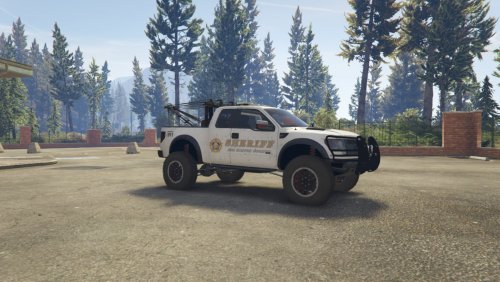 Can someone explain to me why this cannot tow a mule away or even a small truck? And whats with the missing wheels when it goes just a tiny bit away from you?
- 31 comments
- 4 reviews
-
 Looks good, i like to ask, how come all tow truck mods cannot lift cars off the road? All wheels stay on road. Also, can this tow a Mule away? Cause the raptor tow truck cant.
- 22 comments
- 10 reviews
-
 In the USA? I seen cops with it. Anyway, good thing im not going to apply for a job there.
- 2,349 comments
- 238 reviews
.thumb.png.e88f1892e13ddb98db35e668d465c34b.png)

