


deliberent
Members
-
Joined
-
Last visited
Everything posted by deliberent
-
 Was this update you submitted an hour ago or so compatible with .22 RPH? Was waiting for an update, love your plugin but had to remove it from my game because of crashes.
- 302 comments
- 66 reviews
-
Hey guys, So if I use LSPDFR .2b with the included RPH (which is v20 i believe?) everything is okay, but obviously can't play with all the plugins we love like Code 3 callouts, police helper, etc. I'll crash upon doing any of those. But if i upgrade RPH, those mods seem to work, but then i'm getting random LSPDFR crashes, such as just now I crashed when i tried to initiate a traffic stop with Shift. Can anybody tell me what combo versions seem to be working for you? --- PS, the problem lies within the mods for me, i know - no computer related issues.
-
Can't wait! This is a new beginning.......
-
40-50 fps on very high settings. Might take some dips depending on if you are flying through the city or not, but yeah. Fluid 40-50 fps on very high. Instead of asking though, I recommend just going on youtube. GTA:V 960 vs. 970. Tons of videos will come up and you can see how it will run instead of having to guess/estimate.
-
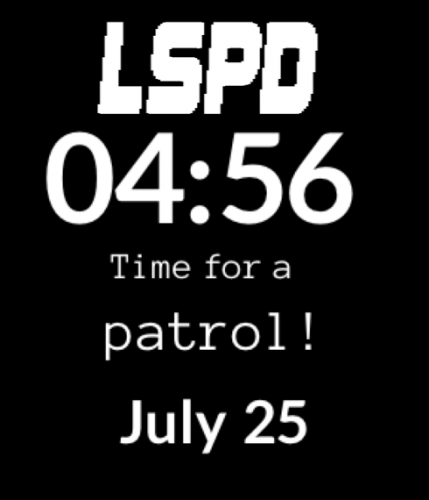 For those that don't understand what this mod is - I am not the creator but I am familiar with the Pebble. It's a smartwatch for iPhone and Android based smartphones. Think Apple Watch except before that, and with custom faces you can download. This is definitely unique - it presents you an LSPD watchface if you own a Pebble. Only problem is, it's target audience is going to be so small, as there is a very small amount of people that own a Pebble. Deserves a 5/5 review from the one or two people that will find use from it - but unfortunately yeah, I don't think many will even be familiar with what it is. Good job FlintSpellHunter.
- 4 comments
- 1 review
-
-
 Left a 5/5 review because I know it isn't neccesarily something on your end (most likely mine), but when i install it - my siren is missing in game. Activating it plays no sound, as if it's just muted. What I normally do when installing a siren is just turn on Edit mode and drag the vehicle.oac into the resident.rpf to replace it. That's always worked for me in the past, because no instructions have ever been clear what to do with the vehicle folders.
- 30 comments
- 12 reviews
-
Great first rumbler out for GTA:V. He even took a personal request. Thanks, I really appreciate it - good quality.
- 30 comments
- 12 reviews
-
-

- 1
-
-
Thanks! If you are able to do a version that replaces only the unmarked buffalo and unmarked granger, that would be awesome! 5/5
- 30 comments
- 12 reviews
-
Is there a way to make these rumbler sirens replace only the federal units? (Buffalo, Granger) Just wanted to know before I download, because i have a siren i like with my regular units but would love this on the feds cars.
- 30 comments
- 12 reviews
-
Incredibly fun callouts. I'm super excited that there are some unit-specific callouts now coming out and yours is among the first. Seeing as how you did so great, would love to see an FIB-inspired callout pack from you. Great job on the Wilderness callouts. 5/5.
- 302 comments
- 66 reviews
-
Couple of those have already been added via plugins. I would post it in suggestions for those developers rather then in the update thread.
-
Use a search engine to look for "Script Hook for GTA V". Download that. It will have instructions on it to put it in your GTA V root folder. Here on lcpdfr, go to downloads. LSPDFR 0.2a download. It has everything you need in it to run the mod, including RageHook, which essentially allows many powerful mods to run in the game. Think of it as a tool that LSPDFR uses. That's really it. It seems more complicated at first but that's all you have to do. Anything else afterwards is considered plugins, and they are on this site and each should have their own installation instructions in the download.
-
No man, thank you. Your hard work is what lets us play. If you do by chance make those suggestions i'd love to test for you! Will leave you a review later, thanks again. :)
-
Great job so far. I didn't want to flood your mod download page with suggestions, but i'd like to make some (callout-wise). Will review it after I play it more. :) As far as suggestions go, could you create a suspicious vehicle call? Slight variation from what you have already. Perhaps you receive the call, and the suspect is driving around a location and you have to perform a traffic stop and see if anything is fishy. Players could use their plugins (breathalyzer, lspdfr, etc) to do the rest. Just for immersion. Also, perhaps a Welfare check. This is a call i suggested awhile ago. We go to a house property and a person is in their backyard or driveway, a simple dialogue with a "press y" key to assure their safety, etc. Small, but good immersion in my opinion. Not all calls are criminal. Thanks so much!
-
 This is pretty spot-on to some of my suggestions i posted last week. I'm ecstatic. Very nice job, hope to see many more to come!
- 422 comments
- 73 reviews
-
-
- 1
-
-
Did the same for me and all. It was flagged on a couple different browsers. It's safe and clean. Everybody here has downloaded it and if it was a virus you would see people complaining.
-
-
 No i'm taking the two folders in the .zip, LSPDFR, and Plugins, and dragging those into my main gta v directory, which merges them. Also: not sure if it has any effect, but i notice that where calloutsV and stray are both listed in the folder, strays only has the .dll, not the .ini like the other.
- 76 comments
- 23 reviews
-
Thanks for the tip. It doesn't say that, only says that it registers all the callouts from calloutsV. I read the instructions again, same thing. I'm installing precisely how it tells me, so nothing else i can do it seems.
- 76 comments
- 23 reviews
-
I followed the readme, but on the latest version of everything, i just never receive any of the callouts. I receive regular + callouts from calloutsV, but never any of these.
- 76 comments
- 23 reviews
-
Downgrading to .2 LSPDFR isn't what people are referring to. If you are trying to downgrade to play LSPDFR, you have to downgrade your gtaV.
-
Anybody know if the update.rpf and whichever other files are up for download anywhere to downgrade? I wasn't expecting a sudden patch. :/
-
I fully trust the team, I just am worried something could've accidentally snuck in the download.. who knows. My computer blocks it as malicious. If you are using google chrome, you can press your top-right settings button then "downloads" and then "retrieve malicious file" but then it will tell you that it will harm your computer, no questions asked. And your options to press are something like "Tear my pc up" and "Be safe", lol.
-
Not sure if anybody else got the issue; but my computer blocked the file completely once downloaded, stating it as malicious. This has never happened to me from any LSPDFR or LCPD:FR download or update in the past. EDIT: Tried to go into a setting to see if perhaps it was labeling it wrong, but still unclear why. It isn't labeled as "Appears malicious" or "Could be" but instead says and confirms that it is malware. This hasn't happened to any update for me or download from the site, ever.
