


Sakeeeee
Members
-
Joined
-
Last visited
Everything posted by Sakeeeee
-
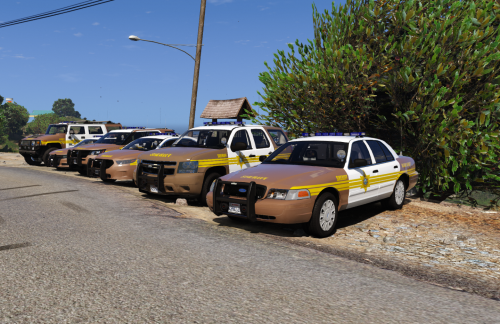 Hi ! Simply luuuuuv' your models, they are gorgeous, thank you very much 😍 Just have an issue with the "sheriff2" slot. Whatever SUV model I put as "sheriff2" (Tahoe, FPIU...), the front lightbar won't light up. Only the rear one. If they're called "sheriff5", or 6, for instance, the both lightbars works properly... Any idea what the problem could be with this vanilla "sheriff2" slot ? My VCF file is right in my default-pack ELS folder, as the others... Thank you for any help 🙂
- 43 comments
- 5 reviews
-
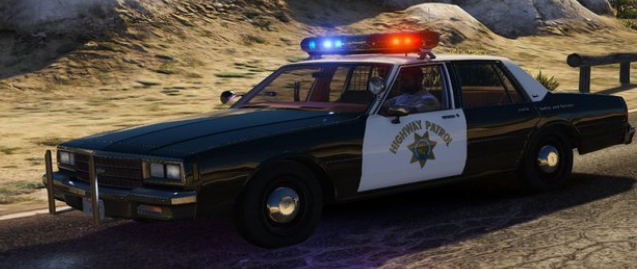
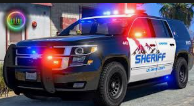
Hi everyone, First of all, sorry if this subject has already been posted (I guess it has). I truely did researches and haven't found any answers though... Can someone tell me if it's possible to have bright ELS led lightbars on some polie vehicles AND bright non-els retro lightbar models (with rotators) on some other police vehicles ? Actually I have "Radiance V", and "Make visuals great again", and some other stuffs, my configs are on "very high" or "ultra" and I already modified my car default lightning emissive day and night in the visualsetting.meta file. Still, my police cars with modern lightbars are gorgeous. But I have some old police cars with rotators that aren't brightning at all ! (I love being retro sometimes <3) For example, I can't figure out how can I have this result : And this result : In the same game... Any advice ? Thanks to everyone 🙂
-
-
 yes, me too you said earlier that your Traffic Policer & Assorted Callouts plugins were outdated, so there's the solution, with the official Steam game ! Just follow the instructions of Albo to edit your GTAV directory and your plugins will be updated so they'll work again
- 3,646 comments
- 306 reviews
-
-

- 2
-
-
Go here : and download his beta links for RPH51 at the bottom of description
- 3,646 comments
- 306 reviews
-
 I was about to desperate, then you came to save me ! x) Thank you VERY-MUCH, this work great ! Can't understand why nobody answered before, it's so... simple... basic... You're awesome
- 2,690 comments
- 236 reviews
-
SO THAT'S THE THING !!!!! Sorry for the caps but you've just saved my game !! I'll try this as soon as I'm home again and will tell you if it works :)
- 2,690 comments
- 236 reviews
-
Didn't work for me. @ barrynevel > found something : I've switched ELS-car slots that were "police21" and "police22" (I have around 300 different police models) into "police" and "police2" and, finaly, non-player characters seems to recognize me as a cop when I'm intempting to pull them over ! So, it seems that ELS works only with the vanilla slots (police, police2, police3, police4, policeold1, policeold2, riot, policeb, policet, fbi, fbi2, sheriff, sheriff2) so to drivers obey to your orders ! It might be a way to change it, but I don't know how... I bet that you're trying to use your ELS car with a higher police slot than police4 or sheriff2 that you've created. Try to switch and tell me if it works ;)
- 2,690 comments
- 236 reviews
-
-
What is the "default mark key" that you use ? Left shift ? I tried it, but it doesn't work : I press LShift so the suspect car is red marked on the minimap, then I press J x3 to light on completely but nothing happens... I think the problem is that people don't recognize me as a cop, as they don't pull over or stop when I'm driving with lights and siren... Although my .meta file seems correct ; I've tried to replace an ELS-car .meta lines with another ones, but people still don't recognize me as a cop... Is it possible that this kind of problem comes from the VCF files ?
- 2,690 comments
- 236 reviews
-
I agree, but still, how do you stop suspect cars ? What keys do you use, how do you proceed with an els-car ?
- 2,690 comments
- 236 reviews
-
By continuing to test some buttons, I've noticed something reaaally strange : When I blip a car I want to order to stop (by pressing B controller button, or T), the car I aim is starting to drive straight ahead, no matter if it hurts a wall, a fence, a mail box, a pedestrian ... O.O Wtf am I doing wrong, is it a using mistake or a bug due to installation ... ?
- 2,690 comments
- 236 reviews
-
Hello everyone I'm sorry if the problem has already been discussed, I havn't found it : Everything seems to work fine, but when I'm driving a "pro-els" car, I can't figure out how to stop a suspect car. I can light on all my stuffs, blip the car (by pressing the A controller button), turn on the sirens, but it doesn't ask it to stop as in a "regular car", I blip it and when I turn on the sirens (by pressing the controller left thumb stick), it automatically asks it to stop and it works. So, ELS seems to deactivate the "all siren and lights on" function by pressing on the controller left thumb stick usually used in LSPDFR. So how can I order suspect to stop ? It must be quite simple, through... Thank you very much in advance for your help, and congratulations anyway for the amazing job you've made !
- 2,690 comments
- 236 reviews
-
-
 A modder called TOTAL PANICO told me to try this : https://www.gta5-mods.com/misc/gta-5-gameconfig-300-cars And it works perfectly !!!!! Thanks to him, enjoy
- 445 comments
- 108 reviews
-
Hi Captain ! Your amazing pack used to work great for weeks, then Rockstar has released his last f***ng update ! Now your pack (not only yours ; everyone's add-on pack) crashes my game since the last update I've downloaded the last RPH version, with the last PluginHook's, and even if I launch the game "normaly", without RPH, it crashes... It's maybe usual when a new update is released, but I'm quite new sooo... Do I have to wait for something to download to make it work with the new version or is there something I can do to avoid crashes ? Thank you veeeeeery much for your help ! If you need some files or pictures to help you to figure out what the problem is, just ask ! (precision : when I remove your add-on pack, it works ! So the problem doesn't come from a wrong plugin or something else that I could have installed, I guess...)
- 445 comments
- 108 reviews
-
Hey ! After few hours I finally found where the conflict came from : it's was the carcols.ymt from this model that generated the conflict ! I removed it and replaced by the original carcols.ymt and all your models works great (as some others which had some lightning bugs too). So I tell it for the others who may have the same issue witht he FBI2's lightbar in front of the vehicle : check your carcols ! Thank you again, Captain
- 445 comments
- 108 reviews
-
I did and, in deed, it works great ! Well now, I have to copy again all my 60 added car models to this new mod folder x') (I'm impatient as hell !) Thank you very much foryour help, you rock !
- 445 comments
- 108 reviews
-
Well yes, but I've deleted it when I've downloaded your files so I can install your models using the package installer. The fact that makes me think it's a vehicle.meta's problem is because when I add vehicle.meta lines for the CHARGER (FBI slot), it spawns it and it works perfectly, whereas when I don't, it doesn't recognise those models as valid ones ! I'll try anyway to search and find any carvariations.meta's conflict with another "fbi2"... Don't know where the original vehicle.meta's files corresponding to the original FBI2 model is ?
- 445 comments
- 108 reviews
-
Hi ! Thank you very much your update. Unfortunately, the same issue remains. I've found out what the problem is : There's no vehicle.meta file for the FBI, FBI2 and SHERIFF2 models. I don't know why it works good for the SHERIFF2, but the game doesn't recognise FBI and FBI2 as valid models (when I try to spawn them, it writes me that it can't spawns "invalid models"). So I just copy-past the SHERIFF3's vehicle.meta's lines and modified the names and added them to the original vehicle.meta file. It works perfectly for the FBI model (the Charger), and it do spawns the FBI2 model, but with the lightbar at the wrong place, according to the picture I've published few days ago. If it works with the SHERIFF2's slot whereas I havn't actually corresponding vehicle.meta's lines, I guess it means that I used to have some FBI & FBI2's vehicle.meta lines that I've deleted ... -_-' Where could I find some working vehicle.meta's lines for the FBI2's model ? Could you maybe send me your working lines here, or in pm (or maybe someone else) ? It would be sooo great ... Anyway, thanks a lot for your work and your kindness :)
- 445 comments
- 108 reviews
-
Hi First of all, as many already told you, thank you so much for making such great job like that !! I absolutely love your models, it highly improves my LSPDFR experience ! The only issue I have is for the FBI2's slot ; I know the question has already been asked, but I couldn't find an answer. The Tahoe model it uses for FBI2 spawns and drives correctly, but here's the lightbar problem : Can't know why it appears like that and how to fix it :/ Could you please help ? I've seen someone told to copy the lines of carcols.meta into the carcols.ymt file, but it doesn't change a thing :| Thank you very much (if you want me to send you some of my files, or some of screen picture so to help you to find out what the problem is, just ask me, I'd be glad to send it)
- 445 comments
- 108 reviews
-
 Another great work done by Albo ! You're simply the best ; this mod works perfectly, as always. Thank you for evolving our game this way !
- 851 comments
- 108 reviews
-
 Simply can't play without this mod, it's THE LSPDFR's essential ! Very easy to install, even more easier to use, so beautiful and realistic... 't's just perfect. So many thanks to you to make such a great work !! Cannot wait to discover the next updates
- 2,346 comments
- 236 reviews
-
 Merci beaucoup pour tes suggestions ! Non, j'avais cru comprendre qu'il fallait juste appuyer et relâcher Altgr et ensuite parler x) ceci explique peut-être cela ! Concernant la "reconnaissance vocale de Windows", il s'agit d'une phrase à lire dans les options de langues et de régions (Windows 10) ? Si c'est ça, je l'ai fait. Concernant les fichiers "script" et "défault" .xml, si je souhaite plutôt utiliser les phrases en anglais, est-ce que je peux garder le fichier "default.xml" et virer le fichier "script" ? Ou le plugin ne peut fonctionner qu'avec le fichier "script", qu'il soit renommé ou non ? (je reconnais le fantastique travail qui a été fait pour la reconnaissance vocale en français, mais je trouve ça plus immersif en anglais, vu que le jeu est en anglais ;) ) Merci infiniment pour ton aide !
 -
Oui, merci, je suis allé voir dans les fichiers et j'utilise les mots clefs Aucun problème pour toi ? Tu parles doucement ? Vite ? Fort ? Bas ?


