


nick_g44
Members
-
Joined
-
Last visited
Everything posted by nick_g44
-
 TESTED ON REVISED VERSION: 24/03/19 Stop the Ped is still having a conflict with the same results whereby an arrested ped takes your vehicle and drives away in it.
 -
I have had it happen on one occasion so it is in there. I would imagine in an effort to replicate real life the chances of this happening are rare.
-
Do you mean the transporting officer is taking your car when he/she leaves? If so, I haven't seen that before.
-
ALPR Lite has been updated? Should be stable...
-
Same here. I've done some testing and it does indeed appear to be PSR causing the crash.
-
 Direct message me and I will see what I can do. Send me some screen grabs of your game directory, mods folder and scripts folder.
- 1,524 comments
- 85 reviews
-
Have you read through all the instructions and followed them? When does the game crash?
- 1,524 comments
- 85 reviews
-
They have vanished 😥. Any ideas?
-
Join the discord server and there is a patch which will run (very well I might add) on the current game version. This has been asked and answered above...
-
Seemingly not with the latest patch and there is talk that it will no longer be updated or working 😥. Any alternatives known?
-
Hey all, With the sudden death of Menyoo I was wondering if there were any alternatives that could be used to set up scenes etc in single player? Map Editor is an option but is forever buggy. I also need something that allows me to spawn RDE related peds and vehicles. Any ideas?
-
Right, Anyone else sick and tired of the same old call outs in packs? I for one have had enough of 'stolen vehicle' and 'wanted person' calls. Every pack has the same thing in it. This needs to change. The proposal. I will be upfront, I know little to nothing about creating these packs but I have a pretty good idea on whats achievable and can be done with them. My proposal is simple, my mind is awash with some ideas on call outs and some more unique calls / more in depth current ones. If one of you can provide the tech side of things, I will give you the ideas. I can try and help with the making of a pack but you will need patience and a large amount of sugar to put up with me. Who's up for a challenge and knows what they are doing?
-
 That would be really helpful! In the meantime, I'll try the playing with pause screen thing snd see if that helps 😀
- 1,743 comments
- 172 reviews
-
Echoing the comments above. I can use this a few times before a plugin crash or a complete GTA crash. It's shame as it is such a good mod and brings a lot of realism to the game. Hopefully this can be looked at!
- 1,743 comments
- 172 reviews
-
-

- 1
-
-
Hiya, Slightly odd one. I recently rebuilt my game and have it working to perfection however, I have noticed that whereas before I had a crystal clear image while playing, it come over as more hazy now. I have tweaked the in game settings to no avail and can't work out what else it could be? It's almost as if I have lost the HD quality I had before. Any ideas? I have GTX980 NVidia card.
-
 Hmm, maybe a good idea for a new version! Watch this space!
 -
Haha, If that's the best you can come up with I will take that. Pedantic.
-
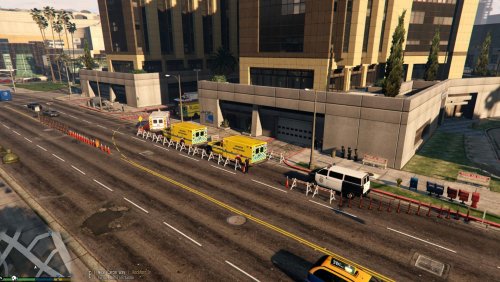
My First LSPDFR Upload! This scenario replicates a major incident at Los Santos' biggest hospital, Mount Zonah in the Burton District. The emergency plan is in effect with police and additional security present at the hospital. This would act as a great companion for role playing a major incident through another Map Mod. The scenario is built around the after effects of a major incident somewhere in the city. Map Editor is required. Map Editor xml File. To Load: Download the XML File. Place this into your main GTAV Directory OR Scripts > AutoloadMaps Folder Run GTAV. If you have placed the file in your GTAV directory then follow the below. If it is in your AutoloadMaps folder it will have loaded when GTAV did. Load Map Editor (F7 Key Default) Load File. Then type 'Mount Zonah Emergency' Enjoy. **Leave any requests in the comments section**
-
If you want to keep the game modified files then just remove the scripts. Open the RDE 3.1 OIV in WinZip and look at the scripts folder. Then remove the scripts listed in there from your GTAV scripts folder.
-
Assuming you have RDE 3.1 you can remove your 'mods' folder which will remove the modified game files. To remove everything else. open the OIV file in WinZip or similar. Then remove the scripts and files listed in there within your directory. The mod will then be fully removed.
-
Do you mean stop it all together? If not, what specifically are you trying to stop from running?
-
Bizarre. Removing my Menyoo doesn't appear to rectify it. I'll keep looking!
-
My thoughts exactly! I will have a look through and see if I can find the key which is causing the problem.
-
Changed. I'll take a look and let you know. I had been playing about with the numbers on that however, had no idea what was the best setting.
-
I's like to do it manually as I don't like how Radiance V makes everything glow and the taxi lights appear like the light of god! Any advice on how to do this?

