
steinberg4145
Members
-
Joined
-
Last visited
Everything posted by steinberg4145
-
Scuderio is making a sort of multipurpose LAPD CVPI if you will. The pushbar and multiple different types of ALPRs for the traffic division cars are all extras so the user can choose between a traffic car or a normal patrol car. The K-9 is a separate car all together. You don't have to worry about the accuracy of his LAPD cars, they are all up to spec.
-
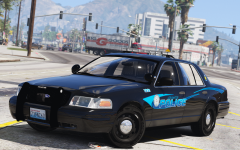
From the album: West Valley Designs junk
It's really just a cool little test car I did. I might release it later as a fictional LSPD car, but it all depends on how I feel.© West Valley Designs
-
-
 as far as I know F5544 never made any ELS cars, so I don't think it uses DROT.
- 951 comments
- 158 reviews
-
-
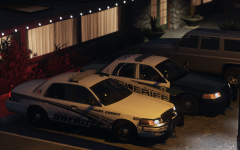 A was made by @Izick so I'm sure he'll love the feedback. lol, maybe a bit bias. I always thought people liked having both spotlights up, or at least I do, but If people prefer flipped down spotlights I guess that can make my life easier.
 -
These are just an assortment of cool things I take pictures of in GTA 5
-
-
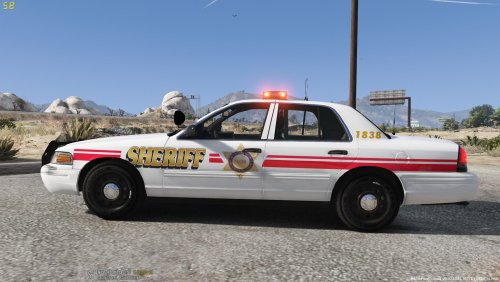 I'm sorry, but saying "it has *blank* on it means it's *blank*" is one of my pet peeves because there are more things than just a name to make something accurate. Ok, let's be honest here, if I had actually said "I agree with Desmond... rename it to fictional" you would have said "but it say LA county...?" again. I know how people act and how everyone has a perfect hindsight bias. There's nothing stopping you from going to 5mods, but just know you're going to get the same thing because it's not accurate.
- 7 comments
- 1 review
-
Just because something says "LA County Sheriff" on it doesn't mean it's LASD and especially not LAPD for that matter. LAPD and LASD are two different departments, neither of which you have recreated even partially with this skin. Next time try and do some research, or you should name the skin fictional.
- 7 comments
- 1 review
-
Oh shit, whoops. Sorry, uh it has to do with added equipment. I name most of my parts "misc_insert letter here" and that should stop the problem.
-
That's an issue the vehicle author needs to fix. Unfortunately the only thing you can do is either deal with it, or use a different model.
-
Yea, the extralights can be used for spotlights. I personally use the extralights for spotlights so they won't blind me in-game and ELS for the actual lightbar takedowns. I think scuderio meant that he won't be using ELS takedowns, so that he can have more than just one extra left for ALPRs and such.
-
Thehurk used els takedowns for his spotlights. ELS for some reason makes spotlights as bright as the sun. Using extalights isn't bad either. Its the highbeam function everyone used before els.
-
If you go back a few pages you'll notice I answered the yelp pattern question already. It works but unfortunately you're left with the choice of accurate lstg 1-3 or fucked up lstg 1-2 And ok lstg3+yelp pattern.
- 951 comments
- 158 reviews
-
 PLANT KILLER!!!
 -
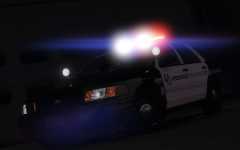 lol, it's pretty much what redbull said. I have all 4 lods, and I just need to crunch the l1 a bit more to meet AC specs. Correct! ......
 -
-
From what I know they only got the chargers to supplement the FPIUs so that they would have something more low profile. I highly doubt CHP is going to switch to primarily chargers since they have a terrible payload, (the next two are from just things I've heard) sketchy handling at speeds, and poorer reliability than the FPIU. During my conversations with some CHP officers they told me they loved they're CVPIs and FPIUs.
-
Thank you, finally someone with some sense. If you scroll up a bit I explained to someone about the yelp pattern. The best solution for the yelp pattern is to have Lt Caine implement it into the CHP setting because using the LED setting kinda fucks the lstg 1 and 2.
- 951 comments
- 158 reviews
-
Quite frankly, no this isn't America. I'm sorry to break it to you, but it's something called the internet which on this site has certain rules and regulations on what you can say and how you rate files. "I've seen videos of them on YouTube" and you call me stupid... I live three blocks from a CHP station, so please tell me "All knowing CHP expert" what patterns have you seen on YouTube besides the yelp pattern (which can't be replicated due to the limitations of ELS) or a different TA pattern (which is changeable on the fly with ELS).
- 951 comments
- 158 reviews
-
-

- 4
-
-
@kevo15, there's no need for the user to have any more control over changing patterns than there already is. The pack is called "California Highway Patrol Mega Pack" for a reason. That reason being partially because it has accurate CHP patterns. If for some reason (I really don't know why you would) you feel the need to change the patterns and make the patterns look inaccurate all you have to do is edit the ELS config and change the settings from "CHP" to "LED", or you could try reading the ELS user documentation. It's also not really justifiable to down rate a file just because you don't know how to edit an ELS config. Reviews should be based off the quality of the work done rather than what you(the reviewer) want, but don't know how to do, or some other reason not related to the quality of the work.
- 951 comments
- 158 reviews
-
-
- 3
-
-
First off that FPIU doesn't belong to this pack, but all he did was edit the ELS config. The issue with using an edited config is that you lose all the other features of the CHP pattern option like park mode and having actual working lstg1/2. I've edited a ELS config for hurks pack that mimics the yelp pattern, but that's about all it has going for it is just lstg 3 settings. Just be warned it's a pain in the ass if you want a semi-functional park mode. hwaycar15.xml
- 951 comments
- 158 reviews
-
-
- 1
-
-
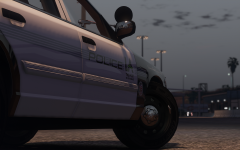
From the album: West Valley Designs junk
So a lot has happened since the last gallery image. The car received some new front seats, spotlights, and door trim from Forza, so now your officer can sit in the comfort of his/her stylish vic and at the same time use thier shiny new spotlights to find those pesky criminals, or if he/she needs to clear an obstruction in the road they can use the freshly installed Pb200. (Don't mind the interior equipment, as I haven't swapped out the place holder stuff for the new stuff yet.)© West Valley Designs
-
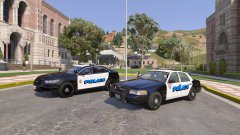 Just so you know the LASPD logo is different than the LA City seal.