falcon3y
Members
-
Joined
-
Last visited
Everything posted by falcon3y
-
I love that CVPI.
-
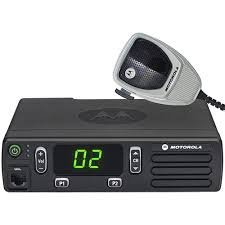 I'm confused how you can call this a mod. You've uploaded 1 single sound for the radio PTT that you have downloaded somewhere else on the internet, then you've made a video explaining how to copy-paste that into a folder. Don't take this the wrong way, or as an offensive feedback.
- 19 comments
- 6 reviews
-
-

- 4
-
-
Well, at least to my knowledge from testing myself, whenever you create a dummy, color in blue and name it siren1 (which flashes red) it will flash purple, so I put two and two together and figured that if you mix red and blue you get purple, I don't know if I'm wrong though. I got the lights set up how I want them, but I just can't figure out how to get environmental lighting set up so for example building walls light up.
-
Because he's a beta tester and he's previewing it to his followers so we can get a sense of what's going on I guess. Not sure if it'll help but maybe you can try to edit dlclist.xml in update/update.rpf/common/data and remove flag <Item>dlcpacks:\eup\</Item> when you uninstall it, prior to a fresh install
-
Hello. I wondered. Many of the lightbars on mods have lighter blue flashing opposite to the original lighting for the GTA V emergency vehicles for example. When you make your sirens, do you change the color of the dummy to something that will mix into lighter blue with red/blue to get that color or how do you do it? Trying to modify my own lightbar away from the default coloring. Also, when it comes to letting the lightbar light up the environment when activated, do you place dummy's underneath the car around it or?
-
 Great addition, glad you included tame shadows upon request, works good even on my low-end computer at work, thumbs up.
- 29 comments
- 10 reviews
-
 I'm so sorry to waste your time, this was all my fault. Was swinging back and forth installing towtrucks and what not, suddenly I overwrote the contents inside dlc.rpf and removed the carvariations for the vehicles.. I reverted them and added the towtrucks etc into the carvariations for the pack and it all came back working, once again sorry lol, my bad.
- 501 comments
- 104 reviews
-
Awesome. Would be nice if there was an ability to turn off the shadows it casts or at least lower them slightly.
- 29 comments
- 10 reviews
-
For some reason suddenly the siren stopped working on the cars. I've backtracked and made sure both vehmetas and the carvariation is installed correctly, still not working. Just get the horn. They also got the FLAG_LAW_ENFORCEMENT FLAG_EMERGENCY_SERVICE on them so I don't understand what's wrong. I installed them as add-on's if that's any help.
- 501 comments
- 104 reviews
-
 Yeah I understand :) To my understanding the ELS versions here on GTA V just makes the lights flash various patterns.
- 6 comments
- 2 reviews
-
-
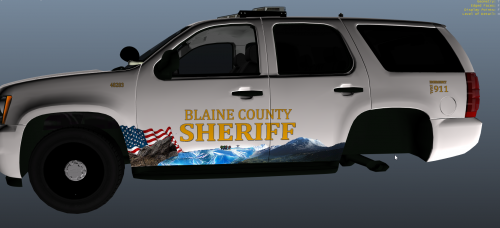
Not sure if you can tell the story the livery tells you, but I think it came out alright. This livery is fictional and made for Captain14's ELS Tahoe in his pack. The pack includes both a 2k and a 4k version and has multiple colors. White, grey and black. I personally favor the grey. Readme included.
- 6 comments
- 2 reviews
-
-
- 1
-
-
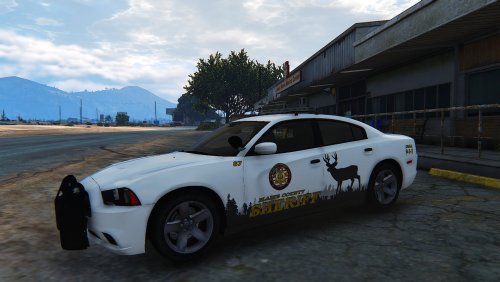 I'm honestly not into white units but you made these look really cool, love the motive. Good job!
- 6 comments
- 6 reviews
-
-
- 1
-
-
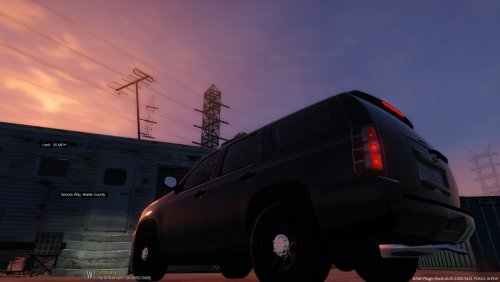 Loosely fictional and loosely based on a real life counterpart, this is a stealth livery for the Sheriffs Department. The livery dims down in direct sunshine and in the dark, making it easier for law enforcement to conduct traffic enforcement and so forth while blending in with the environment. This livery was made for Captain14's ELS Tahoe from his pack and you need it installed. (Also, the livery looks better in-game on your computer since I have graphics turned way down and the screenshot program I use limits quality even further, so it looks kinda crap here) Readme included. Please leave a constructive review so I can take my work further.
- 1 review
-
-
- 1
-
-
-
Some progress. Keep in mind a lot of this is unlocked dev-parts.
-
Well, I have started working on this. If anyone want to help out with the lighting, let me know in a PM.
-
If you do the lighting, I can do the rest, maybe we can work together and make one?
-
Too bad I can't import that since it's the old Zmodeler files, otherwise I might give it a shot too.
-
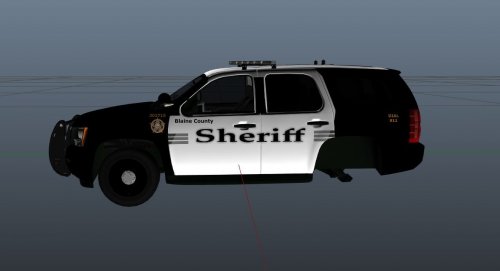 Good evening, Thought I'd make a Sheriff livery for Captain14's awesome ELS Tahoe. Don't mind the bad quality screenshots, it's better in-game. It's loosely based off the Ventura County Sheriffs Office. It got working plates, not sure what happened to the screenshots.
 -
just hurry up and release the new eup update so i can holster my revolver
-
-
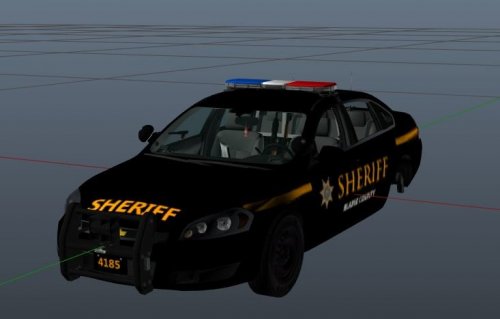 I personally think they look better in-game. I have a shitty computer at the moment so my screenshots look bad :) Thanks!
 -
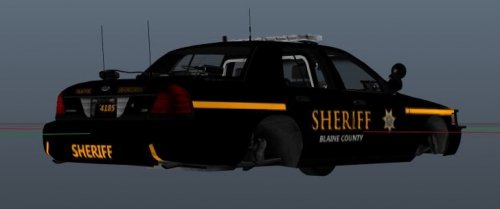 Hey, I made this Sheriff Livery based off the Saratoga County Sheriffs' Office for the BXBUGS CVPI. Readme included for those that don't know how to install liveries.
 -
Hello! I made this Sheriff Livery based off the Saratoga County Sheriffs' Impala for the BXBUGS version. I think it looks alright and wanted to share it with the community. Readme included for those that don't know how to install liveries.