
ScottyTooHotty
Members
-
Joined
-
Last visited
Everything posted by ScottyTooHotty
-
 You were too mad to send a text file? Also, that was an issue fixed back in 2.6.0 so you must have been running on an old version because since the fix in 2.6.0 which was months ago I've had no complaints.
- 329 comments
- 53 reviews
-
Once again, if there are so many occasions that it crashes then why don't you give me a log to identify the issue? I can't do anything unless I know the issue. Also, thats very weird but I did implement any crash fixes in the last update...
- 329 comments
- 53 reviews
-
Well rather than just moan and complain, how about you give me a RagePluginHook log so I can see your crash logs and work on a fix?
- 329 comments
- 53 reviews
-
Yes, plugin developers have very limited choice in what audio they use so sometimes there is no suitable audio for the callout and as a result have to just leave it with no audio. For further explanation then please look back on the previous comments page or the one before that and you'll see an explanation.
- 329 comments
- 53 reviews
-
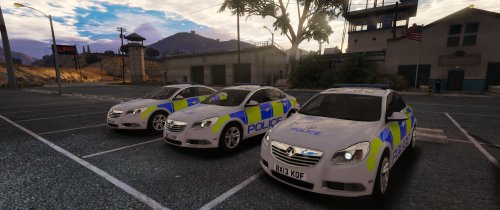 Confused as to why you've done the skin because the original model was a West Midlands skin but anyway, not as good as the original so I wouldn't replace it with this file. Rear of the vehicle isn't correct, roof is inaccurate and generally doesn't look as tidy and neat.
 -
No problem, should have another minor one coming in the very near future. And then a bigger one at some point. No worries, further updates coming shortly.
- 329 comments
- 53 reviews
-
-

- 1
-
-
-
Cheers buddy, really appreciate it! Thanks, appreciate the kind words. As for those callouts you see let me explain. So callout manager will show any callouts that are present in the entire Code Red Callouts file. However, for a callout to be shown and for you to be able to accept it it must be active and registered with LSPDFR on initialization. Callout manager does not check if the callout has been registered it purely looks for it to be present. The callouts you listed are WIP callouts and are not finished and therefore are not activated meaning you are unable to play them. So in summary, the callout is present in the file because it's being worked on but not registered because it isn't finished. So normally if it weren't for Callout Manager it would never show up in game. Hopefully that answers your question?
- 329 comments
- 53 reviews
-
@nixxx621 Not once have I asked you or even mentioned you rating it 5/5. In my opinion, rating something 2/5 is not something that 'needs some work'. In my eyes 2/5 should be for something that doesn't work. So let me re-address points. Also, let me just say again, you are entitled to your own opinion and I respect that, I'm just trying to give you a better understanding of the 'issues' you've brought to light. Audio - So unless I've miss understood you'd rather me put in audio that does not relate to the callout at all? If so, that is not something I'll be doing. In the past I have had people mention that there was no audio and they are very understanding of the situation when I tell them why. However, I don't believe I have ever in the 173k downloads ever had someone say they missed a callout because there was no audio. It pops up as a notification. In my opinion it's not easy to miss. Dialog - They say 3 lines each. In no way do I feel that excessive or too much. This is the first time I've ever had a complaint over this. In my opinion if that was even able to influence your rating then that's a little ridiculous ini - I understand why you may want an .ini but at the moment it's not a priority. I'm developing other callouts at the moment and they will be what I'm working on not an .ini file. I've consulted other people and asked their opinion and they have said they do not feel the need for an .ini in my file. Also, just something caught my eye. You say sometimes you've 'overlooked' a callout and by that I assume you mean you've missed it coming through. Now to me that does not make sense because to know you'd overlooked it you'd have to had known it had come through but you wouldn't know that because you've 'overlooked' it? That logically does not make sense. Like I say, your opinion is just as valid as anyone else's but not only do I feel your rating was harsh but the 'issues' you pointed out could have been brought to my attention, fixed, released and then a more fair and accurate rating could have been posted as now that 2/5 stars will sit there forever.
- 329 comments
- 53 reviews
-
-
- 1
-
-
@nixxx621 Thanks for your review. I'll just start off by saying that you are entitled to your own opinion and that is fair enough however let me address a few of your points. Dispatch audio - All dispatch audio is derived from GTA 5 game files and therefore is not endless and limited to what we are given. There was nothing that I have found so far that fits the callouts which do not have audio so on that front I have no choice but to release without a callout description. Panic Button - Can I ask how the dialog is too long? How short do you expect it to be? And as for the Suspect getting out the car when he shouldn't, well that's clearly a bug and rather than putting it in the review should have commented so I can fix it but oh well. .ini file - An ini file has not been made for this because I quite simply do not see the need. There is nothing to customize and if you do not want a callout then quite simply do not accept it when it comes through. Now like I said, it's all your opinion and I cannot argue with that but I just wanted to respond to your review and explain things to you.
- 329 comments
- 53 reviews
-
Flip it on the image editing software and it'll flip on the vehicle.
-
-
-
Possibly but it's not top on my priorities list at the moment, you can just not accept them? :P
- 329 comments
- 53 reviews
-
-
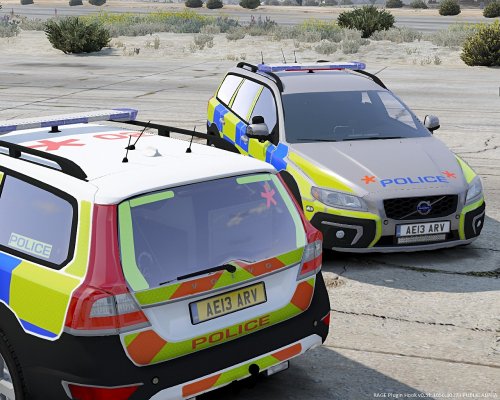 Basic British Police car design is there but when described as a Metropolitan ARV is greatly inaccurate.
- 8 comments
- 2 reviews
-
-
-
-
-
-
-
-
-