


Slickybp
Members
-
Joined
-
Last visited
Everything posted by Slickybp
-
Thanks man this is awesome!!!
-
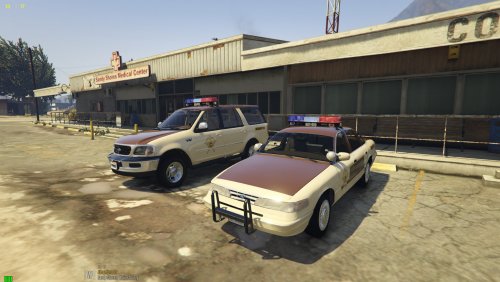 Absolutely love this pack! Is there a way to turn down the ENV lighting intensity/range? I've noticed that this pack in particular is a lot more intense than my other ELS packs. Is there a setting I can tweak in the ELS vcf's or is it located in the custom vehicles.meta or carcols? Any advice you have @apoundofapples would be much appreciated! Thanks again for another breathtaking work of art :)
- 93 comments
- 4 reviews
-
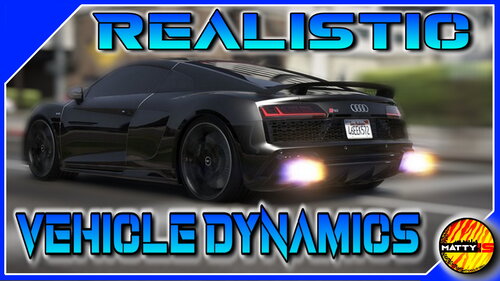 Just gave this a spin shortly after it was posted and WOW! If you enjoy "softer-suspension" similar to what was available in GTA IV then this is going to be your new favorite mod. In addition to the suspension adjustments there are a lot of quality of life features as well such as a more realistic braking distance (no more stopping on a dime), and no more burnouts! Sadly it does not look like the most recent DLC vehicles received this treatment, but to be fair it would be unrealistic to expect the author to go through all the DLC files and adjust those as well. Perhaps someday 😉 Awesome job here @MattyIsBall this blows away all other handling mods I have used over the last few years! Great work.
- 23 comments
- 5 reviews
-
@iGoDPrince was wondering this too? Does it include your modifications to the recent DLC vehicles as well?
- 23 comments
- 5 reviews
-
-

- 1
-
-
 @Lieutenant Dan out of curiosity does the steering section adjustments impact xbox 360 controller sensitivity? Thanks!
- 330 comments
- 24 reviews
-
 Thanks for the upload! Would you mind making a showcase video, I'm a little leary of downloading a soundmod if I can't hear the sounds first 🙂
 -
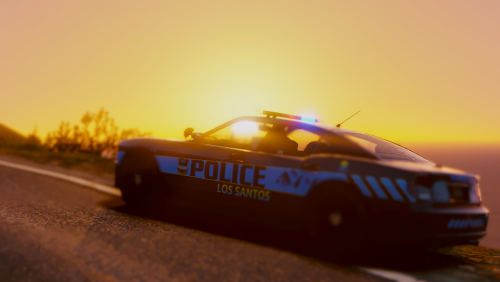 The easiest way to install the pack is to put all vehicle files into the vehicles.rpf in Patchday24ng (update-x64-dlcpacks. Then place the VCF's into your ELS folder. Works for me. Even with this pack having not been touched since 2017 it is STILL a work of art!
- 82 comments
- 30 reviews
-
I am one that prefers more of a soft suspension feel when driving similar to that of GTAIV. I use these mods together which comes pretty close to replicating the feel of GTAIV... Natural Vehicle Dynamics Realistic Handling (Adjusted) 1.0 : https://www.gta5-mods.com/vehicles/natural-vehicle-dynamics-realistic-handling-adjusted True Realistic Driving V (Realistic Mass, Handling) V5.5 : https://www.gta5-mods.com/scripts/true-realistic-driving-v-realistic-mass-v0-1-beta Manual Transmission 5.1.1: https://www.gta5-mods.com/scripts/manual-transmission-ikt Only problem is that sometimes the cars will spin out when too much gas is applied. I'm sure there's a setting within the mods that I forgot to tweak so its likely user error. Might need to manually adjust a few of the police handling lines per this forum to prevent your SUV's from flipping over as they are a little top heavy with this mod combination.
-
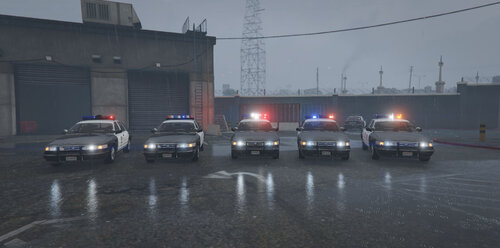 The cars in this pack are awesome and some of the best versions of rotator lightbars that I've seen on this site. Great work! @apoundofapples is there a way to turn down the environmental (ENV) lighting a bit the vector especially is a little overwhelming. Is that setting in the carcols or another location? Feel free to pm me if its easier to point me in the right direction that way? Again, only wanting to change the ENV lighting for these cars not ALL my ELS cars as they don't have ENV brightness issues.
- 42 comments
- 6 reviews
-
 The discord link in the post doesn't work 😞 says the invite is invalid. Otherwise great file!!
- 20 comments
- 1 review
-
Is anyone aware of any mods that exist to slow down the speed in which helicopters start up? I know this sounds like a strange request as GTAV is not a simulator, but I swore I saw a mod not long ago that adjusted this! Here's an example of what I was hoping to achieve... https://www.youtube.com/watch?v=0ep03e2e4EQ
-
Actually found one that softens the suspension and improves the handling pretty well. I'd encourage you to try this with your mod https://www.gta5-mods.com/vehicles/natual-vehicle-dynamics-realistic-handling-mod
-
Greetings friends, I was hoping for some support on an issue I've been having. I've tried installing different versions of reshade and none seem to work when launching the game with the current version of RPH. If anyone can point me in the right direction of a configuration that they use that seems to be working I would be most appreciative! Thanks!
-
First, thank you for the great notes on this. I look forward to playing around with your settings and seeing what I can find. I'm curious if you've found a way to replicate this with a controller or have setting suggestions for those of us that prefer controllers over mouse.
-
In your RPH menu ensure that no mods are set to launch on game start. You should load plugins within the game.
-
There is an option in the LSPDFR menu to turn off the radio in the patrol vehicle. I believe the hotkey for the duty menu is "M" on your keyboard.
-
Greetings all! I'm just curious what handling or driving physics mods you all use since we all know vanilla GTA V driving feels like the cars are on rails and far too stiff. This could be a single mod or a combination of multiple mods together, I'm just curious how you all are getting the most out of your driving experience. Thanks for your help!
-
While I definitely understand the necessity of patience and the mods gently suggesting that people don't ask for updates; I do feel that after over a month of no news it's a fair question to ask for a little more insight about some of the new features. I don't think anyone has the expectation that we are given visual previews of parts of the mod that are not ready for public consumption. But perhaps some more specifics about features that have already been introduced? I suppose I don't think it's fair to tell people to be patient over and over when your original marketing stated that there will be more "soon". Arguably, "soon" is a subjective term but if someone tells me something really exciting/impressive and then doesn't say anything for over a month I really wouldn't consider that "soon".
-
Just watched the video and it looks great! 2 minor suggestions I might have; 1. Perhaps integrating different responses from dispatch other than "10-4, copy". I imagine that might get a little old after the first few communications with dispatch. I know Vocal Dispatch uses a couple of different responses. 2. Perhaps integrating an option to delay the response from dispatch for a couple seconds. I know I would like be saying my communication out loud and with a delay in dispatch response that would prevent me from being cutoff. Otherwise it looks fantastic!
-
Hey Lundy, just out out of curiosity will the carcols still be able to simulate strobe and LED patterns on light bars? I think that was one of my favorite aspects of ELS was the flexibility of being able to easily change patterns etc of my lights.
-
On the Pranger model I was just curious how to disable the white takedown lights that appear whenever the vehicle engine is on? There doesn't appear to be any controls in ELS to turn them off. I've tried the toggle tkdn button and toggle cruise buttons and it doesnt effect them. Thanks!
- 82 comments
- 30 reviews
-
I've been working on this as well. From what I've been told you need to search for "police dual" then find "sequencerBPM" and lower it to whatever value you want. I'm still working on finding a value that looks realistic.
-
I agree with Night. Keep doing what you're doing, there is nothing wrong with giving people an ELS alternative. What you have planned with the rotators in the next release is something that I doubt ELS will even come close to being able to mimic. Plus, having a competitor in the lighting market forces both DEV's to step up their game with each release and fuel their creativity. You've already released a game-changer within the GTA V modding community, don't stop now
