


A Stranger
Members
-
Joined
-
Last visited
Everything posted by A Stranger
-
You have an invalid vehicle. Rename mods to _mods.
-
Go to GTAV/LSPDFR -> LSPDFR.ini and disable game.blips Main.DisableGameBlipHiding = true Then, move RAGENativeUI from /Plugins/LSPDFR to your GTAV main folder. It does not belong where you currently installed it.
-
For EPIC Games you will need to start Grand Theft Auto V first, then RAGEPluginHook.
-
Could have two roots. 1. Asiloader got corrupted. To fix this, delete asilaoder from OpenIV or your gamefolder (dinput8.dll) and then restart your PC. Once done, reinstall it from OpenIV and retry. 2. Second issue could be window tint. Make sure that it's set to "white" in the vehicles.meta, not only the Trainer. It should look like this: <diffuseTint value="0x00FFFFFF" />
-
Try installing them in the latest Patchday (patch2023_01) If you do not have it in your mods folder, use OpenIV to copy it into /mods or do it manually. (From GTAV/Update/x64/dlcpacks) Then, make sure patch2023_01 is in dlclist.xml (mods/update/update.rpf/common/data). If not, add the line.
-
Don't add %temp% to your Antivirus exceptions! It can be a security risk. Just add your GTAV-folder to Antivirus exceptions, and allow it on your Device if it pops up. Disable Defender before starting RPH, then enable it after it successfully hooked the game.
-
It's the wrong log. Rename mods to _mods and then start GTAV before RAGEPluginHook. If that doesn't work, clean your GTAV folder and start over.
-
The above makes absolutely no sense. Rename mods to _mods, then start GTAV first, then RAGEPluginHook. If that does not work, you will need to clean your Grand Theft Auto V folder. That means removing anything modded.
-
Make sure you updated your mods folder and did not save while on duty. To update your mods folder simply copy the "update.rpf" from GTAV/update to GTAV/Mods/update and overwrite. Do the same for the "update2.rpf".
-
Show me where you installed the gameconfig in OpenIV. Screenshot of the path & file. Also, change your PackFileAdjuster.ini to 10000.
-
Recently, Windows databases flag RAGEPluginHook as malicious. Add your GTAV-folder to Antivirus exceptions and if it still "disappears" after; disable your Antivirus, start RAGEPluginHook and load into the game. Once successfully loaded in, re-enable your Antivirus. This applies to the RAGEPluginHook included in LSPD:FR setup and manual.
-
Recently, Windows databases flag RAGEPluginHook as malicious. Add your GTAV-folder to Antivirus exceptions and if it still "disappears" after; disable your Antivirus, start RAGEPluginHook and load into the game. Once successfully loaded in, re-enable your Antivirus.
-
That log is 4 days old an therefor useless. Recently, Windows databases flag RAGEPluginHook as malicious. Add your GTAV-folder to Antivirus exceptions and if it still "disappears" after; disable your Antivirus, start RAGEPluginHook and load into the game. Once successfully loaded in, re-enable your Antivirus.
-
Disable Game.Blips in your LSPDFR.ini located in GTAV/LSPDFR. Set the following to "true": Main.DisableGameBlipHiding = true Also disable Ambient.Cop Spawn in your LSPDFR.ini: AmbientSpawn.MaxCopsInArea = 0 Remove in /plugins/LSPDFR: 686Callouts; OfficerPorciPlugin; PursuitPack; UnitedCallouts I recommend switching VocalDispatch with GrammarPolice.
-
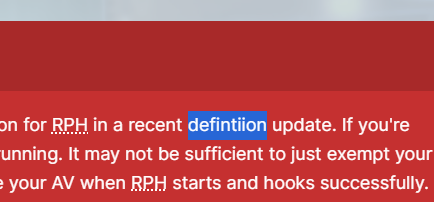
As beautiful as it is, it might have a spelling error in it.
-
Do you have ScripthookVdotnet or ELS by any chance?
-
You need to add your GTAV folder to your Antivirus exceptions. Additionally, make sure nothing else (Like gameoverlays) hook into GTAV.
-
Grand Theft Auto V just dropped an update a few hours ago. If you did not create a backup folder of 2845, you will need to wait.
-
1. Make sure to turn off your Radio in GTAV settings to compromise compatibility issues. 2. If they are add-ons make sure their audioNameHash is a police-hash and not a non-police one. F.ex: <audioNameHash>police</audioNameHash> You can find the vehicles.meta for the add-on vehicle in their respective dlcpacks.
-
Change the plugin timeout threshold from 10000 to 60000 in the RagePluginHook.ini file; found in your Grand Theft Auto V folder. Then locate to the GTAV/LSPDFR folder and open the LSPDFR.ini. There change Main.PreloadAllModels to "false".
-
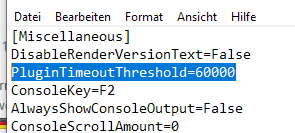
Öffne deine RAGEPluginHook.ini (In deinem GTA Hauptverzeichnis) und füge folgendes in [Miscallaneous] hinzu: PluginTimeoutThreshold=60000 Das sollte dann so aussehen:
-
Grand Theft Auto V just updated. You will need to wait for an update from ScripthookV, LSPD:FR and RagePluginHook.
-
Make sure you have added your Grand Theft Auto V folder to your Antivirus exceptions. How, depends on which one you use. You may Google those steps. Also make sure you can run GTAV via Steam without issues. Sometimes running GTAV first, then RPH solves the issue.
-
Please send your RAGEPluginHook.log from your main GTA V directory.
-
Did you install anything into your mods folder recently? If so, try renaming mods to _mods and play for a while. See if the issue persists.



