


A Stranger
Members
-
Joined
-
Last visited
Everything posted by A Stranger
-
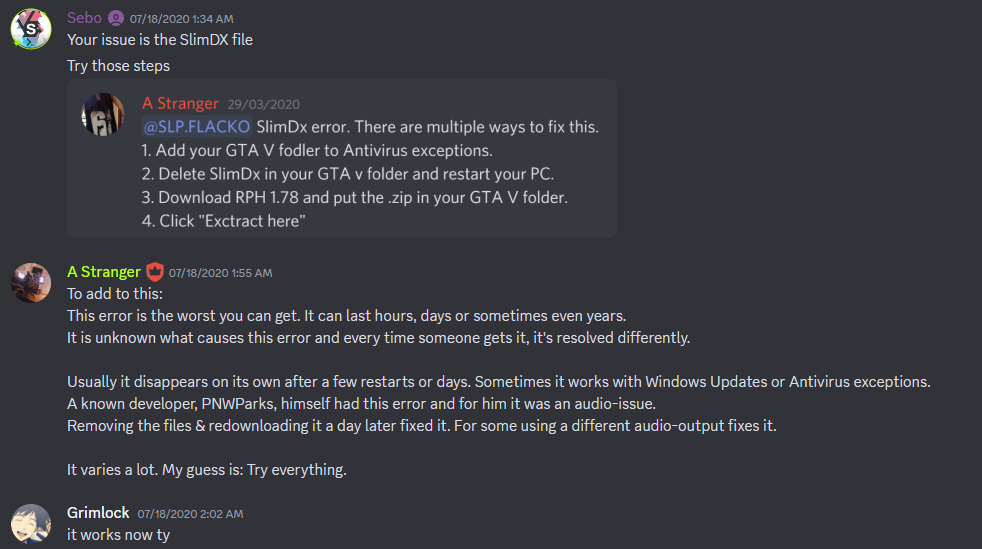
To To add to this and @Mrsuperx13's incredibly informative response; the SlimDX issue is a system-specific error. Meaning that yes; it's an exception caused in RPH by your system. The Antivirus scheme + the reinstallation of DX and system specific drivers has always seemed to work best. It's not RPH, LSPD:FR or your mods. It's your system. And that is why it's so hard to diagnose. Everyone's system is different. Therefor, please retry the steps in the RPH FAQ like mentioned above. As said all the way back in 2020:
-
That log seems to crash much earlier. It doesn't even get to loading any RPH plugins. Do you use ELS or ScripthookVdotnet?
-
Seems like a DirectX issue. 1. Remove EnhancedNativeTrainer. 2. Reinstall/Repair DirectX: https://www.microsoft.com/en-us/download/details.aspx?id=35 3. Try forcing DIrectX11 or 10 in commandline.txt You can do so using RAGEPluginHook in the Game Settings -> Command Line Switches (Only use one at a time.) 4. Start GTAV before RPH.
-
Also remove SirenSetting Adjuster if you have it. It causes issues with Stage 3.
-
Nothing specific in your log. I see a few unstable LSPDFR-plugins. Try disabling ambient cop spawns/events in your LSPDFR.ini by setting the values to 0. Then, rename mods to _mods (if you have one).
-
Your log only states that you are missing required libraries for CalloutInterface. (IPT.Common) Reinstall it from CalloutInterface into your main GTAV-folder. If your visual / graphical mods lag, you might want to take a look at your computer specs and resources.
-
Highly unlikely. It might have been a callout CM was forcing. If you're crashing, send a log.
-
Latest is: mods\update\x64\dlcpacks\patch2023_01\dlc.rpf\x64\levels\gta5\vehicles.rpf\
-
Remove in /Plugins: SirenSetting_Limit_Adjuster CheckYourAmmo; Remove in /Plugins/LSPDFR: EmergencyCallouts; HolsterSounds; MegaPhoneUI; OfficerPorciPlugin; OP_Immersive_Dispatch RegularCallouts; UnitedCallouts;
-
You need to update RAGENativeUI. Put the .xml and .dll into your GTAV folder. Download from here: https://github.com/alexguirre/RAGENativeUI/releases
-
1. Make sure you have LSPD:FR loaded with RAGEPluginHook. 2. Make sure the "commandline.txt" file in your GTAV-folder is empty. If not, delete everything in it, then save & close.
-
Just click on the attach files below and send your RagePluginHook.log from your main GTAV folder. here.

-
You need to update ScripthookV. http://dev-c.com/gtav/scripthookv/
-
Clean out your GTAV-folder. Make sure no modded files exist- then reinstall LSPD:FR 0.49 manual.
-
Your path seems- odd. Show me where you run RAGEPluginHook.exe from.

-
LSPD:FR itself cuts performance a bit. Every callout or plugin you add, depending on how "heavy" it is, adds to performance loss. Since you already have the game modded quite a bit, I'd say it's normal. Try renaming the /LSPDFR folder in /Plugins to _LSPDFR. That disables any LSPD:FR plugins installed for now. See if that helps or if your performance is still down.
-
Disable game.blips in your LSPDFR.ini (GTAV/LSPDFR): Main.DisableGameBlipHiding = true Also, increase your PluginTimeoutThreshold to 60k. Open your RAGEPluginHook.ini and change the following setting: PluginTimeoutThreshold=60000
-
Go into GTAV/LSPDFR/data/customs and send a screenshot, please.
-
Please send your RAGEpluginhook.log from your GTAV-main folder.
-
Looks like you are one of the unlucky people that need to clean their GTAV-folder. Seems like visual mods and certain scripts cause this. TL:DR: Remove everything mods related in your GTAV folder.
-
Looks like you're using the wrong gameconfig. Please us this one (Yes, it works): https://github.com/pnwparksfan/gameconfig For the Packfile simply open the .ini in your GTAV-folder and change the value:

-
Install the EUP Configs.
-
Please send your RAGEPluginhook.log from your GTAV main folder.
-
Sounds like your mods folder isn't getting initialized. That can be and has been a common issue for some user. If there's anything you'd like to backup in your current mods folder, do so. Then start a new one.
-
Can you send a screenshot of the said error? Also, make sure you remove RAGEPluginHook.exe before installing the new one from LSPD:FR manual. Do not use the RAGEPluginhook website!




