




LieutenantColombo
Members
-
Joined
-
Last visited
Everything posted by LieutenantColombo
-
Great! ;)
-
Seems like you may be having the same problem I did, I can see errors at the top involving Dssound.dll file. This is part of the FOV mod, unless you updated it, that dll will crash the entire game on boot up. Go ahead and delete that dll file, and let me know what happens. As for some of the other dll files in there, I am not sure, deleting them may work, but I wouldn't unless you know what they belong to, but you can go ahead and delete the dsound dll file for FOV, or get the new version of FOV and replace it.
-
Yes Visual V has had a biker compatibility update
-
I removed a Dll file called, "dssound.dll" It is part of the FOV mod.. it has been updated so might be safe to but FOV back in, but that out of date dll was causing the crash for me, if you have FOV mod, remove it. And get new version.
-
Hm, What do you have in the mods folder? If Visual V or something is in there, make sure its updated. Also, does the game run on vanilla? Or still crash? If so then it could be something in the mods folder. Once thats done come back, one way to solve the problem, is deleting the mods folder, and rebuilding it, However this is a long process (I did keep a back up of mine, but simply putting it back in just crashes the game again) So hold off from doing that until we find what could be causing it.
-
When does it crash? On the launcher? You may have a different error code to me. I suggest posting your Launcher Log, and your GTA V main folder contents as a screenshot,
-
I fixed the problem yesterday :)
-
FINALLY After 5 hours of work over the past 3 days, I fixed my issue, I deleted the "dssound.dll" file. I just going to carefully re add the mods again. But I can now boot up and play GTAV with rage
-
Same, my topic has kind of already hit a dead end, I am trying out more solutions, but my GTA stopped working completely, with or without Rage, updated the rpf in Open IV, deleted mods folder, deleted script hook (I updated it too) Verified files, deleted my profiles in GTAV Documents. But not giving up just yet, got a couple more things I am going to do. My launcher log is saying its a code 107, unable to stat out file, apparently some people fixed it by unplugging USB, I unplugged my joystick, but no avail. If you guys have it where the game launcher comes up after the rage has done its thing, it loads, then disappears, few seconds later it says "GTAV Exited Unexpectedly" then you have the same issue as me. I suggest posting your log from Rage, or launcher, found in Rockstar Games, in Documents
-
Nope. I got the latest version anyway, so removing it did nothing. Thanks though anyway update: I am creating a thread on the Rage hook forums, but any help still will be appreciated.
-
UPDATE: Spent hours nearly 3 trying to fix this problem. I have deleted mods folder, unplugged my USB joystick, verified files, deleted the GTAV folder in the documents, tried to replace DX files in system (but couldnt). I am stumped. Never before has a DLC screwed my game up so much. Apparently Code 107 unable to get Stat out file, can be all sorts of reasons. Its got to be something we are missing, because the game crashes even when I launch it vanilla.
-
Well I don't give up too easily. New day. Fresh mind. Going to continue
-
Deleted the mods folder. No avail. so now I am minus a mod folder and still a crashing game.. starting to completely give up.. Launcher log once again
-
Well okay.. I deleted the update biker folders, but now its re downloading those..I'm out for dinner now, Ill check it later then see if the re download might of picked up some stuff that got missed or corrupted along the way last time.. If it still don't work ill delete the mods folder, will suck as I have to re download and re do liveries and modded vehicles again. But hey ho. Will be worth it I think. If anyone else has suggestions please do post.
-
I don't know how that would fix the problem? I think Ill hold off doing that for a little while.
-
Hello everyone.. Basically on the same boat as everyone else, with the new dreaded DLC, its broken everything.. Although I am posting to make sure its not something wrong with my game only. So I have the latest RAGE in, script hook V, and updated the update folder in Open IV, and the game isn't even launching. I boot rage hook, no issues, "Launching Game" Then it disappeared like normal, I would then expect to see the exe launch up and I am being introduced with the splash screens. But instead the GTAV launcher just comes up saying "Grand Theft Auto V Exited Unexpectedly, blah blah" I have tried everything, Albo shooter, the updates, everything should be working now like other updates, but I can't get the game to launch, I have seen people having issues in game too.. Anyway, the RPH log isn't much help because the game doesn't even launch it doesn't create a new log. But I can give you the launcher log from Documents in Rockstar games, it does have a few errors which I don't know what they mean. Ill appreciate any help with this guys, and sorry if you are having problems too, this is why these DLC's are our worst nightmare. Regards, Columbo
-
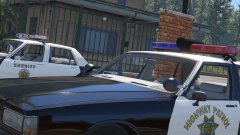 Nice stuff sir!
 -
Hello everyone! Columbo here, I was a bit skeptical of posting my Youtube channel here, as I didn't know what people may think of my police cinematic's, however the community in Police-10-13 liked them, so I thought I will take the plunge and post my YouTube channel here too for anyone that is interested, I make short police dedication movies, from kidnappings, to emotional videos. To humorous ones, I would really appreciate for you guys to check them out and let me know what you think! ;) Here is the link to the main channel, and also the link to my video that got the most views and likes by the 10-13 community. Hope you guys enjoy, I appreciate any feedback, positive and negative (as long as its constructive) Note: I am learning object spooner now, which opens up all new fields in my film making, so I am making a new cinematic as we speak! ;) https://www.youtube.com/user/dude98ify/videos
-
Researching what to do to make this. xD
-
Hello Community! Columbo here. I have recently been experimenting with the police predator boats, and found that you can blip someone else in a boat on the water, however without police lights or sirens, I cannot pull this boater over. I have come up with a modification suggestion, that perhaps we can have a water policing mod. That allows you to pull other boaters over, add boat licences, (like the fishing and hunting licence options in wilderness callouts). And perhaps add callouts involving boaters. BUI, Stolen boat, Reckless boat driver, Boat out in storm, SOS call. I think there is a lot of potential in the water policing aspect, and will be a great addon to LSPDFR. I'll see what you guys think! Be safe! Happy policing! Lieutenant Columbo ;)
-
Hello all! Columbo here. After seeing the possibilities with Vocal Dispatch, and other modifications regarding the use of your microphone. I was wondering if perhaps a plugin can be created where we can use our microphone if we have one, and use it as a police megaphone. To replace the scripted lines that are said by your officer. Maybe it can have an echo, megaphone like sound after its projected out the car. So basically what I am saying, you get your microphone, hold down the talk key. Say whatever, "Stop right now" It processes it and projects it out the car in a megaphone style. If it can combine the Pursuit Deterrence mod by Tanu, it can actually have an effect that the suspect may stop. I am not sure if any of it is possible, but after seeing what else has been done, I think it would certainly be an up from just using the scripted lines set for each cop skin. What do you guys think? Thank you, and happy policing, stay safe folks! ;)
-
Hello! I solved the problem last night, so I am an idiot, as I was away for a while, I forgot to update my Update.RPF files in OpenIV, once I did that, bam, launched with no issues. Thanks for your help though!
-
Hello all, Columbo here I have been away for 3 weeks in the USA, and I know there has been a lot of updating going on, so I re updated everything I have for LSPDFR, Script hook V updated, Scripthook.NET. VisualV, Rage hook to 0.40. However, I am having a big issue, which is my game crashing. Sometimes I had the issue where I would load up GTA then it will black screen, then crash after loading plugins, then I set the game to not load plugins, however still had the issue, now I don't have the black screen issue, but my game still crashes when loading/populating world. My log is below: Strangely, I disabled Developer mode, but it seems to still enable, as seen as the end of the log, is this causing the crashing? Or can someone experienced see something in the log that's incorrect? I would like to say, that one log I had, said that "D3D.dll" or something related to directx or direct3d failed to be created or loaded. Not sure, I am pretty stumped here guys, I just want to get back into LSPDFR. Thanks in advance.
-
-
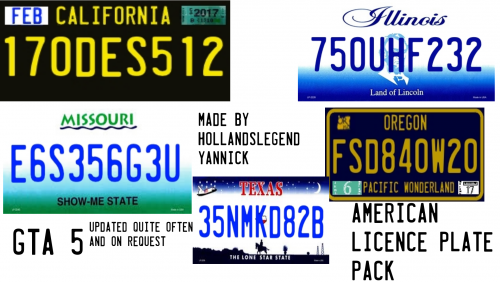 Hello sir, although I am British, in honor of my family who live in Nashville Tennessee, could you do a Tennessee plate? Thank you! ;)
- 29 comments
- 3 reviews


