


HvyMetal
-
Joined
-
Last visited
Posts posted by HvyMetal
-
-
22 hours ago, Lennyy said:
I'm playing GTA V on Rockstar Games Launcher and all I have to do is untick Battle Eye in this windows
I have already attempted that method as indicated in the second screenshot below. However, it has proven ineffective. Thanks.

-
Hello
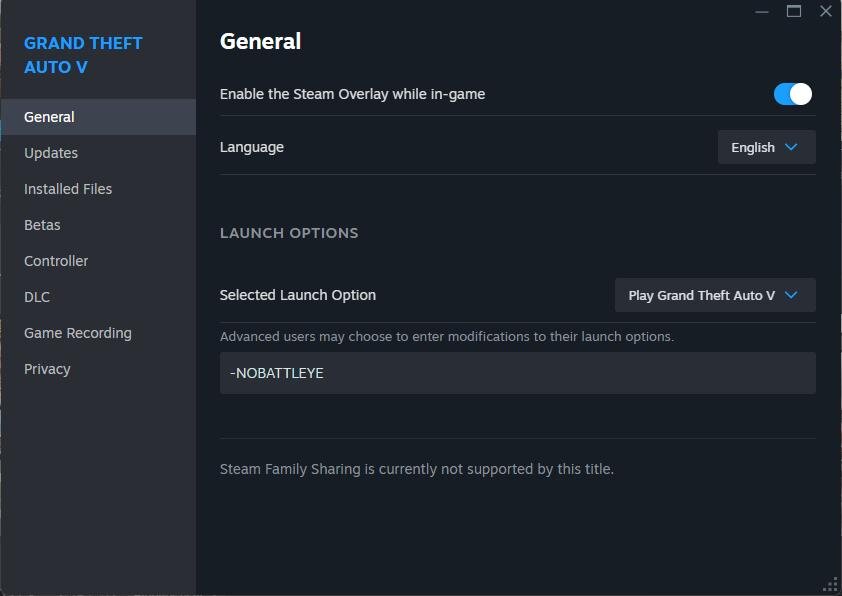
Has there been any resolution to the issue that prevents Battleye from bypassing the installation of mods? Consequently, will GTAV launch in story mode?
I have tried this in Steam.
This does not work.
Rockstar Games Launcher.
Does not work
I have even disabled Battleye in service
No luck.
Unless I am overlooking a crucial aspect, I believe I have exhausted all available options. I am currently operating the game on either Stame or
Epic Games.
Thanks
-

Any ideas what is causing this error. I'm aware of the trainer. I just don't know what's causing the error to rectify it.
Here is the SCV log file
If this is not correctly submitted in the correct forums area. My apologies.
Thanks
-
OK so we know the importance OpenIV is/was to GTAV and LSPDFR. Hopefully it will continue that way for many years.
However. Don't Script Hook V have just as much importance as Open IV? This may not be the time and place to mention this. This is not intended to start any rumors or cause any bickering. I just don't understand how SHV has no impact on the LSPRFR community? Maybe because SHV is it's own entity and no one really cares until it effects them directly. My opinion.
I'm surprised of no mention of Script Hook V. Keeping people in the dark is a good thing(sarcastic voice).
Without SHV GTAV (resent update) Granted everyone should know by now to keep a back up of GTAV for scenarios such as this. For those that haven't they are stuck where they can't even play the game.
This all being conjecture on my part.
Have a good day.
PS. I really did enjoy playing LSPDFR. Peace out!
-
On 6/14/2017 at 6:18 PM, Gerdss said:
i would be if fucking scripthook got updated
What gets me is that everyone seems to forget the importance of Script Hook V has just as much as Open IV is/was/did.
If they were to keep people better informed. I doubt their would be as much whining and crying etc on get the update for SHV. When people are left in the dark, they cry.
This my opinion.
-
2 minutes ago, LeGeorgettier said:
Would you really play LSPDFR ONLY with original cars :P ?? I would not
Guess I wasn't specific enough when I meant "impact" it would have.
Meaning will it
force
stop
halt
close
be done with
the end of a eara
kill the site
the modding of this site? Thus having to drive generic cars? So to speak.
To answer the question. Of course not. But that's really what I wasn't asking.
Only time will tell.
-
-
-
10 minutes ago, 10 DAVID said:
what he means is, delete the contents of the mods folder then copy from your main game folder: Update, X64 and what ever else content you plan to modify you'll do the same fashion. Its easiest to copy the whole update folder to your mods folder that way it will have all dlcpacks available to modify in future event should you decide to modify anything in those packs. there is also additional game content you can copy to your mods folder such as any of the x64a-w or the common.rpf
I'm confused then. Thanks
-
1 hour ago, Babylon said:
No,I'm using a previous version so not tried with anything new yet. As DAVID10 pointed out - probably better off just recopying the entire mods folder starting fresh....no hiccups that way!
When you say recopying the entire modes folder are you talking about this folder?
Witch contains update>x64 and update.rpf>dlcpacks>patchday3ng and patchday5ng. If so where are you recopying it from?
Thanks
-
45 minutes ago, 10 DAVID said:
They updated ragehook now.
Copy that. Thanks for the heads up. I just downloaded it.
Unfortunately it's still not working either by stating through steam story mode or through the updated version of RPH. Everything is updated accordingly as it has came out. Otherwise I have not idea whats going on.
Thanks for everyone help.
-
1 hour ago, 10 DAVID said:
if you are running an updated version of the game, and your scripthook is outdated, that is likely what is causing gta V to crash.
as others have stated, ragehook isnt up to date yet with the current version of the game, so if you did not back up the game, you wont be able to play lspdfr or us rage hook until they release a compatible update.
Unfortunately I am running updated version of the game(thanks to Steam and their forced updating)
Updated version(10.944.2) of Script Hook V was released on 12-15. I have updated that. I'm aware that RPH is not updated yet. I don't run it until it does get updated. I can wait to play LSPDFR until it or if it gets updated. Right now my focus is getting the single player(story mode) game to run.
I suspect that nothing will get updated until after the holidays. Witch is fine. I can wait.
Would you know who does the update for the ScriptHookVDotNet? I have noticed it has not been updated since October.
Thanks for your information.
-
9 minutes ago, SeaHawk14 said:
Yeah, that looks like mine (other than a couple of scripts and the Mods folder). This is the problem to GTA V, once they update the game then it causes issues. It's annoying but I guess there are so many users which play online.
Good to know I wasn't as disorganized as I thought .
LOL I don't play online as much any more. The clan(if that what you want to call it) abandoned GTA V all together. I was getting tied of all the hackers also. So single player is more my choice. With the LSPDFR makes it more enjoyable. For me anyway. Now if RS would just live things alone. Thanks for the help.
-
13 minutes ago, SeaHawk14 said:
FYI: I tried putting a new Mods folder in (because I deleted the old one) and I had the exact same issue. Fatal crash, after launching Story Mode. When I removed my mods folder, it worked as normal. You don't necessarily have to remove each mod one by one, if you just cut and paste the Mods folder onto your desktop (or somewhere else) then launch it.
Copy that. I'll give that a go. Thanks for the information.
Here is my GTA V directory.
-
Edited by HvyMetal
Thanks for the info. So a trial and error type of deal. Reading the Script Hook V page on GTA 5 mods. Many other are having the same issue. Not sure if it's related or not. Again Thanks for the info. I'll start removing mods.
-
-
-
This news comes bad. Especially if RS does another major update. This is why it's always nice to donate. When something good is gone. You don't know how much people really depend on it, until it's gone. How much will this effect LSPDFR? And other mods? Hopefully RPH will be back up soon.
-
Edited by Sniper296
"Also, make sure to add a spoiler tag if you're posting more than one screenshot at a time."Spoiler
-
I'm guessing due to the recent RS updates. This is why I'm getting this when starting single player. I'm also probably assuming I'll have to wait for the Rage Plugin Hook to get update also.
Yes I'm running LSPDFR and other mods. I've already updated the Script Hook V.
Otherwise not sure what's going on.
If this is posted in the incorrect location. My apologizes.
Thanks.
-
10 hours ago, RambosNachbar said:
Hey, I started this Thread simply to keep the comment section of Albos Traffic Policer cleaner and don't have people discussing the same issue over dozens of pages.
The problem is a stuttering after 30-40 minutes of play time. It may or may not be caused by Traffic Policer, problems with our hardware or other plugins in combination.
So far the discussion went like this:
RambosNachbar: I'm sorry to say it, but it seems your fix did not change anything for me. I'm still getting lags after 30-40 mins of playing lspdfr.
anotherc6vette: Im still in the same boat Rambos , its like the smallest stutter when you sit still you can see the stutter of a passing vehicle , almost like it drops a frame but it isnt actually if that makes sense ?
Dippa:
Bro, no need to keep letting the group know the same thing with the stuttering over and over again....trust me I know and have made it a point to make Albo and other well aware of this issue and being as not many people are having this issue it’s hard for him to pin-point what the problem is. When I read your first complaint about the stutter, man I feel you because I've been talking about it for a while now. I do however watch when it was happening, it seemed to stop after the Ragehook .37 update happened, and I've mentioned this on here. I'm starting to think it may have something to do with OUR hardware, even though we have pretty beefy set-ups. I'm also noticing the people mentioning the issue have the GTX 970 Graphics card and the I7 4790 processor like I do. With that said, so far the stuttering has subsided for me after removing “safe chaser” and a few other resource heavy Plugins (and trust me any plugins that perform the best need resources). I feel this is strange being as my card had 4 GB to itself and I too have 16 GB of ram on my gaming pc and yet still get occasional memory error crashes. We (meaning the community along with Albo) will figure it out eventually… because trust me, I know it’s frustrating when you have mods like Albo’s, that make the game so much more enjoyable, because I feel it also lol. I was having and still CAN have the same lag issue as you when I use certain plugins along with Arrest Manager and Traffic Policer. We hear you bro trust me and looking for a resolution lol
anotherc6vette: I dont think it is a albo issue , i just seems weird that my old 750 never had any issue at all , i am also running .36 , it has to be a 970 thing ,
i will keep going till i figure out what it is , i have a feeling other people have a diff kind of stutter thats why i mention it to see if that particular person is having the style i am , and sorry im not PC person and because of that i have to ask questions
HvyMetal: Would it help to run some bench marks? Or video of this on going issue? Not saying I'm having the same lag issue. Or posting system specs?
I would guess the more detailed information the makers of the mod have and those helping, the better understanding they will have to know what the issue(s) is. And resolve the issue in a timely manner.
Just saying.
________________________________________________________________________________________
I think it is a good idea to keep the rest of the discussion in this thread.
@anotherc6vette; @Dippa; @HvyMetal; @Albo1125
My System: i7 6700; 16 Gb RAM; 6 Gb Gtx 980ti; Win 7
I apologize offering/suggesting a idea trying to shed a beam of help was interpreted as a negative. Not my intent. I'll leave the issue to the experts.
Good day.
-
-
On 3/23/2016 at 10:24 PM, Trasheater said:
The Darkmyre.Common folder is supposed to be in the plugins folder, not the plugins/LSPDFR folder. Also, you can remove the LMS.Common.dll from your plugins folder, since theres already one in the main directory
Thanks for the help. I think that has fixed the crashing issue.
Thanks again!
-




 LOL I don't play online as much any more. The clan(if that what you want to call it) abandoned GTA V all together. I was getting tied of all the hackers also. So single player is more my choice. With the LSPDFR makes it more enjoyable. For me anyway. Now if RS would just live things alone.





Battleye Resolve Yet?
in Legacy
Thank you so much for pointing out the obvious. Works great!