


Ryan9295
Members
-
Joined
-
Last visited
Everything posted by Ryan9295
-
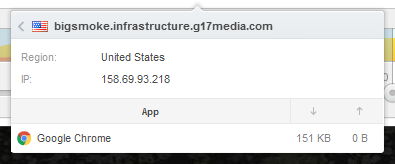
I use GlassWire to monitor all traffic on my computer. I can't speak for the entire router. But this has been an issue for me for a few days now. Even at times when I know I am the only user on the router. This is the server I'm connected to. It says 151kb, but I think it measures it in seconds. Google Chrome says 17kb/s. I just downloaded another mod from a different website, and I got 600kb/s. So it can't be my computer or router. Somewhere between my ISP and your server, something is clogged up. And if I'm the only one in my region that has this issue, it must be closer on my end. Which sucks. Is it possible to connect to a different server? I know you have different infrastructures, I can see the different names. But is it possible to force my IP to a different one?
-
First of all. I am super jealous of your download speed. I live in the US. Oklahoma to be more specific. My ISP is AT&T. This is peak time for them. So that must be the issue. All other websites are fine though.

-
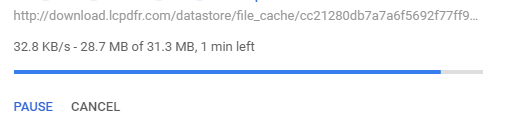
Hello Community, recently I have noticed that the bandwidth between me and LCPDFR.com is incredibly slow. Like less than 100kb/s slow. I know this is not on my end. I just recently did a speed test of my router and it's operating at normal speeds. On non peak times, I used to get 500kb/s a sec, more or less. But the most I get now, regardless of the time of day is around 30kb/s. I even dusted the cobwebs off of Microsoft Edge and tried that. Same speeds. I understand that servers are expensive, so if this is the result of cut backs. I understand. But I wanted to report this issue anyway just in case something is acting funny server side, or if anyone else is having this issue. Thanks, Ryan9295
-
 Every update just gets better and better. I love what this pack is turning into. I have no better way to describe this pack as simply amazing. This is something the LSPDFR community has been waiting for; especially me. I love the excitement in the lighting patterns, the strobes, the different vehicles. There are still a couple of things I personally would like to see improved/added, but play no effect in the outcome of my review. Unlike Amazon's bias reviewers that claim to make un-bias reviews in exchange for a free or discounted product, I am actually capable of giving an honest review. Bunch of sappy stuff: Suggestions: Push guard with an optional wrap around as an extra. Better spotlights and use-able spotlights as an extra. Stationary antennas and one moving antennas as an extra. (Moving antennas are my weakness) More cars. I would love to see a 2015 Tahoe, 2013 FPIU (explorer), Ford Taurus, a 2016 charger, I suspect an unmarked Crown Vic is on the horizon :P Improve the dirt mapping on the vehicles. It gets pretty bad really quickly, and for me, the CVPI seems to only get dirty on the inside of the glass. Which blocks out the two LED lights in the back window. Somewhat annoying. Add support for multiple liveries. Even the unmarked units, I would love to add a few skins to make some slick top variations. Add some prisoner cages. DISCLAIMER: I received a free copy of this pack for an honest and un-biased review. (I didn't receive anything. I just saw this on Reddit today and decided to make a joke.)
- 445 comments
- 108 reviews
-
-

- 12
-
-
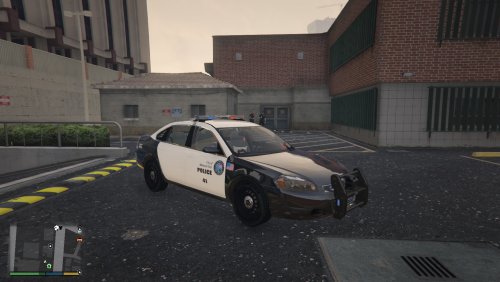 This is awesome, thank you!
 -
.thumb.jpg.4066677156985e22489bfecddc2f6c45.jpg) This is by far the best Dash Crown Vic. that I have come across. The exterior, the interior, even the reflections on the vehicle are amazing. There is a lot of details that went into this vehicle, and I appreciate every bit of it. I do have a few complaints with the vehicle. The first being the installation, I do think it's an easy way to install it, I won't deny that. However, I am very comfortable navigating through the GTA files, as I'm sure plenty of other users are as well. I think you should include the files to manually install the vehicle, as well as any other files that are needed to get the vehicle working properly. Or at least tell us where the vehicle is going and what is being changed, that would be appreciated as well. This might have been stated somewhere, I haven't really looked that hard to find the information. Since this vehicle has liveries, I would like to change the vehicle skins to that of LSPD, or maybe even CHP, but I can't find the location of the vehicle. That's why I am interested to know where the vehicle is being installed. I noticed you put sirens in the rear backup lights which is awesome, however, it seems very ineffective considering it is just a white dot. I'm not familiar with creating models for GTA, but is it possible to make a texture to light up the entire reverse light housing? I just think it would make the vehicle lighting look better. One more suggestion to add to the Dash Crown Vic. Recently, F5544 added a moving antenna to his 2015 Dodge Charger. Since this type of technology is available. I believe it should be used on all vehicles. Just one of those details I probably appreciate more than anyone else, but it makes me giggle.. so that is why I am suggesting it. Like I said, this is a fantastic model and I really look forward to any new vehicles that use the same 2011 Dash Crown Vic.
This is by far the best Dash Crown Vic. that I have come across. The exterior, the interior, even the reflections on the vehicle are amazing. There is a lot of details that went into this vehicle, and I appreciate every bit of it. I do have a few complaints with the vehicle. The first being the installation, I do think it's an easy way to install it, I won't deny that. However, I am very comfortable navigating through the GTA files, as I'm sure plenty of other users are as well. I think you should include the files to manually install the vehicle, as well as any other files that are needed to get the vehicle working properly. Or at least tell us where the vehicle is going and what is being changed, that would be appreciated as well. This might have been stated somewhere, I haven't really looked that hard to find the information. Since this vehicle has liveries, I would like to change the vehicle skins to that of LSPD, or maybe even CHP, but I can't find the location of the vehicle. That's why I am interested to know where the vehicle is being installed. I noticed you put sirens in the rear backup lights which is awesome, however, it seems very ineffective considering it is just a white dot. I'm not familiar with creating models for GTA, but is it possible to make a texture to light up the entire reverse light housing? I just think it would make the vehicle lighting look better. One more suggestion to add to the Dash Crown Vic. Recently, F5544 added a moving antenna to his 2015 Dodge Charger. Since this type of technology is available. I believe it should be used on all vehicles. Just one of those details I probably appreciate more than anyone else, but it makes me giggle.. so that is why I am suggesting it. Like I said, this is a fantastic model and I really look forward to any new vehicles that use the same 2011 Dash Crown Vic.- 376 comments
- 81 reviews
-
Yes, but does it crash when you launch without Ragepluginhook?
-
Does this crash occur when launching the game normally through GTA.exe, not through the RAGE application?
-
Hello anyone who reads this. I have been utilizing the LSPDFR forums over the past couple of days to try and help out as much as I can. I have noticed a common occurrence with some of the new users, they sometimes put their entire ragepluginhook.log file just right out in the open, so you have to scroll for hours just to get to the bottom, or maybe they made a few simple grammatical issues. Which is fine, no one is perfect, but my point is, regular users should get rights to edit other people's post. Now, I understand this is the job of one of the site moderators, and I also understand that this could be a potential catastrophic event. Here is my suggestion: Lets say someone forgets to use a Spoiler when posting a log file. An average user such as myself, can review this error, then just hit "edit" and add the spoiler or any other changes needed to improve the post. Then, instead of it taking effect in real time, a notification goes to the original author of the post, or maybe even a moderator, showing the mistakes, how it was fixed, and the reason why it should be changed. The user can accept my changes or have the option to quickly edit them themselves. Another option would to have a new rank named "Grammar Police" or something of that nature that has explicit rights to only edit people's post. I think this is a good way to quickly correct a user who made a mistake without the need to have a Moderator online. And just overall improve the forums. Thanks, Ryan
-
What questions do you have about the process? It's actually pretty simple. Start by making a "mods" folder in your GTA 5 directory. locate the "update" folder (also in your directory) copy and paste that into the mods folder. Next, download the OpenIV application ( http://openiv.com/ ) (You will need this to expose the "hidden" file systems and to install ASI Loader and OpenIV.asi ( http://screencast.com/t/W5ia3Xan )) After you download and extract the files of the car you want, locate the Readme file. MOST vehicles and plugins have a readme file that will tell you the exact path to install them. I know this path by heart, most car mods will be placed in mods\update\x64\dlcpacks\patchday3ng\dlc.rpf\x64\levels\gta5\vehicles.rpf\ (Just note that some vehicles will be installed in different paths. For example, vehicles pertaining to police 3 will need to go in patchday4) After nagivating to that path, just hit edit mode and drag your files into place. Thats it. (Highly recommend you turn edit mode off after you are done, even deleting or moving 1 file will corrupt your game! That's why its very important you know what you are doing and only replace what you are told to)
-
Try launching the game normally, and once it loads, Alt+Tab out, or whatever will free your mouse so you can click on RAGE.exe application while GTA is running. If it still crashes, I have a suspicion... Even though you may have a legal copy of GTA, RAGE can't verify its a legal copy. And that's why its crashing. In your directory there is a file RagePluginHook.log its a text document. Can you send that? It should be two down from the actual application http://screencast.com/t/4XV9ulm51HXw That should explain why its crashing.
-
Are you using a Mods folder? You said you've "rebuilt" many times. I assume that means using the Verify Integrity of Game Cache option through steam. I would recommend using a mods folder, placing your modded "update" folder in there, then installing ASI Manger. However, I know this probably won't fix your problem. It sounds it might be in the "x64e" folder. Try having the vanilla x64e and your modded "update" folder. I have a theory on the Mods folder. I have no evidence or any prove of this, or knowledge for that matter. If you are placing your cars in the vanilla Update folder, the game automatically suspects something isn't how it should be and says its corrupt. Even if everything is correct. When using the mods folder. The game does it's self check of the files and sees the vanilla update folder is how it should be, then ASI loader will use whatever is in the Mods folder and override the default files... Again, just a theory. If you aren't using a Mods folder, I would try using that first. Best of luck, Ryan
-
Is it possible to take screenshots of your GTA directory? Also, have you tried launching the game normally? If it launches like it should then we can conclude its with RAGE plugin hook. If it still crashes, your game is most likely corrupted. If you have the Steam copy of GTA V, then in the steam client, under the Library tab, right click on Grand Theft Auto V and click Properties. Then under the Local Files, you'll see four options, the very bottom one, "verify integrity of game cache..." will look through each and every file in your GTA V directory and make sure all files are how they should be. If it finds a file that isnt right, it will automatically download the files and install them. On the other hand, if its RAGE that is causing the problem. Reinstall the RAGE files again. Make note of the check list that appears when you first run it. All those need to be green. One last suggestion is to make sure you run RAGE as an Administrator.
-
Hmm.. First of all, appreciate the video. It makes it easier to see the issue, but there are still plenty of reasons why it could be crashing. However, I did noticed something in the console before it went away. http://screencast.com/t/fruvJnNRh This might be why its crashing. I would suggest downloading LSPDFR again and replacing every file, then inside the Plugins folder, take the new LMS.Common and replace it with what you have. Best of luck, Ryan
-
Clearly you have the latest build of GTA V, I assume you have a Mods folder, and I am also assuming you created that Mods folder a few versions ago. If you did, then you will need to update your mods folder. There are new DLC packs that were added to the vanilla "update" folder, you will need to add those DLC packs in with the Mods folder, or simply re-copy the vanilla "update" folder, and add your vehicle mods again. If this isn't the cause of your errors, then can you supply a little more information? What does the error message say? When does it pop up? Can you still launch the game vanilla?
-
Uh-oh lol... Well, I can only assume you tried launching the game in vanilla, if it launches into single player like it should, then its an issue with RPH, simply reinstall it. If you launch GTA in vanilla and it still crashes then that means you corrupted the game. Luckily, If you bought GTA V through Steam, under the "Library" tab in the Steam client, Right-click on "Grand Theft Auto V" and click on "Properties". Select the "LOCAL FILES" tab and then "VERIFY INTEGRITY OF GAME CACHE". This will go through your local files and make sure they are how they are suppose to be. If it finds one that isn't right, it will automatically download it and install it. That should fix it.
-
Are you using a Mods folder that was created a few GTA versions ago?
-
Troubleshooting a problem is very difficult if you don't provide details. Can you describe how its crashing? What it says, or what you did when it crashed? Can you take screenshots while in game? record it? the more data the better. Otherwise, I would just suggest reinstalling LSPDFR and Rage plugin hook. Make sure you have Framework 4.5 and Visual Studio C++, or any other requirements installed. A lot of times that fixes the issue. Also make sure you are running RAGE as an administrator. There's are literally thousands of reason why it won't work. The more information you can provide the better it is to solve the issue.
-
Plugins that go in the directory: Plugins>LSPDFR are loaded automatically when LSPDFR is loaded. I'm not sure what call-out plugins you have, but I also have the PoliceRadio installed in plugins>LSPDFR. Assuming you have the same one I do, try to hit "C" in game, it should bring up the radio whenever you are on-duty.
-
When you say "mods" what do you mean? Plugins? actual mods? Is it possible to be more specific with how you are "installing" them? Like where you are placing them? An excellent tip I have is every plugin, or file you download, look for the ReadMe.txt file. It will give you specific directions as to where you are suppose to install them. Best of luck, Ryan
-
Its the DLC packs in the update folder that is causing the crash. When you update GTA, it installs the new DLC packs in the vanilla update folder, but obviously not for the update folder inside the Mods folder. You can still save any installed cars you have by navigating to the DLC packs in the modded folder, extracting them to the desktop, then delete the entire update folder inside the Mods folder, then copy the newest vanilla Update folder into the mods folder. Navigate to the DLC pack again, and overwrite the existing ones with your modded ones. Best of luck to anyone to has this issue, it was a real pain for me, Ryan
-
You might be having the same issue I had. The game always crashed at that point and even when I wasn't using RAGE Plugin hook, and launching the game normally, I would still crash in the loading screen. I discovered that it was the Mods folder. I created mine a while back, maybe 3 or 4 versions ago. Inside the Mods folder I had the "update" folder, as I'm sure everyone does. Well, updating the game will add new DLC packs into the vanilla "update" folder, but obviously not in the Mods "update" folder. So when you have ASI loader or OpenIV installed, it points to the outdated Mods folder, and GTA is trying to find content that doesn't exist. Thus explaining the crash. What I did to fix this to avoid losing my modded vehicles and customization was navigate to the modded DLC packs using OpenIV (mods>update>x64>dlcpacks) extracting all of the DLC packs to the desktop, deleting the entire update folder in the Mods folder, then copying the newest vanilla update folder into the Mods folder. Then navigate to the same path, and just overwrite the DLC packs you took from the old Modded dlcpack folder. Obviously if you don't have any car mods, then this is irrelevant, but regardless, you have to add the new DLC packs if you want the game to run if you have a Mods folder. Or simply uninstall ASI loader, but then you lose your car mods, because it is pointing to the normal update folder as intended. Hope this helps, Ryan
-
I know the anticipation you are having to play LCPDFR/LSPDFR, I was super excited when it became available. Like you, I have been watching videos of them for a while. A few things you can try if you are still having the issue: Make sure you have the latest version of LSPDFR and Rage Plugin Hook. Make sure you have everything you need installed (Visual C++, framework 4.5, etc. If Rage works correctly, you should see a first time screen going through a checklist of what you need to have installed) Try to reinstall the current version of RAGE (I've had this work for me a few times) Make sure you are running RAGE as an Administrator. Once the game has successfully started and you are in single player. Try Alt+Tabbing out of the game and running RPH.exe again. Best of luck, Ryan
-
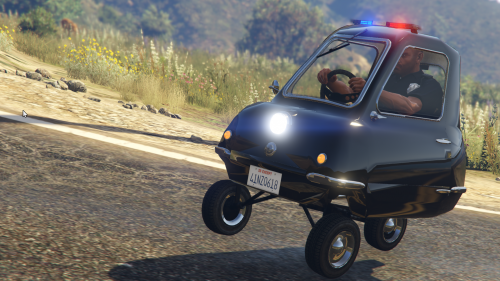 Excuse me, but I have a few jokes that I would like to say. I apologize in advance. My leaf blower has a bigger motor than that thingYou literally have to the worlds worst cop to be issued that carThat car is so small, you have to have the siren on all the time just for safety reasons.If the wind is blowing higher than 7 mph... You have to anchor the car down so it doesn't blow away.No place to park? Non-sense! just stop, turn off the car, get out, and just simply place it in your back pocket!The car is so small it doesn't need a full license plate. All you need is 2 numbers.If you get T-boned.. excuse me, i-boned, you are taking the scenic route across town!When you pull someone over, you don't even need to get out of the car, just drive up next to the vehicle, and after they stop laughing, hand them their ticket and drive off. That's all I got. Not hating or anything. Its a funny vehicle in itself, but to make it a police car... That's golden lol Defiantly going to have fun with this car :)
- 14 comments
- 8 reviews
-
-
- 24
-


.thumb.jpg.4066677156985e22489bfecddc2f6c45.jpg)
