tacticalpanda
Members
-
Joined
-
Last visited
Everything posted by tacticalpanda
-
Sup, so theres alot of visual mods you could use, like it's amazing, but one oi'd for sure recommend is Visual V and to make the lights brighter at night switch a visualsettings.dat folder you like (I'd recommend the one from Radiance V) and just drag and drop it in the following folder Mods/Update.RPF/common/data : Or you could even try using, BEL:
-
Oh Okay, my bad
-
You make a good point, however it's always worth a shot plus, in the comments you there are still people who use them and seem to have no problems. Some food for thought though.
-
Hey, I'd say this first run the lspdfr troubleshooter by albo first and see what it tells you.
-
You want something that changes them all? Okay that seems alright, are you looking for anything in particular such as, for a certain name/theme of department anywhere or lore- friendly stuff?
-
There's a few fuel scripts I know you've already got a suggestion but I'll just give you a few more and maybe see if you'd like to check them out,. https://www.gta5-mods.com/scripts/fuel-script-v-sakis25 https://www.gta5-mods.com/scripts/advanced-fuel-mod https://www.gta5-mods.com/scripts/i-fuel
-
I gotta Agree with some of the guys on this one, unless you've used files/packs from that particular author before and had minimal to no problems D'd advise against a complete overhaul of your models.
-
-
Ok thank you.
-
One question, has EUP been updated to latest patch yet?
-
 Wow absolutely incredible, ya'll have truly outdone yourselves this looks EPIC!
 -
-
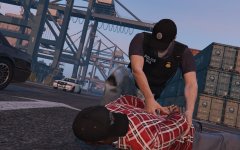 Whoa!, that vest setup looks sick, which combo is that?? Looks like something out of a movie. Great work :)
 -
If I remember correctly, everything weapons is 8ng
-
Yea only patchday8ng for the new update, all weapons that was other patchday files need to go to 8ng to work.
-
Since the new update for GTA, the weapons files go into patchday8ng. Are your weapons files there? (I have these weapons)
-