


BMJ2013
Members
-
Joined
-
Last visited
Everything posted by BMJ2013
-
Hello, LSPDFR 4.6 worked just fine for me but when I updated scripthook and rage after this update lspdfr keeps crashing. I have it set to no plugins load on startup. Any help would be appreciated. Here's my rage log RagePluginHook_20082020_044906.log
-
So after I updated LSPDFR and ScriptHook V, I noticed that all my police vehicle addons had very dim lights. The only thing I did was go into OpenIV and clicked the button at the top that everybody gets when a new update comes out. Sorry I forget what it was lmao. I think it copied the update.rpf or sum idk. Before you ask, yes my postFX is ultra high and so are all my other settings. Any help with this would be appreciated. Thanks
-
No I only have 1 copy, the steam version.
-
Almost every time I start Rage Plugin Hook, I get an error saying, "Slow or insufficient permissions." I've tried renaming folders, restarting my pc, unblocking and whitelisting programs on my antivirus software, and nothing seems to be working. Any help would be appreciated.
-
Hello, so my issue is whenever I arrest someone and call for a prisoner transport (using arrest manager), the prisoner will start walking towards the transport vehicle, and then start walking back to mine. Or the prisoner will get inside the transport vehicle and then hop out and come in my vehicle. Anybody have any solutions? Thanks.
-
 Great cars! The only problem I'm having is my lights aren't very bright at all. They don't spread the light beams out if you know what I mean. You can just see the outline of the actual light rather than seeing it spread. Any way to fix this?
- 445 comments
- 108 reviews
-
Already have that installed man. Still can't figure this out. Like I said, it's just the new skins that I installed. Is there something I should change in the visual files?
-
My lights, especially the rear window lights, dont really have a lot of texture and are very dim. I tried messing with some settings and graphics but nothing seems to work. I know it's not the graphic settings because the default cruisers lights are perfectly fine. It's just the new skin I downloaded. Any help would be appreciated.
-
Hello. When I start LSPDFR up via RagePluginHook, it brings me this message that says "The current game version is not supported. Please visit http://ragepluginhook.net/Downloads.aspx to see if an updated version of RAGE Plugin Hook with support for this game version has been released." How can I fix this?
-
Hello. I have a GeForce GT 705 graphics card. My CPU is a 4x Intel(R) Core(TM) i5-4460 CPU @ 3.20 GHz I have seen people with the same amount of video storage run GTA V on the PC with good graphics. For some reason, when I run GTA V, the graphics are trash and the FPS is extremely low. Does anyone know how I could fix this, and if my graphics card should run this?
-
Alright I guess I have to find it myself.
-
So you wouldn't give me a link to anything like that i'm assuming?
-
Do you know of any free mod menus that could spawn in money?
-
I meant in game money. Like spawn in money bags online.
-
Hello. I am new to this modding thing, but I really want to know how to get a ton of money which is why I was looking into creating a menu for money only. I don't have any modding experience however, I do have some coding experience. If I have a regular PC and PS4, meaning no JTAG or whatever that is, would I still be able to install my own mod onto my PC? And would a mod like this work online?
-
-
Hello. I want to record LSPDFR for my channel, and I use Bandicam to record. I don't have the best graphics card, so you can kinda see all the pixels. If I were to do the game recording on Bandicam, would the graphics look fine for the video, or would it look the same as I see it?
-
Hello. When I go ahead and change the graphics to something higher because the game does not look good, it lags the crap out of my computer. What would I have to buy that would enable me to crank these settings up without experiencing any lag? Here are my PC specs:
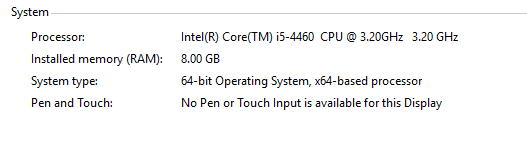
-
-
Not familiar with graphics cards at all. I found this one, but wasn't sure if this is a good one because of the price. Would this one be fine for running GTA at max graphics? http://www.amazon.com/EVGA-GeForce-Whisper-Graphics-02G-P4-2966-KR/dp/B00SC6HAS4
-
I found it. But it said if I have this on it could cause damage. Here are my specs GPU: GeForce GT 705 CPU: Intel(R) Core(TM) i5-4460 CPU
-
How would I ignore the limit?
-
Thanks that helped! When I made my texture quality "Very High" it said I needed more room on my graphics card. I have a Nvidia graphics card. Like I said I don't know how to really use this. I see the specs of it. Which should I look at most in buying a new one for increasing the graphics on GTA? Such as bandwith.
-
Hello. I bought GTA V for PS4 and then for PC when it came out for the graphics. I know just about nothing when it comes to PC tech stuff. I use a Nvidia graphics card, but don't know if that plays a role. Anyway, when I went to crank up the graphics, you could see the pixels on the sides of objects, and it just did not look good. What would I have to do so when I crank the graphics up all the way, it won't lag? Is it the video card? idk.
-
I edited it. How can I import it?

