


vt1032
Members
-
Joined
Everything posted by vt1032
-
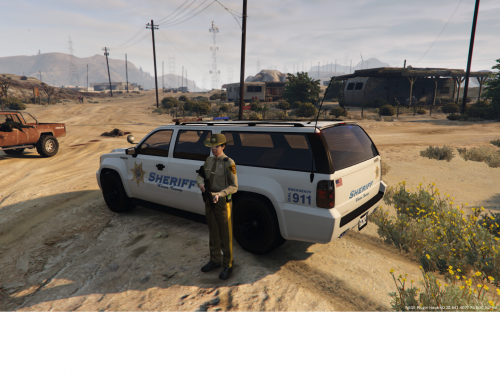 By seal, do you mean the patch or the badge or what? The county seal in the center of the badge on the car is the same as the one in the center of the badge, as well as at the center of the badge on the patches of the peds. These are going to get updated some time in the near future now that we can mod cars.
 -
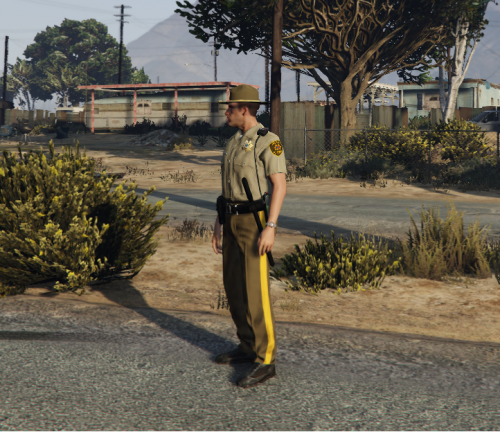 Correct. Almost the entire area that the sheriff's patrol in game is Blaine County, not Los Santos County so it only makes sense to do so.
- 10 comments
- 2 reviews
-
Drag and drop the new textures from the "s_f_y_sheriff_01" folder into "GTA V > x64v.rpf > models > cdimages > componentpeds_s_f_y.rpf".
- 10 comments
- 2 reviews
-
It was from the wildlife callouts plugin. I think the spawns are still a little wonky as that's how it was when I showed up on scene. Monkey was probably trying to jack the hunter's ride when he got shot...
- 10 comments
- 2 reviews
-
Tired of seeing the Los Santos County Sheriff's patrolling Blaine County? Now you can have a Blaine County Sheriff's Department for Blaine County. These are all white textures of the Sheriff and Sheriff2 with updated Blaine County logos and badge. The go great with my Blaine County Sheriff peds (pictured in the screenshots), which you can find here
-
Tired of seeing the Los Santos County Sheriff's patrolling Blaine County? Now you can have a Blaine County Sheriff's Department for Blaine County. These come with updated patches, a more realistic looking duty belt and updated badges with the Blaine County seal. They also come with updated vests that say "Sheriff" instead of Police. These go great with my Blaine County Sheriff's Cars (pictured in the screenshots) which can be found here
- 10 comments
- 2 reviews
-
-

- 2
-
-
I'm not sure whether this would be possible, but I use the LSSD SWAT and Maverick mods, but LSPDFR does not generate those as part of the backup generation. Even in stock gta 5, noose teams generate in LSSD grangers outside of Los Santos, rather then FIB Grangers, but LSPDFR always has them in the FIB grangers. I think it would be cool to be able to call for sheriff's helicopters and swat if that would be possible. Another idea, again I don't know if it's technically possible would be to be able to modify your weapons loadout as part of the initial start process. I would allow for 3 categories of weapons. Pistols, long guns and non lethal. You could choose between the combat pistol and pistol, and whether you wanted a light, then choose what long gun (maybe, pump shotgun, MP5 or M4) and whether you wanted a light or optics, and then choose whether you wanted a taser or nightstick. I'm not sure if that is doable or not. Finally some callout ideas. variable callouts by agency. Park Rangers deal with fish and game stuff. highway patrol more vehicle pursuits. Sheriffs and LSPD do general patrol work, but the crimes could be region specific, IE, someone cooking meth in the desert, or a gang shootout in the city. I think some actual missions, not callouts would be cool too. I think some "probation officer" missions along the lines of the maude missions for trevor would be cool. Also, some investigation missions where you have to find clues leading to an eventual solved case, like LA Noire, might be cool. These are just food for thought. They might not be doable at all, but I figured I'd put them out there. Thanks for the awesome mod.
