NoCountdown
Members
-
Joined
-
Last visited
Everything posted by NoCountdown
-
I believe you are looking for this mod. Doesn't do anything with the callouts, but it makes stuff more interesting for sure!
-
-
Latest RAGE Plugin Hook version works like a charm with all mods. No reasons not to upgrade.
-
Try removing the modded file and verify the integrity of your files with either Steam or the Rockstar Launcher.
-
S Support for the POLICE MOD is on their forums. We have little to no knowledge about it.
-
Just open up explorer and have a look at the amount of space you have left in your C: drive. This shouldn't be a problem I believe. Did you try running the setup as an administrator yet?
-
Hello, can you confirm that your system is on or above these hardware requirements? https://msdn.microsoft.com/en-us/library/8z6watww(v=vs.110).aspx If so, you could try moving the installer to your desktop instead of your downloads folder and launching it as an administrator from there.
-
It has been like this for a few days already. At least there isn't a countdown right?
-
I was having the exact same problem yesterday. Here is my log if you want to take a look.
-
Just delete the modded files and check the cache using steam. If you have the CD or Rockstar version, you can just delete them and the launcher will download them once you start up the game.
-
There is a trainer for that sort of stuff. I highly recommend to use the simple trainer by sjaak327, who also made the simple native trainer for GTA IV. You can find it right here. https://www.gta5-mods.com/scripts/simple-trainer-for-gtav EDIT: Just for the record, you will also need ScriptHook V for this one.
-
Good to hear! Enjoy LSPDFR!
-
That is due to a modified older version of the file which is not supported in the newer version of GTA V anymore. I would suggest to delete all of your mods, and try to install them again with the up to date files in the "Updates" folder.
-
Perhaps you have a modified version of for example the gameconfig, which was edited in a later update by Rockstar. This will cause your game to crash. You could try to backup your mods folder, remove every item in it, and try booting GTA V again.
-
It is working fine for me. Be sure to update to the latest version of the RAGE Plugin Hook on their website, and check your settings on the first startup.
-
 Oh yes. Just yes. Adds a lot of immersion in LSPDFR, and is one of the more difficult callouts, which is a great thing. Although it might be rare, it's a gread addition.
- 84 comments
- 22 reviews
-
-
Your RAGE Plugin Hook log would be better to identify the cause of the crash. I also recommend making a new thread in the Support section of the forum. PS: It's LSPDFR, not LSPD:FR
-
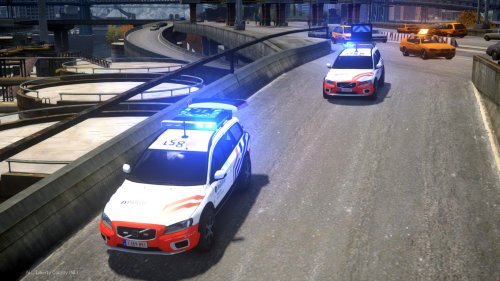 Wegpolitie Oost-Vlaanderen has these. They are also quite common in Antwerpen as seen in "Alloo bij de wegpolitie".
- 25 comments
- 1 review
-
-

- 1
-
-
You don't know how many times I get them wrong!
-
-
-
I've been using the FoV mod by DrDaxxy for quite a while now, and it really improves the overall experience in first person. You can download it right here: https://www.gta5-mods.com/misc/gta-v-fov-v1-11
-
Impossible to stop it from updating unless you disconnect your computer from the internet, although GTA V has to verify that it is a legitimate copy every few days. So it is very hard to keep it from updating.
-
The launcher immediately wants to put the original files back in place, this can be solved by using the "mod" folder by Open IV. Follow the instructions on this website: http://openiv.com/?p=1132