


sloosecannon
Members
-
Joined
-
Last visited
Everything posted by sloosecannon
-
 Toast wasn't the developer. I am. I left out a DLL file in the download which caused it to not work on some computers. Try it again - redownload either the plugin.zip or unified.zip and reinstall the plugin.
- 95 comments
- 17 reviews
-
-
It will be the same one - but the plugin is the only one you'll need. I forgot to include a DLL in the folder. That's why you don't upload things at 4AM.
- 95 comments
- 17 reviews
-
Yeah, looks like I missed a dependency that got updated in the latest version. Gah. I'll have a fixed version up in a sec.
- 95 comments
- 17 reviews
-
-
And we are now public!
-
Here it is! It's currently 4:36 AM, so I really hope I didn't screw something up. If I did, I'll fix it tomorrow!
- 95 comments
- 17 reviews
-
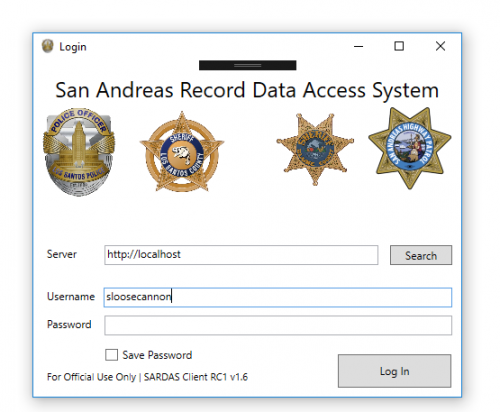
Hello LSPDFR community! Today I'm releasing a new plugin/application. This is the San Andreas Record Data Access System - SARDAS for short. It's a Windows application you can run on a computer in real-life that will allow full access to ped/vehicle records, IN GAME! This is a combination of a RagePluginHook/LSPDFR plugin, to access the ingame data, and a Windows application to run on any other computer that accesses the API provided by the plugin. You will be able to access any ped/vehicle records from any computer connected to the same network! The SARDAS-unified zip contains the plugin, client app, and API documentation. There is also a seperate zip download for each individual part. Please make sure to read the README - this plugin is somewhat more complicated than most, due to its nature (Networking is tough!). Please read the README!!!
- 95 comments
- 17 reviews
-
-

- 22
-
-
Tonight, if I don't fall asleep on the keyboard before packaging it :)
-
I will - I'll make it as user-friendly as possible, but reading the README is definitely a good idea :)
-
I'm not planning on it, but it shouldn't be too hard to write. I'll have documentation for the API attached in the final version, so anyone with an interest can build a compatible client. Beta is going pretty well - haven't had any bugs pop up. Assuming I don't have any issues, we should be releasing very soon.
-
FYI he posted a couple pages back too, or at least I assume it's the same guy. So he's here, in this thread.
-
UPDATE: I just released a beta version. Assuming no bugs are found, I should have a full public release within a few days.
-
Last major bug just got worked out. Hopefully within the next day or two I'll have a release ready.
-
-
Yep, that's it.
-
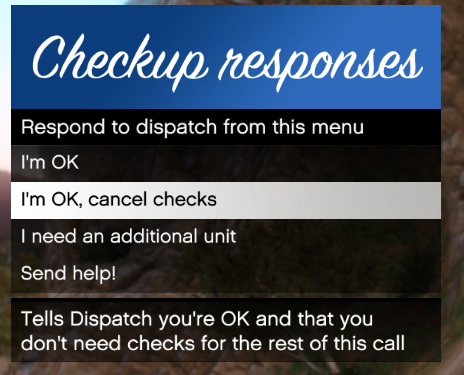 You can now change the key to open the menu via the .ini file. His comment was about a prior version (where you couldn't do that) @ThisIsntMyName - I can probably add that as a configurable feature. I've set it up like that because that's how my local area police do things (all plain words, the only "codes" I've heard are Code 2/3 and Code 99), but it shouldn't be too hard to make it configurable.
- 82 comments
- 22 reviews
-
Absolutely - this lets you do just that! These are things I'm thinking about adding eventually too. Obviously that information would only be local to the computer it's installed on, but it would still be pretty cool. The ALPR might be possible, but it's probably more work than it's worth.
-
Correct, in fact, most mods don't use it. There are a few that do, so if you have one that does, I've integrated it.
- 82 comments
- 22 reviews
-
I don't think TP uses the ini file, so no I doubt it would. I think one of Darkmyre's scripts uses it though. If you don't have one, I don't think any of your plugins uses it, so you can just use the individual plugins' configuration.
- 82 comments
- 22 reviews
-
Yeah, that's a library, not an INI. I didn't provide a MyOfficer.ini file, but, if you're using another plugin that has one, you can edit it and I'll pick it up.
- 82 comments
- 22 reviews
-
-
CPU: Intel Core i7 2700k overclocked to 4.4-4.9 GPU: NVidia GTX 970 RAM: 24GB DDR3 Storage: 1TB Samsung SSD/256GB Crucial SSD OS: Windows 10 Professional Build 14986 (Insider) Graphics settings: Ultra everything with MVGA
-
Oh, so ( /\/\ ) has the same issue? I've got EF Johnson radios, the handhelds program fine (usually, YMMV, do not combine with any other offer...) but the mobiles are picky as $%&#! Sometimes they even refuse to program with the toughbook, and I have to use a desktop (With the same OS, mind you, just... different electrical properties or something...)
-
I wish I could... Unfortunately that's the only API available. In the next version, though, I've got a slightly better algorithm that should decrease those false positives. I'd love to do that, but I'm not sure where to start with that. All of my backup is handled by LSPDFR, and that's just what it does. I might look into improving it somehow though. That's much more complex than my plugin though :)
- 82 comments
- 22 reviews
