



FallenOfficer
Members
-
Joined
-
Last visited
Everything posted by FallenOfficer
-
@Scott Dean I'm thinking its not an ad on the website, but malware on your end. McAfee is a pain in the ass to remove from your system. It'd be more of a problem if your system doesn't have McAfee as well. Search your computer files for McAfee and see if it's installed and if it is, use the McAfee Removal Tool on their website.
-
As the title states, anytime I use STP's Traffic Control, its barely effective/doesn't work as expected. i.e peds still drive through the zone etc. Has anyone encountered this issue and found a fix for it? Or do you use a separate plugin for that?
-
Not sure what you mean, but you're able to change the coronas. Take a peak at the ELS keybinds, I believe it might be ALT+2 to change the "tail light" coronas.
-
In my experience no, EUP has never worked with other clothes packs for me. But I could be doing something wrong. I'm sure there is a video that explains what you need to do out there somewhere.
-
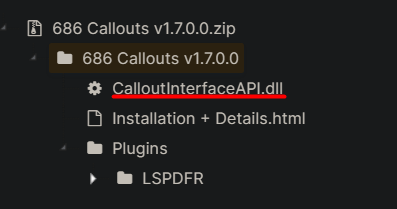
Reinstall 686Callouts and make sure you install all necessary files with it. You may have put files in the wrong location. The underlined section will go into your Main Directory, where your GTAV.exe file is installed. Plugins obviously goes into the plugins folder which you have figured out. If your problem still persists, he even included an Installation + Details file. That explains everything related to the callout pack. Hope this helps!
-
Change your mods folder to _Mods and relaunch, see if the issue persists.
-
Sometimes that's all a bugged callout will do. It's to prevent a hard crash for LSPDFR. I don't believe there is a work around for it. If you know for sure what callout pack is doing it, your best bet is to attempt to contact the author of the callout pack. Ensure you provide logs of the callout to the author as well. Hope this helps!
-
If you hit shift again after performing the traffic stop, it will cancel. Maybe that's what is happening here?
-
Try uploading a log right after the game crashes, the one provided I'm not seeing anything providing information that led up to 1.) LSPDFR crashing or 2.) RPH/GTAV crashing.
-
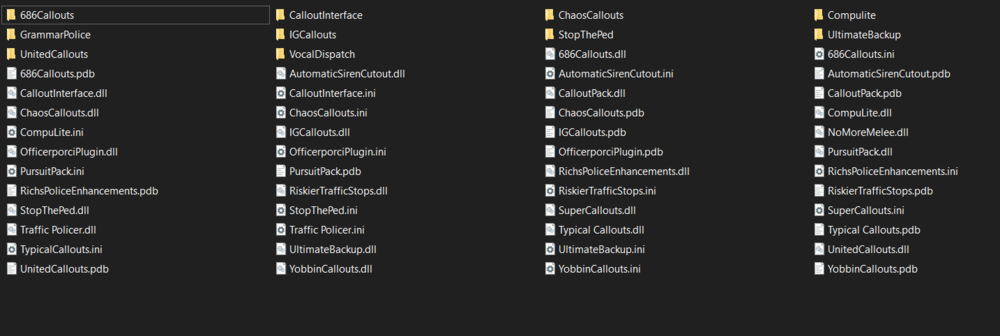
Looks like you may be missing the .dll Files that go with those callouts. This is what my plugin folder looks like: Also make sure you have an updated RageNativeUI, I see a lot of "System.AccessViolationException" in your logs.
-
Glad I could help!
-
No worries!
-
Of course! Have fun with it too!
-
Yes and no. It could've been a one time thing. It common for some callouts to bug out. If it happens repeatedly, then I'd try to contact the author of the plugin for assistance.
-
First things first if you want to get into modding GTAV. If you haven't already, download OpenIV. You're going to be using that for most of your modding needs. If you're every stuck on where to put certain files, theres a few people out there that explain the whole process very well. Most file authors include an installation and requirement guide with their mods as well. If it's not in the description of their file, its usually in the download itself. I'd be happy to help you kickstart your modding experience though! To answer your question: (there'd be to many to post them all, but all of those are mods I use not including all the callouts I linked below) These are some of the mods I use, mainly just callouts:

-
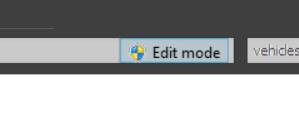
You need to go into OpenIV and go to the meta file for you vehicles. Once you have OpenIV opened, follow this path: Grand Theft Auto V\mods\update\update.rpf\common\data\levels\gta5\vehicles.meta To make sure you can edit, make sure this box is highlighted: Edit the file and look for the vehicles that are disappearing. (Police, Police2 etc...) You'll see something like this: <lodDistances content="float_array"> 15.000000 30.000000 70.000000 140.000000 500.000000 500.000000 </lodDistances> And all you just need to do is change the values to this: <lodDistances content="float_array"> 500.000000 500.000000 500.000000 500.000000 500.000000 500.000000 </lodDistances> Then save and launch your game! I changed all my custom police slots to that and I've never had an issue afterwards.
-
 Still have issues with NPCs wearing random parachutes/clothing other than uniforms.
- 263 comments
- 20 reviews
-
Seems like its a bugged callout crashing LSPDFR. [7/11/2023 9:12:34 PM.823] LSPD First Response: ============================== [7/11/2023 9:12:34 PM.823] LSPD First Response: UNHANDLED EXCEPTION DURING GAME FIBER TICK [7/11/2023 9:12:34 PM.823] LSPD First Response: ------------------------------ [7/11/2023 9:12:34 PM.823] LSPD First Response: Origin: Game fiber "Money Truck Theft [UnitedCallouts]". [7/11/2023 9:12:34 PM.823] LSPD First Response: ------------------------------ [7/11/2023 9:12:34 PM.823] LSPD First Response: Exception type: Rage.Exceptions.InvalidHandleableException [7/11/2023 9:12:34 PM.823] LSPD First Response: Exception message: Operation is not valid because the specified Rage.Ped is invalid. [7/11/2023 9:12:34 PM.823] LSPD First Response: ------------------------------ [7/11/2023 9:12:34 PM.823] LSPD First Response: Inner exceptions: [7/11/2023 9:12:34 PM.823] LSPD First Response: ------------------------------ [7/11/2023 9:12:34 PM.823] LSPD First Response: Stack trace: [7/11/2023 9:12:34 PM.823] LSPD First Response: at Rage.Entity.get_IsDead() [7/11/2023 9:12:34 PM.823] at UnitedCallouts.Callouts.MoneyTruckTheft.<Process>b__16_0() in D:\Development\GTA5\UnitedCallouts\UnitedCallouts\UnitedCallouts\Callouts\MoneyTruckTheft.cs:line 117 [7/11/2023 9:12:34 PM.823] at Rage.GameFiber.Main() [7/11/2023 9:12:34 PM.823] LSPD First Response: ============================== [7/11/2023 9:12:34 PM.823] LSPD First Response: [7/11/2023 9:12:34 PM.825] LSPD First Response: [FATAL] Forced termination Its coming from UnitedCallouts
-
Add the file(s) back, and then name your "mods" folder to "_mods" and after if your game launches, then the problem lies within your mod files. In my experience it helped to remove all mods, and add them back one by one to see which one was causing an issue. It would also help if you copied vanilla files back to modded files in case it was something in one of the RPFs.
-
Sounds like game data was corrupted. Have you verified your game files? If you're using steam follow this: 1.) Open Steam. 2.) Right-click GTAV in your Steam library. 3.) Click Properties. 4.) Click the Local Files tab on the left sidebar. 5.) Click Verify integrity of game files… 6.) Once Steam finishes this process, open GTAV.
-
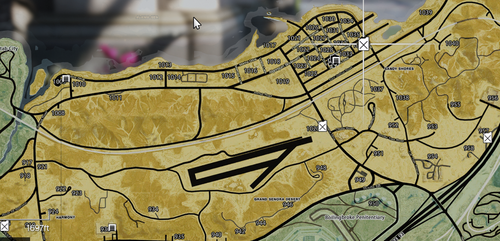 Not looking for help, merely just stating an issue. I've already got everything I need installed properly on my own.
 -
I have installed radar zoom yes. I have the latest file(s) installed.
-
 Great Callout pack, just hate getting the officer ambush callout whilst in the city lmao.
- 1,032 comments
- 65 reviews
-
I can assure you that I've done everything right. Just because you haven't had problems with it or seen anyone else with the same error doesn't mean it doesn't exist. I don't get why you keep trying to fight me on this. Im certainty positive it is the package installer that is bugged. I've used other OIV installations after the fact, and they all installed correctly.
-
For something as small as this file? It's more than plenty. Nobody needs to have 1TB of storage free for a few megabytes of data. The OIV file is what is bugged. The installation path is incorrect.





