


ZBNYNC
Members
-
Joined
-
Last visited
Everything posted by ZBNYNC
-
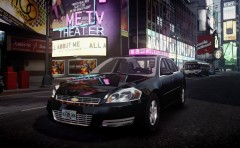 That is so awesome! I can't wait! Is it from Driver: SF?
 -
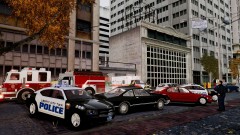
From the album: ZBNYNC's Album
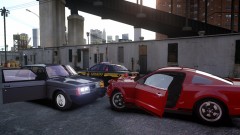
Low visibility conditions from fog Saturday afternoon lead to a two car accident between a BMW 5-Series and a Plymouth Volare on Jonestown Ave. in Alderney City. LCPD say that John Holding, Jr. was traveling west on Jonestown Ave. in his BMW when he went to make a left turn down an alleyway and was struck by William Warren in his Plymouth. Holding has been charged with unsafe movement by the LCPD. No one was injured in the accident. Police say Warren was traveling slowly because of the foggy conditions. The right side of Jonestown Ave. between Myung and Boyden Ave. was closed for a short period of time due to the accident. NBC News Liberty 3/24/12 -
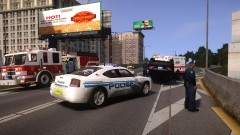
From the album: ZBNYNC's Album
A driver has been sent to the Leftwood Memorial Hospital after he flipped his car on the Plumbers Skyway in Leftwood Saturday morning. Police got a call about a black Mercedes-Benz that was flipped over on Plumbers Skyway at about 8:00 a.m. Saturday morning. They arrived on scene shortly after. The driver of the Mercedes, whose name is being withheld at the moment, swerved into the concrete barricade to avoid a driver in a Hummer that came into his lane and cut him off. The driver of the Hummer fled the scene. The westbound lanes on the Skyway were closed for a few hours while emergency crews cleaned up the mess. NBC News Liberty 3/24/12 iCEnhancer 2.0N was used in this picture. -
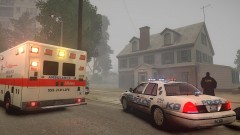
From the album: ZBNYNC's Album
Police say two people were found dead in a Broker home this afternoon and are now ruling the incident a homicide. Police units first responded at 2:15 p.m. for a shooting call at a house at 314 Shinnecock Ave. Multiple police units and an ambulance were on the crime scene as well. According to police captain Rob Williams, one male and one female are dead from what obviously aren't natural causes. Detectives and officers are canvassing the neighborhood. NBC News Liberty 3/23/12 iCEnhancer 2.0N was used in this picture. -
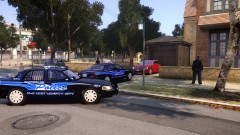 @bigdogsix2 It's 1.0.4.0. with iCEnhancer 2.0N.
 -
From the album: ZBNYNC's Album
This was the scene outside of a house on the corner of Aragon St. and Stillwater Ave. in Dukes Friday morning. The suspect who did a hit and run on a 57-year-old woman while driving a red BMW 7-Series was arrested Friday morning at 124 Aragon St. in the Meadows Park neighborhood of Dukes. The hit and run happened Wednesday evening when witnesses say they saw the 57-year-old woman crossing Saratoga Ave. get hit by a red BMW 7-Series. The driver of the BMW, 23-year-old Horatio Roberts, sped away from the scene at a high rate of speed. He is being held in jail on a $300,000 bond. NBC News Liberty 3/23/12 iCEnhancer 2.0N was used in this picture. -
 @visible25 No, I don't have LCPDFR installed in my game right now because I'm running patch 1.0.4.0. Whenever I feel like playing it though, I have to patch the game up. Tricksta005 It's a Pierce engine made by LuxAid. I downloaded it from a now non-existent site a couple of months ago, I haven't been able to find it anywhere else since.
 -
@visible25 iCEnhancer 2.0N
-
From the album: ZBNYNC's Album
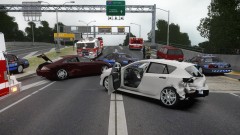
Four people were sent to the hospital after a three car wreck on the Broker-Dukes Expressway near Francis International Airport in Dukes on Thursday afternoon. An LCPD officer says at about 5:30 p.m. a Mazda station wagon entering the expressway from an entrance ramp pulled out in front of a Chevy Suburban. The Suburban couldn't stop in time and rear ended the Mazda, spinning it out and pushing it into the side of the Mercedes CLS. Three adults and an eight-year-old child were all taken to Cerveza Heights Medical Center. Officers say that they're going to be okay. Traffic going northbound had to be moved into the southbound lanes to bypass the accident. NBC News Liberty 3/22/12 iCEnhancer 2.0N was used in this picture. -
-
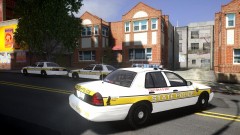 @Slimory It does and it doesn't. The lights are a little dim at times but then other times they're acceptable, for my taste. But they're not as bright as ELS with stock graphics, I think it's more about personal taste.
 -
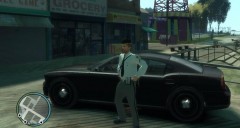 No, it's definitely not NCHP.
 -
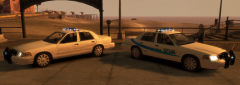 I like them, I also like the night reflective idea.
 -
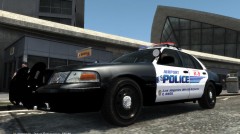 Yes! You should definitely release this as a pack.
 -
-
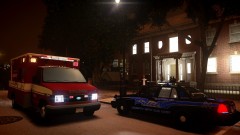 It's Lt. Caine's and LuxArt's Ambulance S-450: http://gtapolicemods.com/downloads.php?do=file&id=511 With Ford badges from gfxle's LC/NYC Ambulance pack: http://gtapolicemods.com/downloads.php?do=file&id=483
 -
From the album: ZBNYNC's Album
This was the scene outside of a house on Owl Creek Ave. in Westdyke, Alderney Monday evening. Police patrol cars and an ambulance. According to authorities, the resident of that house, 85-year-old Tommy Hoyle, tried to shoot his 86-year-old wife but missed. She was not injured. Hoyle went before a judge Tuesday afternoon and was charged on counts of assault with a deadly weapon with intent to kill. Hoyle denied trying to shoot his wife but police had a different story. They say that they found a gun, a bullet hole in a door, and gun residue on Hoyle's hands. Hoyle was set under a $50,000 secured bond with another court date on June 29th. NBC News Liberty 3/20/12 -
From the album: ZBNYNC's Album
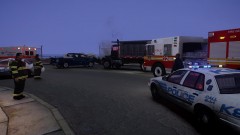
A bad truck accident Tuesday morning kept emergency personnel busy in one Liberty City borough. The LCPD says that a dump truck almost caught on fire after an accident on Hardtack Rd. in the Tudor neighborhood of Alderney. The crash happened at around 6:50 a.m. this morning when a Chevy Silverado heading north on Hardtack crossed over the double yellow line and was hit by the dump truck. The Silverado flipped over twice and was pushed several feet before it came to a rest next to the curb. The dump truck's engine then started to smoke but firefighters were able to put it out before it caught on fire. Police have charged the driver of the Silverado, David Perry of Bohan, with exceeding safe speed and driving left of center. Both drivers only suffered minor injuries that were treated at the scene. Hardtack Rd. was closed for a few hours before being reopened at 9:00 a.m. NBC News Liberty 3/20/12 -
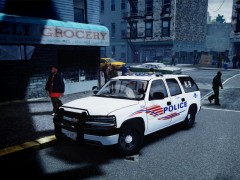 Looks great.
 -
 Link for the sheriff's car:http://gtapolicemods.com/downloads.php?do=file&id=1297
 -
iCEnhancer 2.0N
-
From the album: ZBNYNC's Album
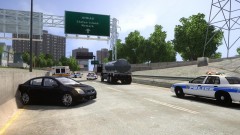
It was a mess on one Alderney highway, that's caused at least one accident. At around 4:50 Monday afternoon, Liberty City officials had to close down a strip of the Plumbers Skyway in Alderney by the Berchem exit due to a chemical spill from a tanker truck. The driver, Benjamin Squires from Broker, has been charged with failure to secure his truck's load. Police say the one vehicle that crashed, a Nissan Sentra, spun out in the spill and hit a concrete highway divider. Both the driver and passenger were treated at the scene for minor injuries. Southbound lanes on Plumbers Skyway were shut down for a few hours between the Berchem entrance overpass and the Berchem entrance ramp. Traffic going southbound had to merge into the northbound lanes to get around the spill. Both sides of the highway were reopened by 6:00 p.m. NBC News Liberty 3/19/12 -
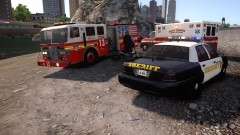
From the album: ZBNYNC's Album
An Alderney County man is dead after a dirt bike crash Monday morning. Sheriff deputies say 25-year-old Charles Clark of Alderney died after the 7:00 a.m. Monday crash. It happened on the beach off of Applewhite St. in Westdyke. Deputies say Clark's dirt bike went up an embankment when he got thrown off. He wasn't wearing a helmet. A beach police officer discovered the crash. The LCSD says alcohol did play a role in this tragic crash. NBC News Liberty 3/19/12 -
From the album: ZBNYNC's Album
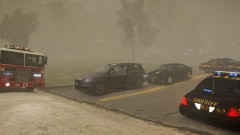
According to sheriff's deputies, early morning fog is being blamed for a car accident that happened in Northwood between a Dodge Charger and an Audi SUV. The crash occurred at around 6:20 in the morning when the Audi stopped short and was rear ended by the driver of the Charger. Emergency crews blocked off the northern end of Exeter Ave. between Frankfort Ave. and Grummer Rd. while they cleaned up the scene. The drivers of both vehicles were transported to the Northwood Medical Center and have since been released. NBC News Liberty 3/19/12 -
I'm not sure if there's a non K-9 version but this car does come with and without rambars.

