officerAMR
Members
-
Joined
-
Last visited
Everything posted by officerAMR
-
![[GIF]Blaine County Sheriff's CVPI.](//s3-gallery.int-cdn.lcpdfrusercontent.com/monthly_2016_02/small.GIF-CVPI.gif.eabec2e45138f287bb79232f78ee5e88.gif) Looks awesome, but where's the blue's?
Looks awesome, but where's the blue's? -
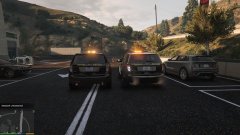 The visual settings provided with the unmarked blue lights CVPI It's Desmond's, I'm just the tester. More lights will eventually be added
 -
I figured out the issue, the car is suppose to be in POLICE slot, I can't test it now, will when I get home
-
Its not meant to light up?
-
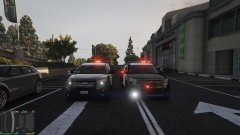 You can't anymore sadly. The one on the left will eventually be just like the one on the right. Its a WIP and all the only thing Desmond has done is put on the CHP lightbar so far.
 -
I found 1 bug with the corner lights on the lightbar http://imgur.com/ZQQvLxi On both sides, the light is a tiny point that rotates, i think thats due to the carvaritation needing to be changed? its a bit clearer on the Red side Notice the small point of red light?
-
Yes...yes it is :P
-
Okay, i'm going to try and do this before the website freaks out again. Firstly you were correct purplepotatoes, when using an ENB the TA is yellow as it should be: The lightbar is excellent, the detail is perfect and the lights are in the correct positions, i did a side by side comparison of your CHP Exploere and the CHP packs Explorer (because it was the best thing to compare) and your lightbar is WAY WAY superior (Desmond's is on the right) (On the left) The skins are very nice and crisp too, some skins come out to be unclear to fuzzy but the rounds and and text are on point. One thing i would like to point out is as the vehicle replaces Hwaycar3 (Which is a vehicle from RDE) you can if you like rename it to Police2, Park ranger or Sheriff2 and the lights will work fine without a carvaritation meta change (as far as i'm aware) as i do use RDE it works fine as it stands Its a very solid start to making the CHP Explorer Heres another image i captured, it shows off the lightbar very well sooooo i'll add it If anyones wondering why the blues are that rich its because i'm using the visual settings provided by the Blue lights CVPI
-
From the album: GTA V stuff
Comparison -
From the album: GTA V stuff
Rear comparison -
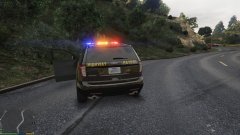
From the album: GTA V stuff
Rear view of FPIU -
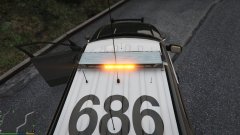
From the album: GTA V stuff
You were correct purpelpotatoes -
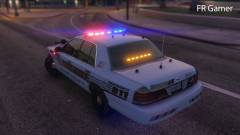 Stap teasing Carperino
 -
-
I see where you're coming from, the GTA V lights seem to pose a few issues when you get to advanced lighting. This is probably the most advanced ligthing i've seen for gta v And it that runs into quite a few issues with the flash pattern. Its definitely a BIG step up from GTA 4's undescribable shambles of a lightbar and i give R* praise for that. Everyone's waiting for controllable TA's and a full siren which you can control. But personally, i don't think the LAPD Taurus would suffer from the default lighting since the LAPD/LASD marked setup works well with the GTA V system for obvious reasons. Bugs Sheriff CVPI is a testament to this. Its your choice, i don't blame you for waiting on better lights, and i will be eagerly waiting on that '16 Explorer regardless of what you do :)
-
You might be right about that, BXbuggs cars TA's look orange without his ENB
-
I think the TA needs to be yellower, it looks orange to me. Rest of the bar is excellent
-
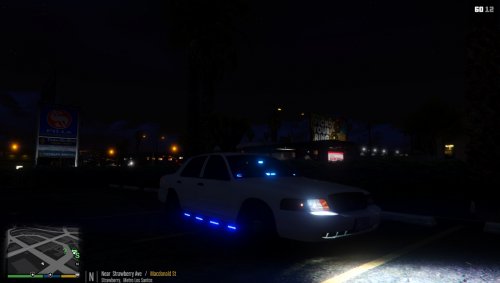 Love the all blues, would make more sense to put it in the FBI buffalo or POLICE4 slot no?
- 40 comments
- 14 reviews
-
-

- 4
-
-
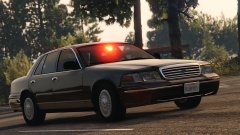 Whoops, i thought he was asking for any anti-gang car
 -
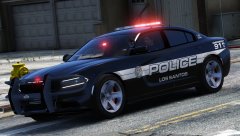 Is she a radical feminist?
 -
This is the Bike CHP use I dont know bikes very well so i dont know the brand or whatnot
-
someone made one, 2011 CVPI its the 2nd upload on the list
-
-
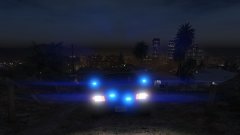
From the album: GTA V stuff
Dem blue lights tho *screw californian law* -
ask the mods i think?

![[GIF]Blaine County Sheriff's CVPI.](http://s3-gallery.int-cdn.lcpdfrusercontent.com/monthly_2016_02/small.GIF-CVPI.gif.eabec2e45138f287bb79232f78ee5e88.gif)