
The Feniex Dealer
Members
-
Joined
-
Last visited
Everything posted by The Feniex Dealer
-
 yea i did alot of changes to the script for this mod i am doing and yea well :D forgot to add 1 thing back
- 371 comments
- 38 reviews
-
nvm I fixed it :P I changed stuff in the script and forgot to add 1 little thing back
- 371 comments
- 38 reviews
-
-
I found a Bug D: The bison2 front left left (When looking at the front) light dont flash.... IDK if it me or...
- 371 comments
- 38 reviews
-
Can we please have a .ini file to be able to set what Highway cars respond when we call them? Even tho the white undercover is ok... it just dont fit without marked patrol cars as well :D
-
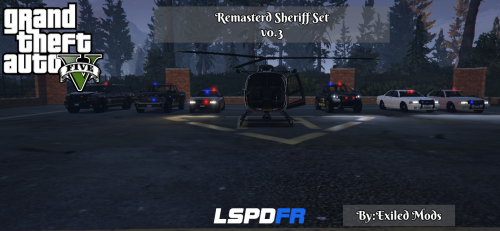 Remastered Sheriff Set is a Project to Overhaul the ENTIRE Sheriff Department. Idea taken from its predecessor (Improved Sheriff Set) its goal is to give you the overhauled LSSD and BLSD look. To Install: Simply Read the readme in the download xD Credit: -Original Model by Rockstar Games -Standard Template by LtCaine -dbock1989 Creator of Bison and gresley -Mapped by MattJeter -Edited Lights edited by me but default are made by MarshallRawR -Exiled Sole Creator Wish to Help with this project? Simply Contact me via Pm CHANGELOG: v0.3 -Added a Standalone Undercover -Added a Standalone Sheriff Mav -Remasterd the Granger -Added a Standalone Supervisor gresley (Read its Readme) -Updated the Dispatch.meta file to allow spawning of all the cars (expect the sheriffm1. Working out a few bugs atm) -Removed the Supervisor theme on the Sheriff (only the gresley is now a supervisor) v0.1b -Added Stealth Sheriff Standalone -Added Option for CID Bison (Read its Readme) v0.1a -Fixed a Small bug -Added Changelog to folder https://www.virustotal.com/en/file/0d7e9923ae0f9bb60d12ad26fe9d815e0d4562723951bec6309b2c533986b24f/analysis/1440423243/ Inorder to use the CID Bison or Supervisor Model you will need to download: download version 2.2 ALSO, DO NOT IMPORT HIS Vehicles.meta or carvariations.meta the bison2 has already been added to mine.
- 4 comments
- 1 review
-
-
-
-
 well... I was waiting for one guy that was helping :/ and well idk what happen as far as the other stuff (cars) I just need the write its scripts as there made already.
- 55 comments
- 4 reviews
-
Try Blkhway* Your done Installing the part 1 of the cars. SPAWN " blkhway " without the " " using a trainer or ragehook to see the stainer and " blkhwayb " to see the buffalo. :)
- 55 comments
- 4 reviews
-
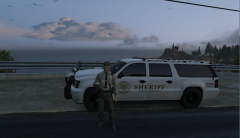 Good ole Cup of coffee at 6am before patro
 -
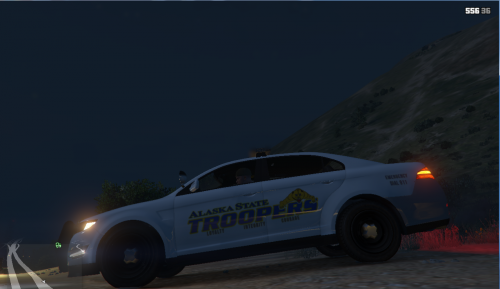 THE "EMERGENCY Dial 911" was removed from the car. This is a TEST Version ONLY. I plan to make a set as soon as i find out how I will do it :/ This was Requested so... I made it :P **IDK if its just me but the back bumper looks... discolored.***
- 1 review
-
-

- 1
-
-
-
 Not for me :/ Some people wanted it xD
 -
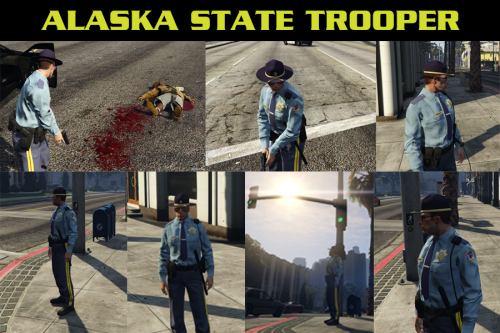 Its coming along: http://www.lcpdfr.com/gallery/image/50842-ast-for-you-ast-style/ The Buffalo and Stainer wont look like that but they will "Hopefully" look somewhat alike
- 20 comments
- 3 reviews
-
This is it so far working out a few bugs but this is it so far
-
The only car you could Do that would best fit the AST would be the interceptor since the buffalo and stainer are limited
- 20 comments
- 3 reviews
-
-
-
-
-
Yes ADD this to Vehicles.meta: And this to to the bottom of vehicles.meta: Then add this to carvariations: Same location as the readme for the stainer. As for the Buffalo It does not read from mpchristmas so just follow the readme for it.
- 55 comments
- 4 reviews
-
Sorry Not been able to accept you PC had to be sent back to HP for repairs :/
-
Um... I tend to just do what ever comes to mind. Tho you could check out peoples youtube videos to get a better view :D