


Creators: Due to background reprocessing of files, approvals and file security checks may be delayed. Thanks for your patience.

NefariousBonne
Members
-
Joined
Everything posted by NefariousBonne
-
 Releasing the vehicles as a standalone pack is something I'd like to do; but things need to calm down a bit first, we're very busy with 3.1 at the moment.
- 1,515 comments
- 85 reviews
-
-

- 3
-
-
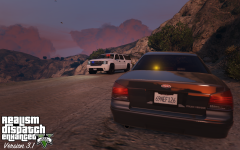
From the album: NefariousBonne's Garbage
Two unmarked LSSD units are seen in the Tataviam Mountains. Unmarked Vapid Stanier and Declasse Granger based off their respective Unmarked LASD counterparts. Will debut in 3.1. Want to be a beta tester? Apply here.© RDE Team
-
-
In order to help make things easier between both you guys, and us, we've streamlined bug reports and team applications: Have feedback, a bug to report, or a suggestion? Click here. Want to be a member of our beta team, our media team, or maybe want to work as an RDE collaborator? Apply here.
- 1,515 comments
- 85 reviews
-
-
- 1
-
-
In order to help make things easier between both you guys, and us, we've streamlined bug reports and team applications: Have feedback, a bug to report, or a suggestion? Click here. Want to be a member of our beta team, our media team, or maybe want to work as an RDE collaborator? Apply here.
-
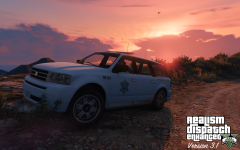
From the album: NefariousBonne's Garbage
The other Landstalker that will make it's debut in 3.1. Mapped by @Aquamenti, texture by @rms8723, outfitted by NB. Want to be a beta tester? Apply here.© RDE Team
-
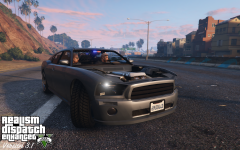
From the album: NefariousBonne's Garbage
... the return of these two classics from my early days of modding. Unmarked Declasse Premier and Bravado Buffalo updated to meet RDE standards. Based on the unmarked Chevrolet Impalas and Dodge Chargers used by LAPD. Will debut in RDE 3.1. -
 To fix the Sheriff's not wearing their combat vests: Change the comp_task="2" to comp_accessories="2" in your backup.xml file.
- 11 comments
- 10 reviews
-
-
- 1
-
-
-
Not at the moment, unfortunately; I would avoid using them until we figure out a fix. But as soon as we have a working fix it will be posted here.
- 1,515 comments
- 85 reviews
-
Interesting you should mention the ATV; the ATV, Predators and the Merryweather Patriot are all known to cause memory issues; we're currently investigating the issue.
- 1,515 comments
- 85 reviews
-
As long as you replace a Stanier with say a Crown Vic, or a Granger with a Tahoe/Suburban, no editing of vehicles.meta or handling is necessary.
- 1,515 comments
- 85 reviews
-
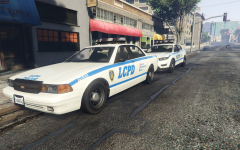
From the album: NefariousBonne's Garbage
If the OIV guys are going to bring back LC, expect us here at the RDE team to begrudgingly support. Watch the OpenIV Liberty City trailer here. -
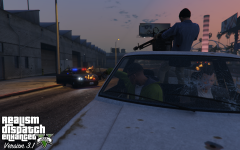 What do you mean by improved; as in updating them to meet RDE standards?
 -
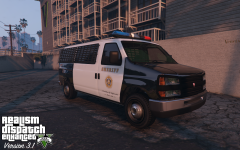 I still needs some work; but I'll consider it. I'll send you a copy once it's complete.
 -
I'll give you that, the Interceptor is kind of naff, but the Stanier is a mighty fine Crown Vic parody.
-
It's only a matter of time until I bring you over to the dark side.
-
From the album: NefariousBonne's Garbage
LSSD Bravado Rumpo based Transporter that will make it's debut in 3.1. Based off the design of the transporter vans used by the LASD. Lt.Caine's EMSVan reworked into a police vehicle by NB. -
While I cannot give you a definite date, I want to say within the next week or so. Everything we add/change has to be tested, and that's about where we are right now. (The testing phase).
-
1) Undo button is the blue left point arrow at the top 2) The direction an item is moved is determined by X, Y, Z axis buttons. (To move things up and down, and to the left and right, make sure both the X & Y are selected. Z will overrule X/Y) Useful hint: Pressing alt will prevent free moving. 3) Hold down the alt key while selecting to deselect. 4) Don't feel bad, both Yard and I hate it too. For the note, using the "separated" tool may make things easier if you're fine tuning things. Feel free to PM me if you have further troubles.
-
From the album: NefariousBonne's Garbage
Expect a slew of new unmarked cars to make their debut in 3.1. Featured here is the new unmarked Vapid Torero (Interceptor) in the style of the newer unmarked Ford Tauruses used by the LAPD. -
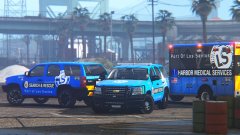 I think blue is the clear winner here, looks really good.
 -
I can answer the second half; The "LSSheriff" Sheriff vehicles are Los Santos Sheriffs, meanwhile the regular "Sheriff" is BCSO. When you have BCSO installed, BCSO replaces the LSSD.
- 1,515 comments
- 85 reviews
-
Had a looksy at the red one again; I think that works best. But since you mentioned seaport, blue might work, would have to see it in action though.
-
If you want opinions: At first I thought they were lifeguard vehicles; but otherwise they look more hazmat or airport based.
