


NefariousBonne
Members
-
Joined
Everything posted by NefariousBonne
-
From the album: NefariousBonne's Garbage
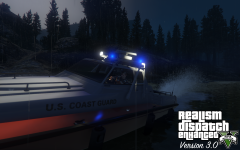
One of the last teasers before release, a Predator styled after the United States Coast Guard. Predator mapped by @Aquamenti, texture by @PNWParksFan, vehicle edits by me. RDE 3.0 launches December 21st, 2016. Part of RDE going forward is a major sub-project, lead by yours truly, to rework the vanilla vehicles to more accurately reflect their real life counterparts. Such reworkings and changes include: removing bullbars, tweaking lighting patterns and lightbars, and adding computers. Do note: not all vehicles are guaranteed to be 100% accurate, due to game limitations (i.e.: carcols), and the availability of lore friendly parts. You can get RDE here: http://www.lcpdfr.com/files/file/9266-realism-dispatch-enhanced/ -
From the album: NefariousBonne's Garbage
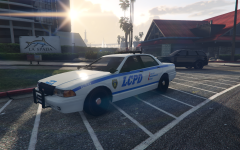
When I'm not working on vehicles for RDE I'm working on stupid shit. -
-
From the album: NefariousBonne's Garbage
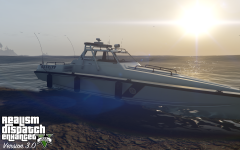
One of the last teasers before release, a Predator styled after the Los Angeles County Sheriff. Mapped by @Aquamenti, texture by me. Part of RDE going forward is a major sub-project, lead by yours truly, to rework the vanilla vehicles to more accurately reflect their real life counterparts. Such reworkings and changes include: removing bullbars, tweaking lighting patterns and lightbars, and adding computers. Do note: not all vehicles are guaranteed to be 100% accurate, due to game limitations (i.e.: carcols), and the availability of lore friendly parts. You can get RDE here: http://www.lcpdfr.com/files/file/9266-realism-dispatch-enhanced/ -
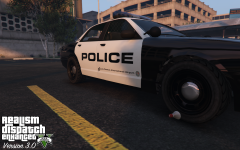 Oh, that. Well, you never know when you'll be thirsty.
 -
It was using the other wheels, guess I'll have to update the model, again.
-
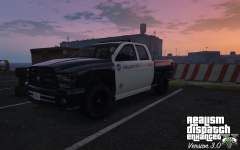
From the album: NefariousBonne's Garbage
One of the last teasers before release, a Bravado Bison styled after the Los Angeles Port Police. Textures by @rms8723. Part of RDE going forward is a major sub-project, lead by yours truly, to rework the vanilla vehicles to more accurately reflect their real life counterparts. Such reworkings and changes include: removing bullbars, tweaking lighting patterns and lightbars, and adding computers. Do note: not all vehicles are guaranteed to be 100% accurate, due to game limitations (i.e.: carcols), and the availability of lore friendly parts. You can get RDE here: http://www.lcpdfr.com/files/file/9266-realism-dispatch-enhanced -
From the album: NefariousBonne's Garbage
One of the last teasers before release, a Vapid Stanier styled after the Los Angeles World Airports Police. Part of RDE going forward is a major sub-project, lead by yours truly, to rework the vanilla vehicles to more accurately reflect their real life counterparts. Such reworkings and changes include: removing bullbars, tweaking lighting patterns and lightbars, and adding computers. Do note: not all vehicles are guaranteed to be 100% accurate, due to game limitations (i.e.: carcols), and the availability of lore friendly parts. You can get RDE here: http://www.lcpdfr.com/files/file/9266-realism-dispatch-enhanced/ -
-
-
From the album: NefariousBonne's Garbage
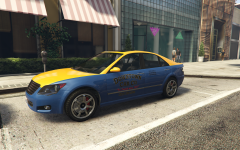
A Karin Asterope in the style of Los Santos' Downtown Cab Co. Will be released within the next few days. -
Alright, thank you. I'll keep you in mind; though you did miss the private message part. We're looking for someone a bit more active.
-
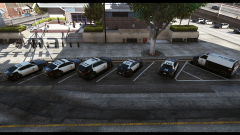 I presume you're looking forward to the RDE treatment the cars have gotten from me? Aquamenti is also a member now; glad to see some of his stuff here.
 -
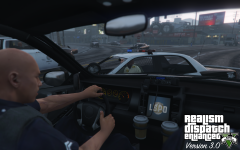
From the album: NefariousBonne's Garbage
The interior of an LSPD Gresley, showcasing the built-in computer. Part of RDE going forward is a major sub-project, lead by yours truly, to rework the vanilla vehicles to more accurately reflect their real life counterparts. Such reworkings and changes include: removing bullbars, tweaking lighting patterns and lightbars, and adding computers. Do note: not all vehicles are guaranteed to be 100% accurate, due to game limitations (i.e.: carcols), and the availability of lore friendly parts. You can get RDE here: http://www.lcpdfr.com/files/file/9266-realism-dispatch-enhanced/ -
From the album: NefariousBonne's Garbage
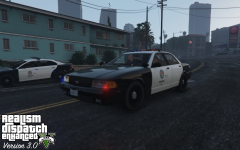
An LSPD Vapid Stanier, with corner strobes and wig-wags. Part of RDE going forward is a major sub-project, lead by yours truly, to rework the vanilla vehicles to more accurately reflect their real life counterparts. Such reworkings and changes include: removing bullbars, tweaking lighting patterns and lightbars, and adding computers. Do note: not all vehicles are guaranteed to be 100% accurate, due to game limitations (i.e.: carcols), and the availability of lore friendly parts. You can get RDE here: http://www.lcpdfr.com/files/file/9266-realism-dispatch-enhanced/ -
Dilapidated and I are reaching out again for beta testers; more specifically people to test RDE configs for release. In addition to getting early access to RDE 3.0, you'd be a tremendous help to the team. If you're interested in joining us, please send a private message to me telling me a little about yourself and why you should be a member of our team. We are at most accepting 4 new people.
-
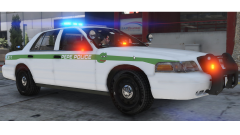 This the best/worst thing ever.
 -
The meme police are on scene?
-
From my screenshots only the ones with the RDE logo slapped on them are official and will appear in RDE. As for the XLS you have there, that will not be in RDE, that was something I made in my spare time, and may see a release sometime. I would release it now, but it requires a custom carcols.ymt entry.
-
I'm guessing by 'agency fleets' he means the cars. I'm the one in charge of vehicle models, and they are all done. If you want more details, go to my page and click on any of the recent screenshots, in the description I have a blurb about what I'm doing.
-
Unfortunately I can't say much more than that. However, I'm re-opening beta tester submissions, things are not moving at the optimal speed. If you'd like to be a beta tester and help 3.0 get released sooner; please PM me with a little about yourself and why you should be a member of our team.
-
We've reached the stage where we are no longer adding anything new; we're testing configs and ironing out bugs.
-
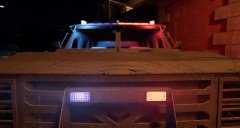 Yeah, I saw one similar to that. I've yet to get it, but how is Watch Dogs 2?
 -
Are real life San Francisco PD riot vehicles just black? But it looks better than the Chicago PD SWAT Polar from the first game.
-
From the album: NefariousBonne's Garbage
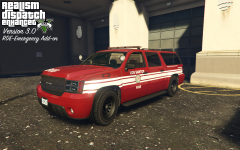
An LSFD Granger Battalion unit, a part of the small RDE Emergency add-on, a new DLC pack launching with 3.0; which adds a mapped ambulance and firetruck, and now a granger. Part of RDE going forward is a major sub-project, lead by yours truly, to rework the vanilla vehicles to more accurately reflect their real life counterparts. Such reworkings and changes include: removing bullbars, tweaking lighting patterns and lightbars, and adding computers. Do note: not all vehicles are guaranteed to be 100% accurate, due to game limitations (i.e.: carcols), and the availability of lore friendly parts. You can get RDE here: http://www.lcpdfr.com/files/file/9266-realism-dispatch-enhanced/



