


LtFlufflez
Members
-
Joined
-
Last visited
Everything posted by LtFlufflez
-
 After this new update I have no idea how, but the bumper lights on the back of the unmarked tahoe are not mapped correctly. They were working perfectly fine before this update, but now the bumper lights only flash a tiny bit of blue at the bottom of the bumper lights and thats it for me.
- 70 comments
- 30 reviews
-
.thumb.png.9d0943161b37f863c291d6d6664edefb.png) I agree with the above comment. Everything about the mod is phenomenal except for the heli orbiting at way too fast of a speed. If able to figure it out, you should patch it up for sure. I also don't know if this has been tested more around mountain regions and freeways so the heli will actually maneuver around obstacles in its path and not fly straight into everything like how normal LSPDFR would be or if possible to somehow change the altitude of the heli as well. Other than that, it's a fantastic mod. Great scripting work here.
I agree with the above comment. Everything about the mod is phenomenal except for the heli orbiting at way too fast of a speed. If able to figure it out, you should patch it up for sure. I also don't know if this has been tested more around mountain regions and freeways so the heli will actually maneuver around obstacles in its path and not fly straight into everything like how normal LSPDFR would be or if possible to somehow change the altitude of the heli as well. Other than that, it's a fantastic mod. Great scripting work here.- 368 comments
- 33 reviews
-
 This is a fantastic mod and I'm really eager to use it after reading about it. But i saw that it modifies the weapons.meta file and i actually have modded weapons in and because of that, the weapons meta is already modified and i don't want to overwrite it. Is there anyway you could post it with JUST the modified lines in the meta files? That would be amazing and so helpful to me. It would be greatly appreciated. Keep up the good work though!
- 36 comments
- 7 reviews
-
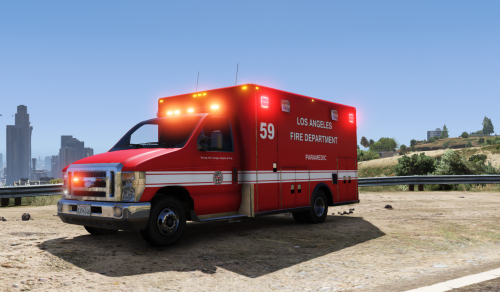 Been waiting so long for an ELS ambulance and firetruck so I can try out Darkmyer's beta of his paramedic/firefighter calls. This is such a fantastic Model. Great job. Also, the scene lighting you added you connected with the headlights. Through ELS now, you can make your own scene lighting. There is a whole option for it. And on vehicles that have it, you can activate them with the "]" key or "Alt+]". Still awesome to have some scene lighting though because not many modders have noticed you can do that now. Edit: And could you fix the back doors at your earliest convenience? Apparently since they are bugged, the peds won't get in and it crashes LSPDFR everytime/my game sometimes. Thank you so much!
- 29 comments
- 9 reviews
-
-

- 1
-
-
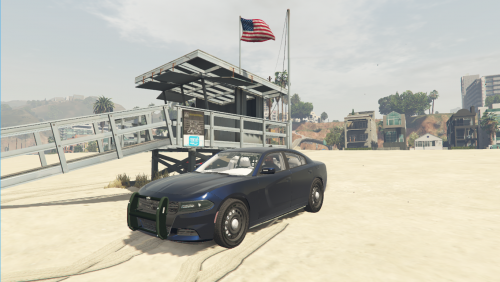 Great model, but i'd definitely still consider it a work in progress. The wheels, as already stated, are different sizes. The rambar looks a little iffy and appears to be dark green? I don't know if the rambar is green in real life, but it doesn't really fit with a dark black charger. I'd suggest changing that if that would be possible. Awesome lighting setup, but this model could use a bit more work. Just to buff out some of the bugs and fix the interior. Still a fantastic model none-the-less. Edit: Oh and another bug I just found. When I turn the scene lighting on (takedowns, etc), the lights appear but they are reversed. So they are basically shining out of the back of the car even though they are mounted in front.
- 1 comment
- 6 reviews
-
-
- 1
-
-
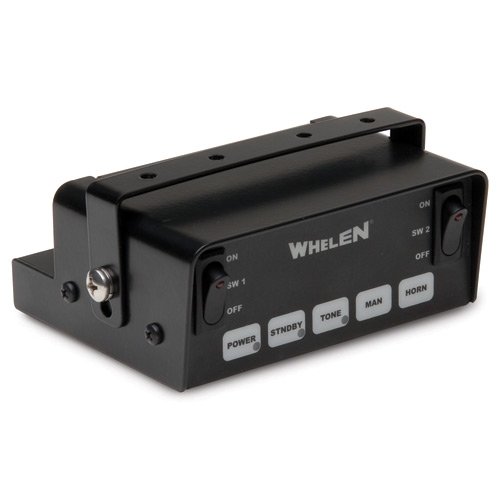 Thank you so much! And I just tested out the louder version. IT'S PERFECT. Phenomenal job!
- 22 comments
- 8 reviews
-
Thank you so much for that! 110% better. Great job. And if you could possibly find a decent 4th siren to go with the ELS version, i'll love you forever :D
- 22 comments
- 8 reviews
-
Fantastic siren. Loops and sounds amazing. But yes, please increase the volume of the siren if you can ASAP and repost it, and i will download it :) Thank you! Edit: Also, could you try and find the Hi-Lo or a 4th siren for this and add it to the ELS version? Like the Warble it has. That would be awesome. And make it so that it only has the necessary siren files in the folder and not the whole vehicles folder, because I have sirens installed for my ambulance and firetruck i would like to keep. Not being able to tell which siren you installed this on makes it kinda difficult to navigate and find it. It would be greatly appreciated.
- 22 comments
- 8 reviews
-
 So I installed the car correctly because I've had this model even before the newest update. I put the new files in and all in the right places. The car works fine, but for some reason it ONLY spawns with it's takedowns/spotlights on. And you cant turn it off. I've tried over and over again with ELS to turn them off with the keybinds and it doesn't work. But the lighting stages still do. Any ideas? Edit: Never mind I figured out the issue. Realized it was just a bug with the way the model spawns in. And it happens randomly so I had to keep spawning until I got one that wasn't stuck in the takedown mode lol.
- 427 comments
- 75 reviews
-
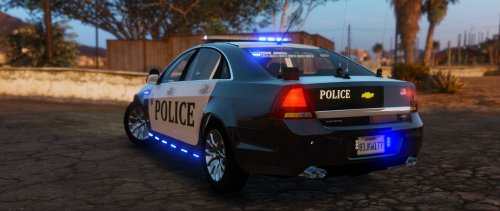 Change the rims to a more modern police fit or at least add different rims into the download file so we can replace at our leisure and the car is spectacular. Also hope it has LODs.
- 32 comments
- 14 reviews
-
-
- 1
-
-
 Hey Albo! Another great mod released again. Great job! And I also have a question. Will this ever be implemented to GTA's police AI? So that we are all able to have custom sirens.
- 851 comments
- 108 reviews
-
Another outstanding mod, once again. Thank you so much Albo! Also, I have a suggestion for you! If it is possible, when you toggle your horn on with the siren going, to make the siren stop and the horn blare? And then once you let go of the toggle, it switches back to the siren? Because that is how the siren systems are set up. Other than that, everything is flawless! Again, thank you for another fantastic mod. Been waiting for a mod like this ever since LSPDFR came out. Remember using the toggle mod on LCPDFR lol.
- 851 comments
- 108 reviews
-
 Look through the comments for a "black window" bug post. Someone replied to it with a vehicles.meta and carvariations file for the handling. But I am also having troubles with this model. I've encountered the black window/lightbar mod. I've followed all the instructions and help. I tried to install it into patchday11, didn't work. I tried it in patchday9, didn't work. I even tried it in regular vehicles meta and mpvalintines car variation, and still didn't work. So i have no clue what's going on.
- 117 comments
- 28 reviews
-
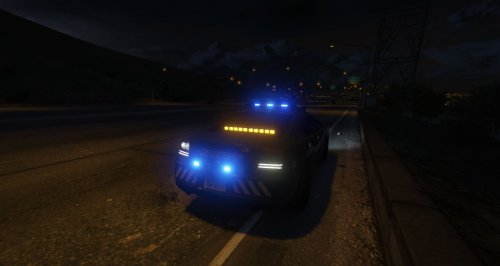 Okay. I did everything you said and it finally loaded in perfectly. But now I have another problem. The traffic advisor doesn't light up for me... I also installed the visualsettings as well
- 31 comments
- 4 reviews
-
Yeah. How do you install them? Like if i change it from police2 to sheriff, would I have to change every police2 in the vehicles.meta and carvariations with sheriff? Or how does it work?
- 31 comments
- 4 reviews
-
.thumb.jpg.4066677156985e22489bfecddc2f6c45.jpg) @Bxbugs123 These are fantastic models and I am in love with them. You couldnt have done a better job. The only problem I'm having right now is that when I used the automatic installer, it put the files in correctly. But if I wanted to change them, it won't let me delete/replace the files? Can you help me out with this problem? Thank you!
@Bxbugs123 These are fantastic models and I am in love with them. You couldnt have done a better job. The only problem I'm having right now is that when I used the automatic installer, it put the files in correctly. But if I wanted to change them, it won't let me delete/replace the files? Can you help me out with this problem? Thank you!- 376 comments
- 81 reviews
-
 @alexguirre Wow. What a fantastic mod. I love using this ingame. It makes the realism so much better! But there is one flaw/bug I have noticed. When you use the strobes and keep them on, you cannot use the modeled in spotlight on the cruisers. Do you think you could find a way to fix that? And also, a suggestion. Is there a way you could make it with different flash patterns for the strobes and not just stale lights? Watch this video for an example. Look at modes 6 and 7. It would be great if this could be implemented!
- 247 comments
- 45 reviews
-
Who cares? It's 2016. Grow up. If you want to make your own mods with your own decals and background content, go for it. Not everyone is into it. Why does it matter if its in the background? It's not flying in your face when you play the game.
- 376 comments
- 81 reviews
-
@Bxbugs123 Again, great work and such a fantastic model. The only problem Im having is with the new automatic installer. When I install the files, they work perfectly fine. But when I try to change the files out for a different car, it won't let me delete the files. Can you help me out with this or figure out a solution? Thanks!
- 376 comments
- 81 reviews
-
So, I already heard in the new update you posted about working on the AI and there are going to be huge changes in the way they function in a pursuit or after a scene. One main idea I have and I would really like to see would be some officers staying on scene to stop and help the flow of traffic. Or make it so we can direct the officers what to do and where to do it. You could have a blue circle around the radius and press a certain button to go into a command menu. And then you can pick where you want them to move and which way to help the flow of traffic. It would be a great realistic implementation because the AI traffic is horrible, as we all know. Making a way for the AI officers to pitch in and stop and direct traffic would be a fantastic idea.
-
 I just want to say that I have never ever written reviews before. But this car right here definitely deserved it. It's outstanding and fantastic to drive. I love the valor lightbar. Although, would it be possible for you to make the blue lights on it a little darker? The lightblue almost looks little too light blue at times. Other than that, everything is in great shape! Amazing job. Really.
- 159 comments
- 53 reviews
-
So I've been changing up my sirens with the American Sirens V5 pack, and its been working fine. I tried installing it brand new with the Federal Signal SS, but the original police siren will not change. It has actually been changed to the Sheriff Granger Siren. I've reinstalled the audio and even put the Federal Signal SS in the vehicles folder again and loaded it on OpenIV, but it still didn't change it. Any Ideas?
-
You have the Trainer. You have to disable the keys by opening trainer>Options>Enable/Disable keys
-
No it does not. Im not able to change it from 0.
-
No, this would never happen before changing the ELS.ini. And thank you for letting me know where this goes :) All i did was go to support lol.
.thumb.png.9d0943161b37f863c291d6d6664edefb.png)

.thumb.jpg.4066677156985e22489bfecddc2f6c45.jpg)

