


tomcat8492
Members
-
Joined
-
Last visited
Everything posted by tomcat8492
-
It works! Thank you.
-
Ah. You are correct. How would I fix that?
-
I downloaded a dev CVPI and added it to openiv which the .yft file opened just fine and worked in-game just fine. I added an els gta iv converted code 3 x2100 lightbar to it and then tried opening the .yft file in openiv and nothing happens. No windows opened, no errors or anything. (.ytd file opened without issues) I tried spawning it in-game and nothing would happen to a point where I had to force stop GTA V. The only error I got when exporting from zmodeler was "Can not obtain Shader material from "Default Material". file:RageExportMaterial.cpp line:126" and some errors that say "mask should be *this*" or some stuff about textures. The issue arose only when I added the converted light bar. Did I convert it wrong? Or export it wrong? Any ideas?
.thumb.png.71072bbdf5aaed640e66e766cbab5dc0.png)
-
 *tomcat8492
 -
.thumb.png.359a0b9103a007591bed81ea1ddde823.png) Assuming you're using Zmodeler 2, this is a good video on how to get started.
Assuming you're using Zmodeler 2, this is a good video on how to get started. -
I see we're getting quite comfortable with each other. May be time to move in.
-
Ohh you know me. lol. Thank you for your support.
-
No problem.
-
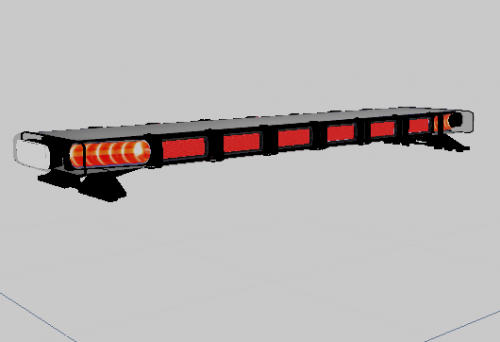
Includes four versions of the TIR3 Dominator series by Whelen. The 6 head and 8 head light bars include a traffic adviser. I had previously made a LINZ version long ago but always wanted a TIR3 version and I didn't screw up on the glass this time. Feel free to convert to GTA V BUT DO NOT RE-UPLOAD TO ANY SITES.
-
.thumb.png.6fbe41152ded667b51977354227c6002.png) This is a push bar for dunkboi's 2014 Dodge Ram made for GTA IV. This isn't an exact replica of any specific push bar in real life. I would have like to make a Setina push bar but I wasn't able to find any good profile shots. Parts of the bumper might be transparent in openiv but wont be in-game. Feel free to convert to GTA V BUT DO NOT UPLOAD TO ANY SITES.
This is a push bar for dunkboi's 2014 Dodge Ram made for GTA IV. This isn't an exact replica of any specific push bar in real life. I would have like to make a Setina push bar but I wasn't able to find any good profile shots. Parts of the bumper might be transparent in openiv but wont be in-game. Feel free to convert to GTA V BUT DO NOT UPLOAD TO ANY SITES. -
.thumb.png.ae54d95b24453fe64f0f215ad8693711.png) I use zmodeler 2. I started watch youtube videos and making simple parts. Manipulating existing parts is also a good start.
I use zmodeler 2. I started watch youtube videos and making simple parts. Manipulating existing parts is also a good start. -
You're welcome.
-
My pleasure.
-
After months of being a contributing member of society, I've finally had time to neglect my responsibilities and create a Whelen Mini Freedom. A practical model for those fancy fire trucks. This file includes both GTA V and IV versions. Credits to 72will for the conversion to V. Edit the model as you please but do not upload to any sites.
-
No. I just made a new surface and traced the original. That's the best solution I found.
-
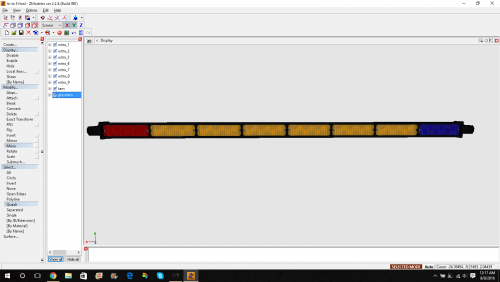 I actually have no idea how. There's a tutorial on how to convert to GTA V using zmodeler 3.
 -
.wft but you can convert it all you want.
-
.thumb.png.91f1cda20263440b8c4beb9c2c6b1554.png) Thanks. Life has gotten busy. I will still continue to make models just at a slower pace. Thanks.
Thanks. Life has gotten busy. I will still continue to make models just at a slower pace. Thanks. -
.thumb.png.46e58dd3c89b8cb7fd1952928665ce22.png) Thank you!
Thank you! -
Feniex Fusion 400 or at least close to what it looks like. Feel free to convert to GTA V BUT DO NOT RE-UPLOAD TO ANY SITES.
-
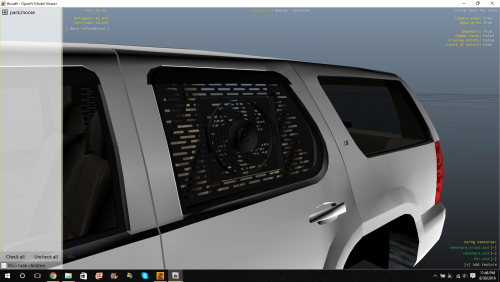 It's made for gta iv. You'll have to convert it to gta v.
 -
.thumb.png.c6864c71ab9ff88439a0d85006570f9b.png) Thanks for the feedback.
Thanks for the feedback. -
This is a work-in-progress templated pushbar pack that I am working on. Please let me know what I should do to improve on this. Feel free to convert this push bar to GTA V BUT DO NOT RE-UPLOAD TO ANY SITE.
-
Anytime.
-
You'll need to download zmodeler 2 and a car. There are plenty of tutorials on how to do all this stuff. Thank you. It's like we know each other! You are very welcome. Though through the internet I can't tell the tone of your comment but please be respectful to people who don't know the modding process or people new to the community. EVERYONE is welcome to my models and help no matter the experience level. Thank you.

.png.37404e6fb049adea4a324ec5bc44e3b7.png)
.thumb.png.359a0b9103a007591bed81ea1ddde823.png)

.thumb.png.6fbe41152ded667b51977354227c6002.png)
.thumb.png.ae54d95b24453fe64f0f215ad8693711.png)
.thumb.png.91f1cda20263440b8c4beb9c2c6b1554.png)
.thumb.png.46e58dd3c89b8cb7fd1952928665ce22.png)
.thumb.png.c6864c71ab9ff88439a0d85006570f9b.png)