


tomcat8492
Members
-
Joined
-
Last visited
Everything posted by tomcat8492
-
 Your appreciation means a lot. Thank you. Thanks! Not a problem. Thanks for the comment.
 -
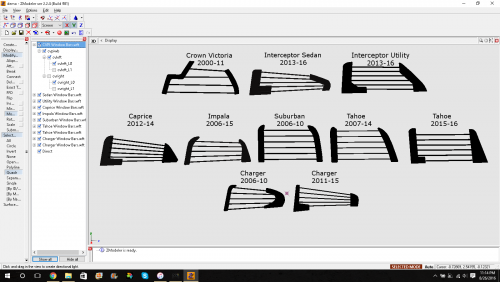
This is a pack that includes 10 sets of window bars for various vehicles listed in the first screenshot along with the model year. GTA IV Install: Place the "Xright_L0/L1" in the "door_pside_r" hierarchy ABOVE the "window". Next, place the "Xleft _L0/L1" in the "door_dside_r" hierarchy, ABOVE the "window". OR: attach the "L0" of the window bar to the respective "L0" on the "door". Same for the "L1". GTA V Install: ...ya i dunno... All credits go to D&R Electronics for the design of all the window bars. Feel free to convert any model to GTA V BUT DO NOT RE-UPLOAD TO ANY WEBSITE.
-
-
 Thank you.
 -
Thank you very much. I appreciate it.
-
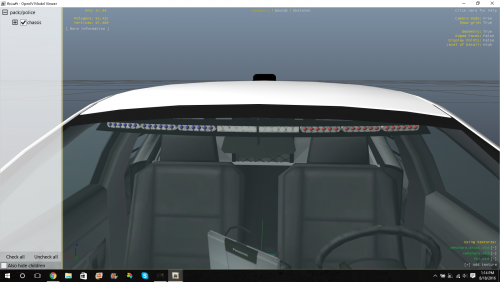
SoundOff Signal Pinnacle EPL8000 interior light bar. NOW WITH A REAR DECK! Just so happens to be my favorite interior light bar not that you care but ANYWAY, here it is. Enjoy. Feel free to convert to GTA V BUT DO NOT RE-UPLOAD TO ANY SITES.
-
 Thank you!
 -
Thank you.
-
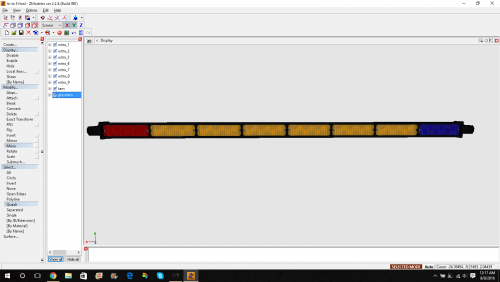
Here...take it. Feel free to convert it to GTA V BUT DO NOT reupload to any site, etc...we've been through this.
-
-
 Thank you. I'm not sure. As I was making it, I found pictures of the patriot that looked very similar to the liberty.
 -
I don't know how to model a camera guy sitting on a car.
-
Thanks KA KAAAWWW
-
Seem like everyone forgot about this light bar...just like how my mother forgot about my sister at the bank once... Feel free to convert it to GTA V BUT DO NOT UPLOAD TO ANY OTHER SITE. https://youtu.be/fnsgjGcw3gc Added a GTA V version courtesy of CodingDev.
-
.thumb.png.90a7c3cbeab905405aad5c0b0d8b90bb.png) Thank you. Thank you very much. I would but unfortunately I don't have the "tools" to do it.
Thank you. Thank you very much. I would but unfortunately I don't have the "tools" to do it. -
Here is the Whelen Dominator 2, 4, 6, and 8. The 6 and 8 includes a traffic advisor. Feel free to convert it to GTA V BUT DO NOT UPLOAD ANY MODELS TO ANY SITE. https://www.youtube.com/watch?v=M4KwHKiIhA8&feature=youtu.be
-
.thumb.png.9213b49ba62ed60a3df1b97834f7a901.png) My pleasure! I'll give the M2 a shot. Oops. I fixed it. Thanks! I did have glass on it but the lights wouldn't show up in-game so I just removed it. I'll update it if I figure it out.
My pleasure! I'll give the M2 a shot. Oops. I fixed it. Thanks! I did have glass on it but the lights wouldn't show up in-game so I just removed it. I'll update it if I figure it out. -
Here's "another one". -DJ Khaled. Make them red and blue, all red, all blue. Whatever you want. It's a good light to slap onto an apparatus. Feel free to convert it to GTA V. https://www.youtube.com/watch?v=e_DClV0Co38 DO NOT REUPLOAD TO ANY SITE and stuff.
-
I'm trying to UV map a blue emissive texture for an indicator on an Interceptor Utility but for some reason it shows up green instead of blue. Any ideas on how to fix this?
.thumb.png.31a82dc1bf1e8746a8203af7403f02a3.png)
-
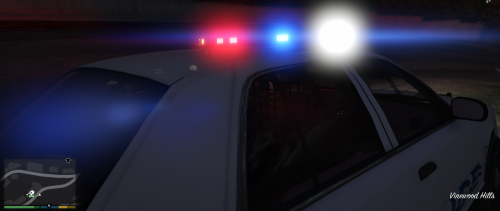
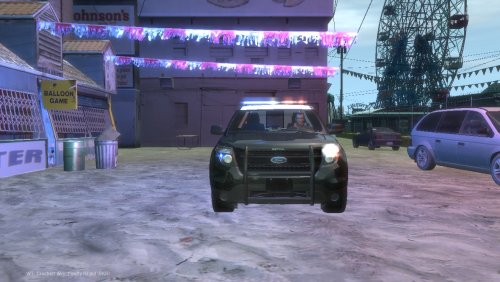 This is the exact lighting setup that EPS has on their Utility's in real life. No need to enable strobe coronas for this vehicle as I added ELS lights in the headlight and reverse light housings. YOU MAY EDIT VEHICLE TEXTURE FOR PERSONAL USE ONLY. DO NOT REUPLOAD.
- 1 comment
- 1 review
-
-

- 1
-
-
-
I had this same antenna on my Crown Vic in real life. Same goes for the wire going into a hole in the car. I haven't made the radio I had for it but it's a consideration.
- 3 comments
- 3 reviews
-
-
- 2
-
-
-
-
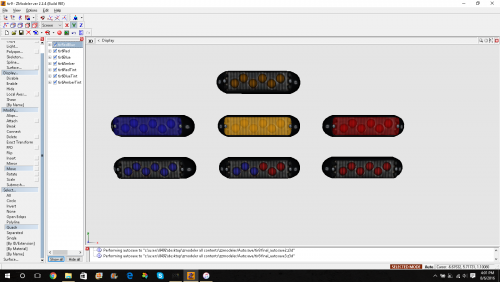 RECREATED FROM SCRATCH. Alright...lets be honest. My previous version of this light head pretty bad but here it is again with a significant overhaul. See below for list of changes. Feel free to convert it to GTA 5 BUT DO NOT re-upload to any other site or claim as your own. Thank you.
- 14 comments
- 1 review
-
-
- 4
-

.thumb.png.90a7c3cbeab905405aad5c0b0d8b90bb.png)
.thumb.png.9213b49ba62ed60a3df1b97834f7a901.png)
.png.baa82a5390e0e5b5e337509d0ecb7674.png)
