



fleming334
Members
-
Joined
-
Last visited
Everything posted by fleming334
-
 heres the thing, either mod words fine on their own, but since the update neither work together. I read somewhere that they are working on a fix but it will take some time, the fastest we will know of a fix is through here (LSPDFR). Im fine without being able to mod my character the way i want because the RDE adds an entire level to gta that ive never experienced before! I hope it gets fixed eventually so i can add that extra level of immersion to gta again.
- 2,349 comments
- 238 reviews
-
-
 I think i know why the FPIU front ram bar lights dont work, i noticed in the tahoe and the chevy pick up that the front lights have color textures on there in open iv (Switching between all blues to red a blue patterns) where as the FPIU, the lights are blank only in the rambar lights. Not sure how to fix or if anyone else noticed but i thought i should post it up here!
- 80 comments
- 27 reviews
-
 Just want to say that i love this mod! I have a wide variety of cars in slots with the RDE mod and everything works flawlessly! I never was a fan of the GTA corona's for the vehicles so i used this mod with removing all vehicle coronas and it looks way better in my opinion! And yes, it works with ELS! Simply set all flashing values to 0 and run with this wig wag mod! cant wait for more patterns to be added. keep up the good work! (No performance loss to report on my end)
- 247 comments
- 45 reviews
-
Quick update, it doesnt seem to be about the dlc packs because i added a car and still loaded up with no issues. added a few more and again no issues! not sure what else it could be
- 2,349 comments
- 238 reviews
-
not sure because i used to have crashing issues when installing add on cars before. its worth a shot for me just to see so il try and keep you updated with what i find when i can!
- 2,349 comments
- 238 reviews
-
Thats what im thinking as well cause i found a forum discussing this but thats all the way in july so i tried it out but no go. i used to have both working together but the update seems to have broken something. Although on one post it says that the reason for this is gta sees to many dlc's thats why we are getting a crash. Just gotta wait and see what the comments say or if an update comes out hopefully! QUICK EDIT: If i had the EUP mod installed alone, it works fine, and if i have the RDE installed alone, it also works fine. They seem to be conflicting with both together although i want to try adding a car maybe as an addon to create a new dlc spot for it and see if that triggers the crash to verify that comment i read about limited dlc slots.
- 2,349 comments
- 238 reviews
-
-
hey guys! slight issue here! recently installed eup with eup menu again after update broke my game files, i am greeted with an error once it start loading up plugins. never had this issue before and not sure if anyone else is having the same issue! tried manual install and no luck, tried auto install with no luck either!
- 2,349 comments
- 238 reviews
-
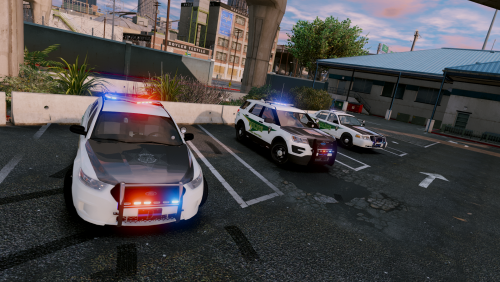 In love with this pack! Ive always passed by this pack in search of a police pack that i would enjoy using. Took the time today to install and am in love with the models and light patterns! using the temporary fix on the models helped and now i am committed to this pack! I hope someone can make an opp skin for this pack ;) Minus the really small bugs that are fixable by the user temporary this deserves a 5/5! Im looking forward to seeing this pack develop!
- 44 comments
- 27 reviews
-
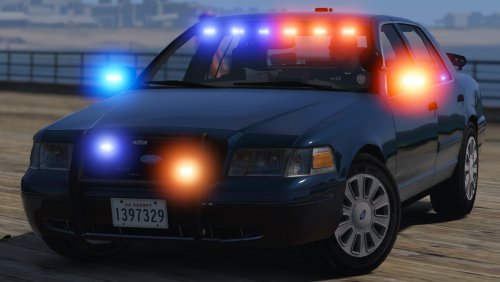 you are replacing a car not adding so the process is easy! The interior colors is meant for you to chose if you like the charcoal (Black) seats and dash or if you like tan (light brown or cream) color seats and dash! which ever one you chose the file you replace is in the .YTD file which you would open using openIV. the veh.meta file goes to: update/update.rpf/common/data/levels/gta5. from here simply drag and drop the provided .meta file and you are good to go! If you have existing mods then you would have to manually add the line that need to be replaced into the .mete file that way the game wont crash during load up! I highly suggest you read the readme as everything you need to know about installing the .meta or simply modifying yours if you already have mods installed is clearly shown in the readme! cheers!!!
- 70 comments
- 26 reviews
-
For all those experiencing issues with the front lights not working, it has to do with the windows being tinted when you spawn the vehicle in! im not sure how to mod the windows file inside the ytd to make em spawn clear rather than dark but if you manually go through the trainer options to where you can add horsepower and upgrade the transmission you should see an option for tint which says "none" once you switch it over to say "Stock" it should work fine! keep in mind every time you spawn you much remove the tint using the trainer unless someone posts a link for the windows file inside the wtd that changes it to being clear, then you wont have any issues! its not windows by the way the file you want is called glass in the ytd file! i may have a fix that can help! EDIT: though i figured out the solution but its a no go, have to simply remove the tint manually when spawning this car! doesnt really bother me that much because i simply love this car!
- 70 comments
- 26 reviews
-
-
-
 Ive tried to get this to work in the fbi2 slot but the front lights dont work and windows are all blacked out! Can you send me the files you edited?
- 58 comments
- 20 reviews
-
.thumb.jpg.61de846de400ca98f85d205992527de1.jpg) do you have a folder labled "Mods" in your gta v main directory (where gta v was installed), if you dont create a mods folder like so... then you want to copy the entire update folder (right click, copy, then in the mods folder past it) like so.... once thats done open up the tool Openiv and select gta v for windows, then double click the folders in this order: Mods> Update> x64> dlcpacks> patchday3ng> dlc> x64> levels> gta5> vehicle.rpf. once in the .rpf file simply drag and drop the .ytd and .ytf files that are named police2 like so... (MAKE SURE TO HIT EDIT BEFORE YOU DRAG AND DROP)... with this pic above you can see the location i went to and can see the files within the winrar that i am using. In this case i did not have to replace the carvariations nor the vehicle meta! hope this helps! I know it shows patchday4ng to install the car to but patchday3ng works just as fine! no need to venture into other dlc folders to add a carvariation line or vehicle meta line!
do you have a folder labled "Mods" in your gta v main directory (where gta v was installed), if you dont create a mods folder like so... then you want to copy the entire update folder (right click, copy, then in the mods folder past it) like so.... once thats done open up the tool Openiv and select gta v for windows, then double click the folders in this order: Mods> Update> x64> dlcpacks> patchday3ng> dlc> x64> levels> gta5> vehicle.rpf. once in the .rpf file simply drag and drop the .ytd and .ytf files that are named police2 like so... (MAKE SURE TO HIT EDIT BEFORE YOU DRAG AND DROP)... with this pic above you can see the location i went to and can see the files within the winrar that i am using. In this case i did not have to replace the carvariations nor the vehicle meta! hope this helps! I know it shows patchday4ng to install the car to but patchday3ng works just as fine! no need to venture into other dlc folders to add a carvariation line or vehicle meta line!- 265 comments
- 83 reviews
-
 did you change the name of the .ytd files or the .ytf files? If not then you should be fine! can you tell me exactly where you put the files? mine is as follows in Openiv: Mods> Update> x64> dlcpacks> mpchristmas2> dlc> x64> levels> gta5> vehicles> xmas2vehicles.rpf i have mine installed there several other added police cars and have no conflicting issues! i never use the package installers that some mod authors provide, i just open the package using winrar and remove all the necessary .ytd's and .ytf files plus any carvariations and vehicle meta files and install everything within the mpchirstmas2 folder! If you want i can walk you through the install of the car models you want! feel free to pm me! I am just heading out to pick up some car parts lol forgot to ask if you install the carvariations line and vehicle meta line for the car! that could also cause it not to spawn!
- 95 comments
- 29 reviews
-
Anytime :) im happy to help! here are the screen shots i took! I literally added this car into the mpchirstmas dlc pack which im sure you did but it must be spawned by the name which in this case since i did not alter the name it was "CHPCVPI" the text highlighted in blue is where you want to go! Cheers!
- 95 comments
- 29 reviews
-
-
@anotherc6vette It does not replace any police as of yet! I believe the mod author said that it will in the near future if im not mistaken!
- 95 comments
- 29 reviews
-
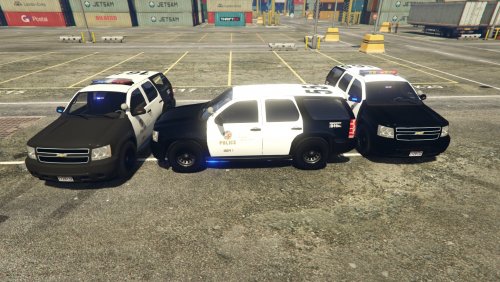 @PNWParksFan I built a 4500 gaming rig not including the monitor or speakers! but the one i left out was literally the last skin which was number 8, I replace each one according to the numbers from the folder in order! But seriously gaming on this ultra wide predator, i cannot use 2k textures because i can see the fuzziness as clear as day even though my gta v is cranked to the max! regardless ive been playing around with the suv and am really happy with the quality of the skins!!
- 118 comments
- 18 reviews
-
-

- 1
-
-
@PNWParksFan Yes he stated on release that you cannot view the models in OpenIV but hes working on a fix! and as for the textures i managed 7 of the 8 4k textures for the fire suv, i cannot go back to 2k because the fuzziness bothers me! im happy with 7 of 8 4k textures!
- 118 comments
- 18 reviews
-
@CandyDaddy9 It also crashed for me as well but when i tried replace one skin and saving it worked up until the 8th skin, cannot seem to replace and save because it keeps crashing but from 1 - 7 i have no problems! @GlitchGamer I just tried that and it completely messed up the lights! lol im not sure why but here is what the back looks like now! if you want i can also upload a pic of the front! In this case il stick the to the blueish tint lol
- 118 comments
- 18 reviews
-
@GlitchGamer Let me start off by saying thank you for this amazing mod! finally have a tahoe to add to my fleet! One thing i cant seem to figure out is for the firesuv, without touching the colors for the lights i get a sorta purple/ blue ish flash on one side of the light bar while the other flashes red, i then tried to change to the all red, then the all red clear but am getting the same results! i put the original light file that was from the firesuv .ytd back and still have that purple/ blue ish flash! im not sure if i was the only one with this issue or others have it too but the other models work great! love the tahoe! :
- 118 comments
- 18 reviews
-
-
- 1
-
-



.thumb.jpg.61de846de400ca98f85d205992527de1.jpg)
