


Majorai
Members
-
Joined
-
Last visited
Everything posted by Majorai
-
I'd be more than happy to join in if you fancy starting/continuing it again. I can't promise high quality code, but I can learn 😛.
-
Hey guys, Hoping this is the correct place for this question: Is it possible to create code/a script that would enable the player to co-ordinate a TPAC manoeuvre with nearby AI police vehicles during a pursuit? Every now and then an AI cop will get in front of a suspect to slow them, but getting the AI to perform an actual full box on the suspect seems to be just just down to luck. I know a bit of C++ and Lua, and am more than happy to learn the required code, but I'd really just like to to know if it was even possible to begin with. Cheers, ~Majorai
-
 Setting up 32 sirens using @PNWParksFan's LiveLights is working fine for me with the updated SirrenSetting Limit Adjuster, however it seems to crash the DLS plugin every time. The only work around I can find is not using DLS, which kind of negates the whole point of DLS. I'm not that good with code, otherwise I'd try and investigate. Might be worth asking on the Discord channel. ~Majorai
- 277 comments
- 21 reviews
-
I had this problem, installing Radiance V solved it for me, might be worth a shot.
-
Hi all, I'm currently trying to replace the Police Scanner audio files with some custom ones. However It seems to by causing crashes left, right and centre. New issue, I seem to be getting no crashes now, but after almost every files is a distinct 'pop' I can't figure out why it's there. I've trawled through every, and there is no pop, so I'm out of ideas. Any help would be greatly appreciated! Majorai
-
Hello, I've come across a strange problem that I've never had before with ZModeler3. I'm attempting to texture various polys on a vehicle (lights, interior, dash etc) using different materials and textures. However, upon changing back to object view, or even just moving the cursor over the part, it seems to just go black and will no longer accept being textured! Has anyone encountered this or know of any fix? I'm not aware of doing anything different from previous models - and they didn't have this issue. Any help would be greatly appreciated. Regards, Majorai
-
That worked mate, thanks for the help!!
-
Hello, I can't get this working no matter what I do, so I thought I would ask here. Basically what I'm looking at doing as putting an ELS light on the wing mirror of a police car like this: Whatever I do the light refuses to move when the door is opened. Is this doable? If so how? Any help would be greatly appreciated. Regards, Majorai
-
 Excellent mod, can't play GTA without it. One question though, is there any way of making custom patterns? (you can never have enough patterns!)
- 2,686 comments
- 236 reviews
-
Vehicles.meta? It's in: mods > Update > Update.rpf > Common > Data > Levels > gta5. Hope this helps.
-
You need to set the appropriate light ID within the properties tab under the scene node browser in ZModeler. They are as follows: Day lights (Constantly on) = 0 Left headlight (headlight_l) = 1 Right headlight (headlight_r) = 2 Left taillight (taillight_l) = 3 Right taillight (taillight_r) = 4 Front-Left indicator (indicator_lf) = 5 Front-Right indicator (indicator_rf) = 6 Rear-Left indicator (indicator_lr) = 7 Rear-Right indicator (indicator_rr) = 8 Left brakelight (brakelight_l) = 9 Right brakelight (brakelight_r) = 10 Middle brakelight (brakelight_m) = 11 Left reversing light (reversinglight_l) = 12 Right reversing light (reversinglight_r) = 13 Hope this helps.
-
The documentation included with ELS has a section dedicated to that, so that should be your first port of call. There may also be various tutorials on this site, and maybe youtube.
-
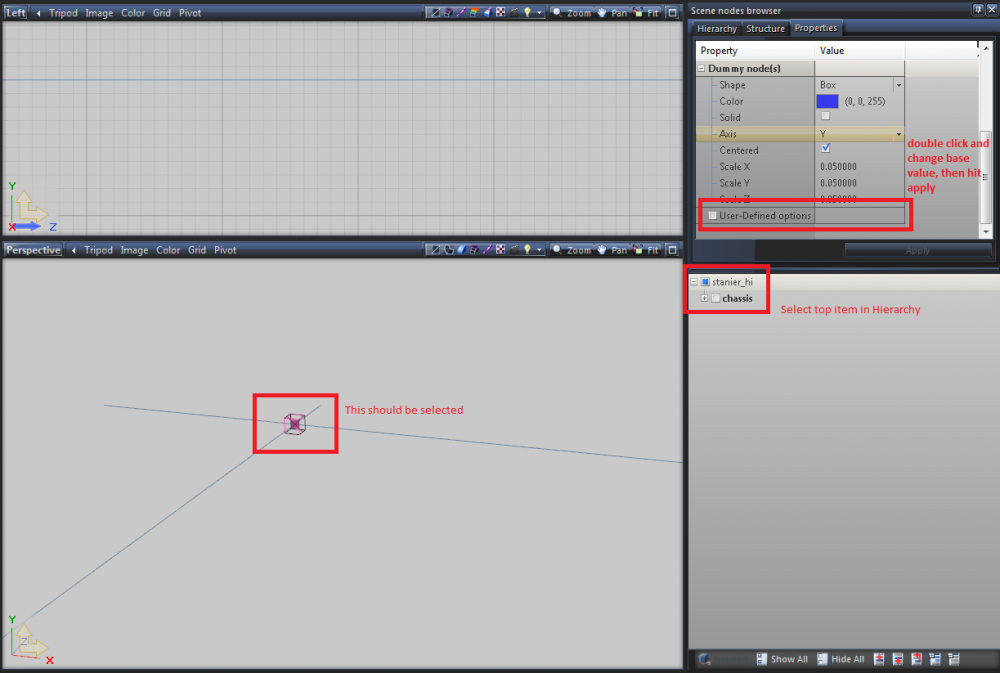
Are you certain you have the part selected? (It should look like a cube with no faces (see attached pic).)
-
You might need to change the base value within zmodeler. IIRC you need to select the top-most item in the hierarchy (in my case stanier_hi), then select the properties tab, scroll down to "User-Defined options", double-click that and change it to a higher value (start at maybe 80), ideally you then want to lower that value as much as possible until it crashes the game, then increase it slightly to make it stable. Remember to hit apply after changing it. Hope this helps! -Majorai
-
I believe you need to change the <txdName> entry in the vehicles.meta file to something unique.
-
-
Fixed it! Well, that is to say that this...: ...fixed it :D Goddamn ELS is good. This thread can now be locked etc
-
I seem to have hit a brick wall while trying to convert one of my models to be able to use ELS lights. I have Extras 2 - 7 working well, they come on when they should, patterns work etc. However, I can't get Extras 1 or 9 to work properly, it feels like no matter what I do they are always stuck on as soon as I enter the car, none of the ELS controls affect them either. I've read through the ELS Documentation, and I can't find the answer to this issue. Let me know if you need any more info. Regards, Majorai
-
Very helpful video, thanks for posting this. Agreed!
-
Got it working, turns out I had an incorrect material set for the front grille. Thanks for the swift reply though -Majorai EDIT: Having the corrupt data issue again, same error message, hierarchy in spoiler tags: EDIT2: Got it working! Forgot I needed to change the Base Value within Zmodeler3. -Majorai
-
Hi guys, was hoping someone would be able to help with an issue I've been having with a model I've been working on. I've been having occasional crashes while working on it, they all seem to be fixed by me altering the hierarchy in Zmodeler. However this recent one seems particularly persistent and I can't for the life of me figure it out. The crash is: I'm using a mods folder. I can post any more info required tomorrow. -Majorai
-
Hello, I'm looking for a couple of unlocked models that I can then convert into british police cars. Anything from the following would be most appreciated: -2007 Ford Mondeo Saloon/Estate -Subaru Impreza (2004 - 2010) -Any BMW 330D Estate All I need are stock cars, I have lights etc. Please PM me with details. **None of these models, police version or otherwise, will be released or passed on without the explicit permission of all parties involved**
-
Trying out a new bar configuration with some red lights, not sure how realistic/accurate it is, but I'm happy with it so far: Current Carcols: Left blues: <sequencer value="168430090"/> Right blues: <sequencer value="2694881440"/> Left red: <sequencer value="1077952576"/> Right red: <sequencer value="67372036"/> With BPM: <sequencerBpm value="1000"/> **This model is currently private**
-
If you're looking for a flash pattern similar to mine in one of the videos, I've been using: <sequencer value="2694881440"/> on one side, and: <sequencer value="168430090"/> on the other. Combined with: <sequencerBpm value="950"/> For pattern speed. Hope this helps.
-
Awesome! I've been having too much fun editing carcols .


