


lcpdsergeant
Members
-
Joined
-
Last visited
Everything posted by lcpdsergeant
-
I tried to uninstall GTA 4 but when I went to the control panel to uninstall it, it gave me this message : Error Code: -5005 : 0x80070002 Error Information: >KernelKernelMedia.cpp (95) >SetupNewsetup.cpp (851) PAPP:Grand Theft Auto IV PVENDOR:Rockstar Games (##ISD_STRING_WEBADDRESS##) PGUID:579BA58C-F33D-4970-9953-B94B43768AC3 $15.0.0.498 @Windows Vista Service Pack 2 (6002) IE Version: 9.11.9600.16521
-
I must know what ppm does.
-
-
Here is a nice gun sounds pack: http://www.gtagarage.com/mods/show.php?id=9978
-
Here's mine: http://www.speedtest.net/my-result/3400901904
-
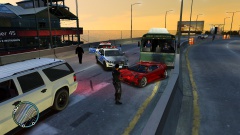 There wasn't enough money in the budget for a police car, so they had to improvise.
 -
Just a random question, would having a trainer change the way LCPDFR performed?
-
 Does this happen to anybody else? When ever I get to the airport, the escorting vehicle drives in a circle.
- 153 comments
- 13 reviews
-
-

- 1
-
-
Thanks for the info.
-
This is going to sound like a stupid question, but would having a graphic enhancer change the performance of LCPDFR?
-
I really like the idea, but it would be nice if the AI vehicles turned on their emergency lights.
- 153 comments
- 13 reviews
-
-
- 1
-
-
I had the same problem, I fixed it by re-installing the game. You should try to re-install the game
-
There should be an option to dismiss partners because every time I go off duty with a partner the game crashes.
-
First you have to check the person's ID on foot, then you go back the investigate menu and a new option will appear
-
If you are in a pursuit, you can press Shift to have your character say a pursuit speech. This works in any police vehicle.
-
"AI police vehicles - Am I the only one who has noticed that the AI police vehicles in pursuit have become very reckless drivers? Is there a way of actually calming their driving down? They like to smash into everything which is kinda unrealistic and annoying when they crash into you." There's not much you can do about that, It's codded into the game.
-
Does anybody know is it's possible to have multiple callout mods for LCPDFR's API running at the same time?
-
After re-installing the game, I got the taser working. Sorry about wasting everybody's time.
-
I tried to manually install the taser by downloading the taser files and that did nothing. Then I tried to edit the files manually, however the text lines I was supposed to add were already there and the taser still does not work. Can someone help?
-
This happens every once in a while, sometimes when I get shot in hardcore mode, my character gets stunned like usual. Then my character freezes and I can't move unless I get shot again. Is there a way to fix this?
-
When I modded a crown vic in the game, the car's handling changed and the AI's driving has gotten worse. Does the different handling affect the AI's driving?
-
There are three callout mods that use LCPDFR API Callouts+ '?do=embed' frameborder='0' data-embedContent>> WoutersCallouts Supervillains '?do=embed' frameborder='0' data-embedContent>> Personally, I suggest WoutersCallouts for more realism
-
This just happened, a NOOSE officer went corrupt and tried to kill me and my partner.
-
One time while I was patrolling Alderny, I pulled over an SUV and as I walked up to the window, all three of the occupants pulled out pistols and murdered me in less then 3 seconds and my partner was just standing there staring at my character's dead body.
-
Does anybody know where to find textures that replaces the default textures for the NOOSE cruiser and NOOSE Patriot with more realistic NOOSE liveries?

