



GRAW
Members
-
Joined
-
Last visited
Everything posted by GRAW
-
-
-
I don't think you understand how to skin properly. This is just editing the template, you need to make actual skins.
- 5 comments
- 1 review
-
Uh...?
-
It's alright, but I see plenty of bugs.
-
Why do your mods never involve emergency services? Why do you even upload here?
- 8 comments
- 2 reviews
-
-

- 2
-
-
It's too wide and not tall enough. Looks too much like the hummer it started as.
- 8 comments
- 4 reviews
-
Any chance we could see any fire apparatus?
-
If you only made the texture then why are you uploading the whole truck, details and all?
- 5 comments
- 3 reviews
-
-
- 1
-
-
-
-
Can you port this onto the other ELS fire engine by LtCaine? The one with the vector?
- 4 comments
- 3 reviews
-
-
-
-
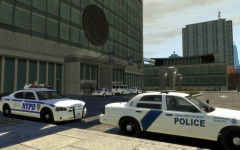 Actually, the CVPI is just a SFPD car with a new skin and clear LED lightbar. The only thing I did was put the DHS skin on it. Though, I did edit the skin so it would be whiter. Try searching for "NYPD and Homeland Security Mega Pack", that's where I got the skin.
 -
From the album: New York Police Department
The New York Police Department and Homeland Security's Federal Protective Service wait outside the United Nations building in mid-town to transport a diplomat to an undisclosed location. -
And he said he wouldn't. :P Funny guy! + Can we get some rear deck lights on there instead of the tail-light wag?
- 10 comments
- 9 reviews
-
-
Since it looks like you're kinda taking suggestions, here's one for us in Cali; Can you add a steady burn to the front? (Red light) Hook it up to the headlights if you do. Thanks.
- 11 comments
- 7 reviews
-
Last time I checked (meaning the last time I saw a CHP officer in uniform, which was less than a week ago) the pants had two small blue stripes, not a big blue one with gold in the middle. Is this accurate or just for fun?
- 20 comments
- 14 reviews
-
-
-
-

