


Nocheese4u
Members
-
Joined
-
Last visited
Everything posted by Nocheese4u
-
-
-
-
-
I saw this on gta4-mods and I came here to take a look haha. It looks so amazing, definitely adding this. Though is it better to replace polpatriot or pstockade with this?
- 11 comments
- 3 reviews
-
So I model in Blender, then I would import it into zmodeler to turn it into .wft, is that how the process goes? And what about the .wtd and .wdd for player models (In SparkIV I noticed there's three files for a character, with the .wdd being a physical model), the .wtd especially looks confusing to make the skins and hair exact, I don't think those two are generated....are they?
-
Thanks for the suggestions guys! I got myself the student (3 year free licence) of 3DS MAX and during installation it gave some error that not even staff could solve from their forums :/. Trying to update it gave me yet another error that google never found a result for. So I'm thinking of just going to user Blender, but what else would I need so the player model is usable ingame?
-
The thing is, I don't know where to start or what modeling program to use or anything. I'm hoping some suggestions for programs and tutorials will be put around and I could experiment with them and see what would work best for me.
-
Hello, I think it's about time I attempt to make something. I have a certain player model (well two, but I'm going to do the first, much simpler one) I want to do and I've been looking around on google but the tutorials are too confusing/vague/outdated. Surely there is an easy way to make a simple model with no experience? I want to keep the model names a surprise, or at least until I am done with one and it proves to be working fully. So I'd like some starter help on how to make a player model, what I need, how it's done, etc. If anyone has a youtube video, that would help even more! Also, if this is in the wrong section, sorry! I tried to find the best spot to put this where I'd be asking for help on something I want to start soon. Thanks in advance!
-
Album of the random shenanigans I encounter while I am on-duty.
-
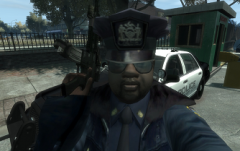
From the album: LCPDFR Shenanigans
The man Liberty City was waiting for has finally arrived, and stops at nothing, not even this thing called "game crashes" to deliver justice, one baton swing at a time. -
-
 So the mod for 1.14 works for me now, yay! Although I haven't gotten a callout yet but it's working with the LCPDFR Loader now. Hopefully I can get a callout before my game crashes so I can tell if the whole thing works XD.
- 132 comments
- 23 reviews
-
-

- 1
-
-
Did you disregard half of what I said? Your version is still outdated than LCPDFR's actually and questionable since you're posting it around everywhere, even though LCPDFR has it's own advancedhook with the installer I said it still did not work. The log says the problem is with the LCPDFR loader file not being able to be accessed since it is in use by something else. I figured it out and oddly it wasn't related to advancedhook nor any .asi. SOLUTION FOUND: It turns out the script "Backup WIP" ('?do=embed' frameborder='0' data-embedContent>>) was causing the problem. LCPDFR Loader .dll said it was unable to be accessed since assumably the Backup script was using it for startup. Perhaps a possible solution might be a "Load Order" mod/script like FOMM (Fallout New Vegas Mod Manager) or Skyrim's NMM and/or Mod Organizer (Nexus Mod Manager) to customize which starts first and maybe help with loading times? Just a thought.
-
-
Hello all! So I reinstalled GTA4 several times before to clear up the crashing and all. It works now but upon loading I get the "Error in LCPDFR_Loader.loader.dll on the top left. Semi related, I installed the minigun mod by JulioNIB and both LCPDFR and the minigun mod say in the console when I scroll "could not access (file location)" and etc. I've tried making the entire folder of GTA4 not read only, gave the folder admin access, tried a manual install, automatic reinstall a few times, and yes I have all the loaders (scripthook/dsound/etc). The strangest thing is that I don't have any LCPDFR.log, but I do have some diagnostics and the logs of the other loaders attached so this hopefully can help. Below is my mods list including .dll/.ini's and .asi's in case something might be interfering that I don't know about. .INI/.DLL mods that are in /scripts/ -AC130 -GTA5HUD -Minigun -vdH PoliceHelper -Backup -Indicator -RPMGauge -Seat Belt Chime -Stop Sticks V1 -vdH Towing Service .ASI mods that are located with GTAIV.exe -ELS V8 -FirstPerson -Skorpro Brake Lights -Traffic Load -Trainer -And of course LCPDFR 1.0D-1 Thank you guys in advance! Update #1: So I looked around and found some other version of advancedhook, and I have a LCPDFR log now but I'm still getting the error plus a message that says "LCPDFR has encountered a critical error and has been shut down. Please see the log file." Log is attached at the bottom. AdvancedHook.log AdvancedHookInit.log ScriptHook.log ScriptHookDotNet.log Diagnostics_20.2.2015_17_31_31.log LCPDFR.log
-
Well one, you could read the settings file since it's in detail there. But here; Go to your settings file and where it says
- 97 comments
- 67 reviews
-
-
Heh, yea probably. I mean considering how unstable GTA4 becomes with a few scripts and car mods. V looks a lot more promising from how it went from old gen to the next gen consoles. They better be saving the best for last!
-
This, I am interested in deeply. An on-foot radio with an actual object on the shoulder/clipped on belt and when responding, you actually lean your head to your shoulder/pull it from belt and speak, and the details come in as it's still in your hand. I understand it's difficult (I've tried modding...TRIED) but it's possible. Good luck with this!
-
Hey, great pack, works wonderfully and all but I want to use the liveries included in each cars' folder, how would I add them? I use SparkIV and from what I see I can only replace textures...
- 89 comments
- 29 reviews
-
Happy birthday Yard! Nice "spoiler" ineseri xD
-
Update 1.3: I am proud to say my classes seem to be more open (as of RIGHT NOW) and some spare time has been found. I will begin working on this over the weekend, or as early as Friday afternoon, and in total time (if I worked on it nonstop, including filming, editing, rendering, uploading, and NO errors whatsoever), this should take me about 24 hours. Thanks for the support so far!
-
-
This is really great, but I've been wanting to use the Extra liveries (I don't mind if I see a bunch of Alderney ambulances in Bohan or whatever), but I don't know how to use it. I want to add, not replace skins. But when I try it with any car model (usually police and this case the ambulance), the certain picture is replaced in .wtd, not added. I'm using Spark 0.6.6 and I am a noob at this. I only know how to import cars and change handling/vehicle lines.
- 20 comments
- 7 reviews

