Skip to content
View in the app

A better way to browse. Learn more.

LCPDFR.com

A full-screen app on your home screen with push notifications, badges and more.

To install this app on iOS and iPadOS
  1. Tap the Share icon in Safari
  2. Scroll the menu and tap Add to Home Screen.
  3. Tap Add in the top-right corner.
To install this app on Android
  1. Tap the 3-dot menu (⋮) in the top-right corner of the browser.
  2. Tap Add to Home screen or Install app.
  3. Confirm by tapping Install.

Michael Grabiec

Members
  • Joined

  • Last visited

  1.    TooTall67 reacted to a file: Undercover Crown Vic Taxi
  2.    Officer GILLETTE ABDI reacted to a file: police cruiser
  3.    TaylorSwift reacted to a comment on a file: Delta Ray
  4. Michael Grabiec started following PMX , 2 and 1
  5. Images added to a gallery album owned by Michael Grabiec in GTA IV Galleries
    cop car from my town
  6. well i always put the extras on the top so i wouldnt know about that
  7. select all the windows and set the texture to [vehicle_generic_glasswindows2 lights(vehglass)]. let me know what happens
  8. you have to change your glass texture. i had the same problem few months back and fixed it
  9. yeah lol 2nd degree robbery.
  10. yeah i made a simpler one too for myself cause im on a laptop and its not as good as a desktop computer, i uploaded this one cause i figured only people with high-end pc's mostly develop anyways. although do you really think the lights look good? i've been thinking about change the els on it cause from far away it seems a little crappy
  11. you're welcome! it would of been out weeks ago but I got arrested before I was able to finish it lol I finally got it done this past week
  12. OMG! alt-j lol please that beeping was annoying alt-j will make it go backwards
    • 454 downloads
    • Version V1.0
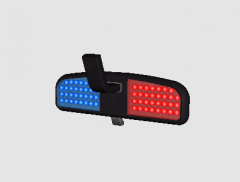
    Rear view mirror police lights. I put this in GTA IV cause I love how different it is from other interior police lights, if there are any problems please let me know in the reviews.
  13.    KN1IGHT reacted to a gallery image: PMX

Account

Navigation

Search

Search

Configure browser push notifications

Chrome (Android)
  1. Tap the lock icon next to the address bar.
  2. Tap Permissions → Notifications.
  3. Adjust your preference.
Chrome (Desktop)
  1. Click the padlock icon in the address bar.
  2. Select Site settings.
  3. Find Notifications and adjust your preference.