Rareroblox
Members
-
Joined
-
Last visited
Everything posted by Rareroblox
-
Same here
-
Do you think this is a good setup for a custom build? First time gonna setup one, so I hope this is good? https://pcpartpicker.com/list/BvyTsZ
-
Graphics is NVIDIA GT1030 w/ 2GB of dedicated graphics memory. Website is:
-
https://pcpartpicker.com/list/k9qg8Y
-
Yup, ELS needs ScriptHookV in order to work.
-
If you'd like I can help you set up LSPDFR. I sent you a message on LSPDFR so we can get started. Welcome to the LSPDFR Community by the way! 🙂
-
So what mods are you currently using?
-
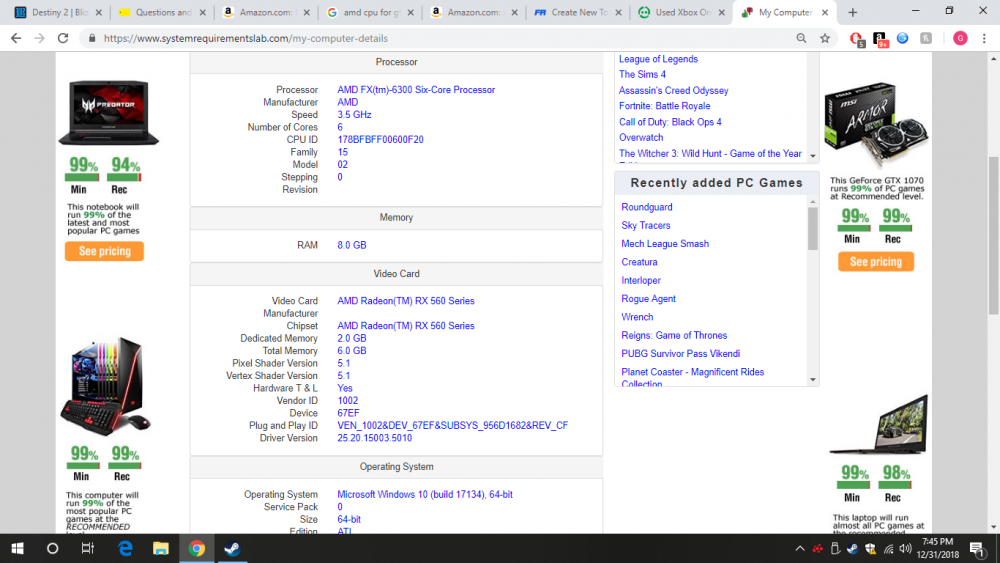
Hello All, I was wondering if an Ryzen 7 2600X CPU would be a good CPU to upgrade to with my current PC specs listed below, and if it will be compatible with my PC. If anything, maybe the GPU needs an upgrade? I am trying to run LSPDFR at 60fps with mods loaded in, because so far it is not doing a great job so far. DESKTOP.txt
-
Most of my callouts are Albo's and once they start loading in, they drop my FPS to about 20-35 fps. So, it's either high FPS or callout packs, which personally I want callout packs.
-
I have these mods installed currently. What mods are a huge FPS killer that would help me?
-
Now, if I delete some mods, will they help my FPS? I notice the big FPS drop and sometimes I don’t even notice it, but will it increase or not even do anything at all?
-
Hello. Whenever I GTA V on it's own without LSPDFR/Mods running, I get about 60+ FPS. But, when I start LSPDFR and all the mods start coming in, it drops the FPS down to 25-30 FPS. Note, I do have a lot of mods installed, but they are mostly callout packs, and some Albo mods as well. Any fix or suggestions of what I should do? It's not fun running 25-30 FPS and trying to patrol with all of the stuttering and lag. Also, I usually don't lag in Blaine County, or some other part of the map than Los Santos, and also at night.
-
Oh, weird. Cause I see Jeff, and FirstThirtyMinutes on YouTube always turn off their siren outside of their car and I have no idea how to do it lol.
-
I actually figured out what was going on, haha. It was actually because I had to reinstall my ASILoader in OpenIV and restarted my PC and it worked 🙂. Question though, do you know how to turn off your siren when you go up to the door? I tried to hit G, but it doesn't work, and maybe I don't know the key to.
-
I updated RPH to the latest one today after not playing LSPDFR for a while. After I installed a new car pack, ELS was working perfectly fine. Then, when I when on to hop on again to play, the lights doesn't want to work anymore. When I turn on ELS, only the taillights come on, and nothing else. I tried reinstalling ScriptHookV, that didn't work. What should I do?
-
Do you think that if I get the Ryzen 5 2600X and the GTX 1660, it would work for my PC? I haven't really went on to do anything to it.
-
It's back up and running again.
-
Hi, is the steam workshop down for anyone else? I am trying to download mods for ATS, but it is showing that there is no mods available like all of it is gone?
-
I put mine at 20000. When I tried to put 30000, it went to fast and didn't load LSPDFR in time.
-
Hello all, I hope everyone is having a great day. I am experiencing an issue with RPH when I start up GTA V. I recently installed a new pack, and installed it under patchday18ng which what it has told me to do via the install.txt file. I did, and suddenly it crashed my game on startup. I said to myself, "Oh, maybe it's just a car pack issue". So, I uninstalled it and downloaded another car pack and installed it to patchday20ng, and it still crashed my game. The first pack I installed wanted me to install the cara,meta, and vehicles.meta as well, so I don't know if it is either the cara.meta file or the vehicles.meta file. When I started up the game, Rage provided me with a crash log, which I will provide below for you guys to check out. My last ever option is to reinstall the game, which is a pain. But first, I would like to try other options as well. I have tried verifying game integrity via Steam, but that didn't work. Hopefully this issue can be resolved.
-
Is there any other CPU's that I can use with like a 1070ti or below?
-
Here you go. DESKTOP.txt
-
I can maybe post a picture of the inside of my PC if you want? Maybe you know some things if I showed it to you?
-
Hi! Thanks for the reply. Right now, my current PC wattage is 500watts. What PSU do you think I should upgrade too? I'll keep in mind of the 1070ti and the Ryzen 5 2600. Since I already have 8gb of ram, can I just add another 8gb?
-
Hi guys. So I just bought a gaming desktop not that long ago, and the specs are attached. I was thinking about putting a Nvidia GTX 1060 because that is the only power supply level that it can run on, and I can put in an AMD CPU because it has a AMD motherboard AMD CPU, so what do you guys think is the best CPU I should get to be able to run 1080p at 60fps games like GTA V, etc?