


vynlthrash
Members
-
Joined
-
Last visited
Everything posted by vynlthrash
-
im at work :( but just go to steam...click on gta iv once then on the left look for properties :) then on one of the tabs look for verify integrity of game cache or something like that :) run it (takes forever) and BAM old cars
-
lol yes...you have to do that looong validations thingy..i was a retard and didnt backup your vehicle file :(
-
dont delete aha in open iv go to gtaiv<pc<models<cdimage<vehicles click edit mode at the top then click the green plus sign...itll open a file browser so make sure your new car is in the gtamods folder and then just click on both files and click okay...then file<rebuild!
-
then youre in the wrong place aha..once you get to cdimages itl have weapons peds and vehicles etc try pc<models<cdimages?? yea its pc then models...once you import the models..go to file and rebuild then once its done go in game and check :)
-
so just go to downloads or google and look for NON ELS cars and then you need to import police and police2 and polpatriot into open iv i think its common<data<cdimages<vehicles ** thats fine aha we can use in game txt chat ***if you find two cars you like that are named police2 for example...you can rename them to fit :)
-
heh they are els versions so youd have to get new cars :( unless you can get els working **howd you like els btw ** also i have the next couple of days off...if you want i can install my lcpdfr and we can play online :)
-
you have els cars so just google non els cars and import them with open iv and youre good
-
damn...i can try again aha AdvancedHookIni.asi ^^^^thats what i took out and put on the desktop..make sure thats not in the root folder
-
ohh aha dang..makes sense..have you tried a different enb?
-
howd it work???
-
i have a fix!!!!!!!! just helped someone else... take out the AdvancedHookIni.asi file, just copy it to desktop or somewhere else but do not delete it.!!!!
-
okay im in..am i good to go???
-
kewl just gimme your ID and password from the program and im good
-
no camera needed then just get teamviewer install it then i can start the connection skype only needs a mic if you have one aha
-
get skype and teamviewer https://www.teamviewer.com/en/index.aspx?pid=google.r.us.s.desk.remote_desktop&gclid=Cj0KEQjwuLKtBRDPicmJyvu_qZMBEiQAzlGN5h6_s1kFV17Vp8WSOEJkzXhrb7JKs-87x9reB0NEbjwaAqHT8P8HAQ http://www.skype.com/en/
-
kewl do you have skype???
-
im actually home..i could now
-
itd make it alot easier..but it should work now..when i can..ill connect in and find out..i want to fix this aha
-
bahahaha right?
-
hey try this too
-
its cool :)gimme a minute hey run through this really quick..ive seen it work..
-
and i also put one in my top help question i meant the diagnostic tool aha not the log...it gives you a list of things needed and gives you a marker for things that are missing or needed
-
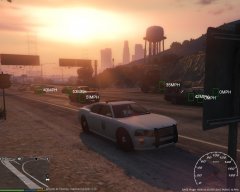 the boxes? its a speed radar mod https://www.gta5-mods.com/scripts/speed-radar
 -
malware bytes always deletes it for me..i just disable security until i finish the download
-
gahh


