




Kode103
Members
-
Joined
-
Last visited
Everything posted by Kode103
-
I personally prefer no rambar like this! We already have Kevin's Explorer (well, those who actually still have it). So no I dont miss a rambar, I love this model just how it is! :D 5/5
- 21 comments
- 10 reviews
-
Work on your alignment and you should be fine. The real looks "squigly" because you typed the text too close to the edge, not taking in mind the curve. Just keep working on it :)
- 5 comments
- 3 reviews
-
-

- 1
-
-
That happen when you change the the lighting types, by default its LED, so if you change it to STRB on your ELS Folder it will change the letter in game, same goes for the rest of the stages. Go to the ELS User Guide (Pg. 9) so you can see what to change it to. Example: Scroll down to [WRNL] and look for Type = halo change the default "halo" to "strb" (without quotes!). Now scroll down to [PRML] and again look for Type = leds, change "leds" to "strb". Lastly, go down to [sECL], and change "leds" to "drct". Save.
-
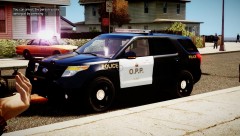 Is that a Arjent lightbar?? :D
 -
Hey guys, this is a small pack of the Chicago Police skins on the 2013 Ford Police Interceptors. I did release it in the past but it was with 2012 Models. I decided to release it but with the new models and also include the light files. I do know that CPD does not use rambars with their models; I live in Chicago. Credits for the original light files go to Cj24 and KevinDV. Credits for the models go to Cj24 and KevinDV. Thanks for downloading! NOTE: On the non Rambar Ford Taurus, the TA is the rear blue lights, so the reflection will be yellow, but the lights will flash blue. To change this, go to your ELS folder, and change the lcpd_taurus_demo file or the default_config file and scroll down to ENV_LIGHT_COLORS, and change "Amber" to "Blue". -RK Models: 2013 Ford Police Interceptor (w/ Rambar) by Cj24: http://www.gta-modding-chest.com/database/220-2013-ford-police-interceptor-liberty-city-police-department-els7/index.html 2013 Ford Police Interceptor by Cj24: http://www.gta-modding-chest.com/database/214-2013-ford-police-interceptor-liberty-city-police-department-els7/index.html 2013 Ford Police Interceptor Slicktop by Cj24: http://www.gta-modding-chest.com/database/219-2013-ford-police-interceptor-liberty-city-police-department-slicktop-unmarked-els7/index.html 2013 Ford Police Interceptor Utility by KevinDV: http://www.gta-modding-chest.com/database/292-2013-ford-explorer-v1-1l-els-liberty-city-police-department/index.html
- 3 comments
- 10 reviews
-
-
It looks good, but you can tell you copied and pasted the text, we can probably be ok with a copy and paste of a logo but the text should be your own work. other than that it looks good.
- 10 comments
- 6 reviews
-
-
- 2
-
-
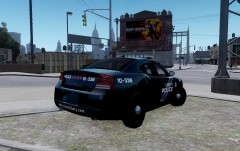
From the album: RK's Skin Packs WIP
This is one of my next Liberty Police Skin Packs. Skin packs may be released in no particular order. Credits for the model go to Cj24. -
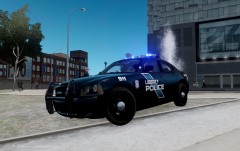
From the album: RK's Skin Packs WIP
This is one of my next Liberty Police Skin Packs. Skin packs may be released in no particular order. Credits for the model go to Cj24. -
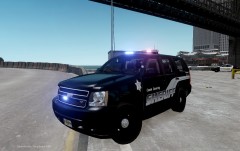 Its being considered
 -
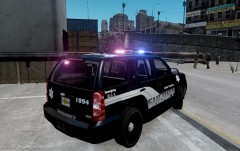
From the album: RK's Skin Packs WIP
Cook County Sheriff skin pack, will include the new design and the old CVPI and Impala design. Model made by Hilth0: -
From the album: RK's Skin Packs WIP
Cook County Sheriff skin pack, will include the new design and the old CVPI and Impala design. Model made by Hilth0: -
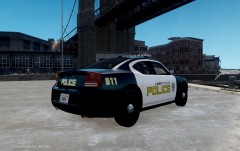
From the album: RK's Skin Packs WIP
Next LCP skin pack #5. Skin packs may be released in no particular order. Logo may be changed. Model made by Cj24: -
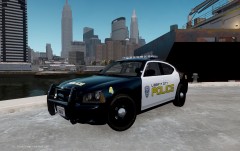
From the album: RK's Skin Packs WIP
Next LCP skin pack #5. Skin packs may be released in no particular order. Logo may be changed. Model made by Cj24: -
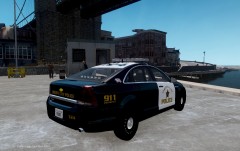
From the album: RK's Skin Packs WIP
Next LCP skin pack #4. Skin packs may be released in no particular order. Model made by KevinDV: http://www.gta-modding-chest.com/database/293-2012-chevrolet-caprice-v1-1l-els-liberty-city-police-department/index.html -
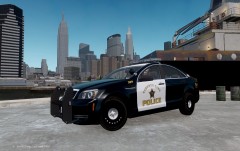
From the album: RK's Skin Packs WIP
Next LCP skin pack #4. Skin packs may be released in no particular order. Model made by KevinDV: http://www.gta-modding-chest.com/database/293-2012-chevrolet-caprice-v1-1l-els-liberty-city-police-department/index.html -
-
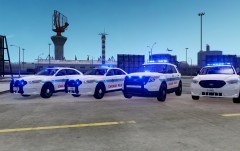 If they were my models, I would, but sadly they are not, and yes they don't use rambars, I haven't seen any in the are with them
 -
Well Ive done the pack before, but that was with 2012 models, this one is with the new 2013 models
-
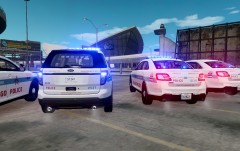
From the album: CPD Skins Screenshots
No word yet if the textures will be released! -
This is my work of the CPD Models. I remade my skins to work with KevinDV Explorer and Cj24 Taurus to make the skins look more realistic. No decision yet if they will be released or not. Emis file was edited by me. Original light textures made by Traumapak and Cj24.
-
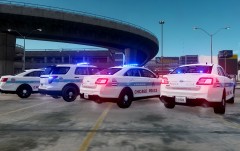
From the album: CPD Skins Screenshots
No word yet if the textures will be released! -
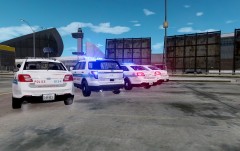
From the album: CPD Skins Screenshots
No word yet if the textures will be released! -
From the album: CPD Skins Screenshots
No word yet if the textures will be released! -
Cancel this, I figured it out, didn't clearly read that Cruise is for LEDs only, please close this topic.

