







Rancho Division

By Jedahdiah
- 1,116 views
- View Jedahdiah's images
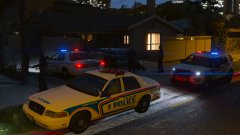
It's been near on two months since I last touched the Caprice's. I've fixed some issues and updated the base model. These were my first ever models, so they're pretty basic not overly good.
My love for this car and the old style lightbars makes me want to start again from scratch (oh god) and get the quality better, inside and out. I'll probably try an ELS version too, and an updated interior.
I notice the speaker coming through the cage. I'll fix it later.
Copyright
© Jedahdiah
Recommended Comments
Join the conversation
You can post now and register later. If you have an account, sign in now to post with your account.