Skip to content
View in the app

A better way to browse. Learn more.

LCPDFR.com

A full-screen app on your home screen with push notifications, badges and more.

To install this app on iOS and iPadOS
  1. Tap the Share icon in Safari
  2. Scroll the menu and tap Add to Home Screen.
  3. Tap Add in the top-right corner.
To install this app on Android
  1. Tap the 3-dot menu (⋮) in the top-right corner of the browser.
  2. Tap Add to Home screen or Install app.
  3. Confirm by tapping Install.

Shots Fired

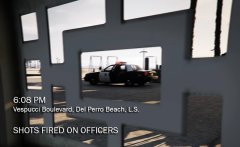
6:07 PM - Four armed subjects assault patrol unit Adam 6. Shots are fired. Officers request help.

6:08 PM - 1 Lincoln 15 responds to Code 99. All units in the area respond 10-99

6:09 PM - Units on scene. Shootout in progress.

6:11 PM - Shootout ends. EMS is dispatched

6:16 PM - EMS on scene. 

6:33 PM - two officers and three suspects declared DOA. One suspect injured and placed under arrest 

6:35 PM - CSI and Coroner are dispatched

From the album:

Los Santos Real TV

· 29 images

Account

Navigation

Search

Search

Configure browser push notifications

Chrome (Android)
  1. Tap the lock icon next to the address bar.
  2. Tap Permissions → Notifications.
  3. Adjust your preference.
Chrome (Desktop)
  1. Click the padlock icon in the address bar.
  2. Select Site settings.
  3. Find Notifications and adjust your preference.