
Skip to content
View in the app

A better way to browse. Learn more.

LCPDFR.com

A full-screen app on your home screen with push notifications, badges and more.

To install this app on iOS and iPadOS
  1. Tap the Share icon in Safari
  2. Scroll the menu and tap Add to Home Screen.
  3. Tap Add in the top-right corner.
To install this app on Android
  1. Tap the 3-dot menu (⋮) in the top-right corner of the browser.
  2. Tap Add to Home screen or Install app.
  3. Confirm by tapping Install.

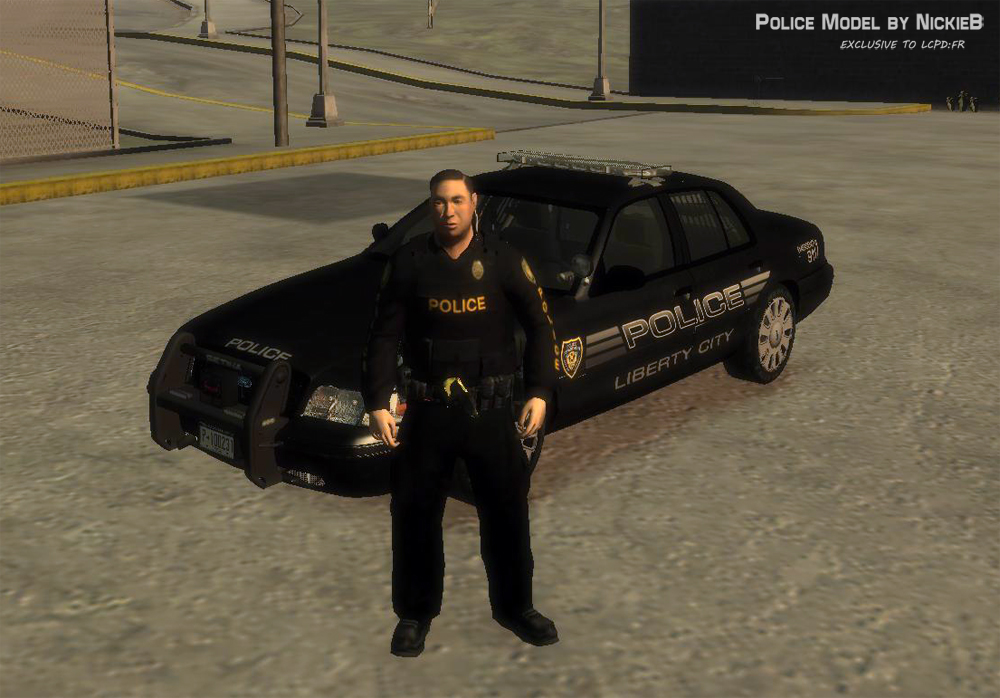
LCPD Vest Officer Model V1.1

(19 reviews)

5 Screenshots

--- Police Vest Ped V1.1 ---

UPDATE V1.1: Fixed the hat bug, police and sheriff hat textures in white/orange included.

v1.0 - This is a ped-mesh of the bottom half of policeman456 cop model combined

with the top half of the FBI ped from EFLC. It can replace any ped you choose it does not have to be

the traffic cop. Other textures I have made for the vest/jacket are included. The skins for the cars are available

if you want them I can release them. The vehicles pictured are all my unreleased vehicles.

Feel free to PM me if you find any issues.

CREDITS: NickieB

Credits from policemans456's readme

DeltaHawk of Arma for the belt model

Maze426 for the help with 3ds max

policeman456 for putting it all together

Used with permission from policeman456

This Mod is Exclusive to LCPDFR.com

Thanks for the download!

What's New in Version V1.1

Released

  • V1.0 -
  • Initial Release
  • V1.1 -
  • Fixed hat bug where hat would spawn inside players head

User Feedback

Recommended Comments

JSDGraphics

Members

Can you make one with a Campaign/Stetson hat on it please, I'll do anything.

nfspatrol73

Members

is there a link to the cv in the third pic

Slimory

Members

Nice work, but i have yet to make ANOTHER uniform to fit this model :( 10/10 :D

EscobarJP

Members

I'm surprised no one has put that belt on the State Trooper model yet.

NickieB

Members Author

@nfspatrol - No, its something I made and is still a WIP, you wont see that for awhile.... Sorry. Other projects to finish first

@JSDgraphics - LIke the one ridgerunner released? the state trooper style hat

@Escobar - Someone has, its in the downloads somewhere

EscobarJP

Members

I know which mod you're speaking about. They simply reskinned the policeman456 cop model. I was referring to the original Rockstar State Trooper model having the DeltaHawk of Arma belt. If you do know of one, please point me in the right direction. =)

NickieB

Members Author

Oh, I didn't know that it was just re-skinned. I'm pretty busy with projects and support but I'll see if I can sneak that in, it only takes a few minutes to make. Keep an eye out for it

f18m44

Members

hey can i make a opp texture from this cause this is perfect, i give 10/10 only problem im having is with the hat. When you put it on the players head goes through it.

NickieB

Members Author

You can make a texture for it, I don't care. Just make sure to credit me for the model if you release it. I'm aware of the problem with the hat. I have a fix for it, I just have to upload a new version New version uploaded pending approval

j0eyb

Members

thats got esu writen all over it haha

geeekfleet1

Members

hey NB nice work !... can you upload that skin on the black cvpi ... did a good job !!!

geeekfleet1

Members

also what cvpi is that?

NickieB

Members Author

@geekfleet1 - Sure I can upload the skin. I have to put the skin pack together for release so watch for it in the next day or two. The CVPI is one of my old WIPs, its unreleased at this time. Sorry... It will be out in the near future, I just have another project to release first. My new slicktop will be out in the next day or two and a 2012 charger soon also

Nigel070

Members

Which files needs to be replaced by wich(i just started modding lacking a lot of knowledge)

NickieB

Members Author

Its optimized for whatever normal police ped you want to use it for except the fat cop. I use it as M_Y_COP_TRAFFIC but it can be used as M_M_FBI or M_M_ARMOURED. The files are categorized in the download as to where they have to go and already named for what they can replace. The files under component ped go into the componentped.img and the files in the ped props folder replace those in the pedprops.img. Lets say you replace M_M_ARMOURED in the componentped.img, you NEED to replace the same name, M_M_ARMOURED in the pedprop.img in order for the hat to work.

If your having problems Nigel070 PM me, I just assume that everyone knows how to install mods. I should have typed up a install guide.

K9Commander

Members

Very nice. Thanks NB!

trw1000

Members

Great Work!!! Seems to be all right now... 5/5

supergrunt

Members

i got a little problem, when i try to change the vest or jacket textures sparkiv crashes to desktop (only one or two can be changed but the rest results in crash)

MrPstromb

Members

i got a little problem, when i try to change the vest or jacket textures sparkiv crashes to desktop (only one or two can be changed but the rest results in crash)

Unfortunately I have detected the same issue.

shawnbrah

Members

I am ABSOLUTELY clueless as to where I save/import the vest textures and the hat textures to... I've looked everywhere an cant believe that no one else has asked the same question yet. Please help?

NickieB

Members Author

For the people with the crashing issue - use OpenIV

Shawnbrah - the texures are changed in the cop_traffic.wtd file under componentpeds.img and for the hat its under pedprops.img. You need to use open iv. PM me if you can't figure it out. I don't check the comments as much as I should

FutureSoldierUS

Members

How do you use OpenIV It wont work for me.

NickieB

Members Author

You use open iv the same way you would use sparkiv. Navigate to the file location(componentpeds.img) and import the new model (M_Y_COPTRAFFIC.WFT/WTD) and then swap around any textures if you want to. Same thing for the hat except that goes under PEDPROPS.img

avsports23

Members

I am the 1000th download! Nice uniform!

Create an account or sign in to comment

Latest Mods

Account

Navigation

Search

Search

Configure browser push notifications

Chrome (Android)
  1. Tap the lock icon next to the address bar.
  2. Tap Permissions → Notifications.
  3. Adjust your preference.
Chrome (Desktop)
  1. Click the padlock icon in the address bar.
  2. Select Site settings.
  3. Find Notifications and adjust your preference.









