Skip to content
View in the app

A better way to browse. Learn more.

LCPDFR.com

A full-screen app on your home screen with push notifications, badges and more.

To install this app on iOS and iPadOS
  1. Tap the Share icon in Safari
  2. Scroll the menu and tap Add to Home Screen.
  3. Tap Add in the top-right corner.
To install this app on Android
  1. Tap the 3-dot menu (⋮) in the top-right corner of the browser.
  2. Tap Add to Home screen or Install app.
  3. Confirm by tapping Install.

Breathalyzer 1.6b

(25 reviews)

1 Screenshot

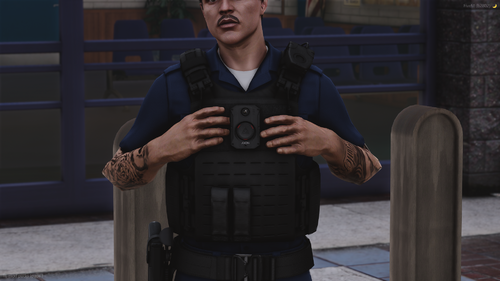
This is a script that gives you an option to test Los Santos citizens for Alcohol in their blood.

Note:
- Script is totally re-written for Rage Plugin Hook and doesn't support ScriptHook.NET anymore!

- When you want to do a test on a person in the vehicle, simply walk to the driver's window and press the key for activation! 

Changelog:

In Version V1.5b:

- Fixed a bug that crashed the mod when pressing T after updating to 1.5   

In Version V1.5:

- Added support for soon to be released Traffic Policer by Albo1125

  • When ped is drunk in his mod, Breathalyzer will read his Alcohol level correctly

- Fixed couple of bugs here and there

   In Version V1.4c:

      - Added support for the latest version of Rage Plugin Hook

   In Version V1.4b:

      - Added an option to use the modifier key, default is Left Shift (you can change it in the BreathalyzerRAGE.ini)

      - If you are using the modifier key, you have to press that key and the key for Breathalyzer activation to start the test

    In Version V1.4:

     - Added animations for every possible scenario for both the suspect and your Police character.
      If you have any recommendations for this feel free to comment bellow and improve the mod!

     - Code optimization

    In Version V1.3:

    - From now on when you want to Breathalyze suspect in a traffic stop (LSPDFR), you don't have to make him leave the vehicle, just press key for starting the test and it will start while the suspect is still sitting inside his vehicle
    - This is usefull when you want to fine or warn him with already included system inside LSPDFR
    - Added some small UI improvments
    - Fixed a lot of bugs and made script even more reliable

    In Version V1.2:

    - Added the BreathalyzerRAGE.ini, now you can change the key for starting the test!  - Big thanks to Straysify for providing the information on how to create and setup ini file!


Featuring:

-  Stand by the person you want to test for Alcohol and press SHIFT + O (you can change it in the BreathalyzerRAGE.ini), test will start and display the results!

- Script is fully compatible and designed for LSPDFR and works excellent with Traffic stops

Known bugs:

- Report possible bugs in the comment section bellow, NOT in the review section!

Troubleshooting:

- Before you say in the comments that it's not working do the following:
1. Download and install newest version of RagePluginHook!
1. Copy everything from BreathalyzerRAGE.rar to your Plugins folder, located in your main GTA V directory! 
4. Start the game!

Donations:

- To support my work (and give me motivation for more modding) go to here and press Donate button at the top!

Donators:

- Be the first one to donate and support this mod!

Video:

https://www.youtube.com/watch?v=gsAQgo0rkDk 

Credits:

Author - Qwerasdzxc

Help - Straysify


Developer note (for Breathalyzer compatibility with other plugins):


If you want to make person drunk (or better said if you want Breathalyzer to read person's alcohol level correctly),

you need to set that Peds armor to 69. When you do that, my mod will read his alcohol level as he's drunk.

 

What's New in Version 1.6b

Released

- Compiled the mod using 0.34.862.6641 version of Rage Plugin Hook

- Mod now relies on .NET Framework 4.6


- Fixed a bug that crashed the mod when pressing T after updating to 1.5

- Added support for Traffic Policer by Albo1125

  • When ped is drunk in his mod, Breathalyzer will read persons Alcohol level correctly

- Fixed couple of bugs here and there


-----------------------------------------------------------------------

- Developer note (for Breathalyzer compatibility with other plugins):


Spoiler

If you want to make person drunk (or better said if you want Breathalyzer to read person's alcohol level correctly),

you need to set that Peds armor to 69. When you do that, my mod will read his alcohol level as he's drunk.


User Feedback

Recommended Comments

ITProMD

Members

Yes you can set your own key, just replace it in the BreathalyzerRAGE.ini 

When I do that it does nothing but crash the breathalyzer plugin, any idea why?

Qwerasdzxc

Members Author


When I do that it does nothing but crash the breathalyzer plugin, any idea why?

Don't now really, try removing other mods.. Not sure what's causing this problem 

Luke387

Members

Well not work I have done it all to the letter and no joy!

Luke387

Members

strange I got it to work for 1 game load in and next time I played was not working again and I made no changes, first time it worked I did not need to use f4 to load but 2nd time when I try f4 to load I get the error permission denied

Qwerasdzxc

Members Author

strange I got it to work for 1 game load in and next time I played was not working again and I made no changes, first time it worked I did not need to use f4 to load but 2nd time when I try f4 to load I get the error permission denied

I have no idea, tthat problem is not related to my mod, it has something to do with RagePluginHook.. 

reaperco12

Members

Yes I have the same problem it either dosent start the game and CTD or just after deffo this mod all I did was take out the ini file so it cant load the mod and not had a crash since

Albo1125

Insiders

I was wondering if this ties in with a ped's movement animation being drunk (or something else) or if it's just random.

Kilyin

Members

Dunno what the other guys are doing but I've been using this mod since it came out and it's never crashed once. Maybe check your installation.

Qwerasdzxc

Members Author

I was wondering if this ties in with a ped's movement animation being drunk (or something else) or if it's just random.

Actually it doesn't tie with the animation, but that's really an excellent idea! I'll just have to find a way to check if specific animation is active, not sure if that's even possible but I'll try!

Thanks for the tip! :) 

Kilyin

Members

Any chance you could add a key modifier (i.e. ctrl-X or shift-X) to initiate the breathalyzer? I'm quickly running out of keys with all these mods and plugins...

Qwerasdzxc

Members Author

(edited)

Any chance you could add a key modifier (i.e. ctrl-X or shift-X) to initiate the breathalyzer? I'm quickly running out of keys with all these mods and plugins...

Yeah sure, I'll do that! 

EDIT: It's present in the current version! :wink:

Edited by Qwerasdzxc

Guest

Guest

Guests

Thanks for the modifier key Qwerasdzxc! I was hoping you could do something like this and it's like you read my mind xD I always had to change the key of the Breathalyzer due to checking someone's name or license plate on foot and the name had the letter O the Breathalyzer test begun. Now that problem will be gone! Thanks again!

Qwerasdzxc

Members Author

Thanks for the modifier key Qwerasdzxc! I was hoping you could do something like this and it's like you read my mind xD I always had to change the key of the Breathalyzer due to checking someone's name or license plate on foot and the name had the letter O the Breathalyzer test begun. Now that problem will be gone! Thanks again!

No problem man, I'm accepting all recommendations you guys give me. Feel free to share all of your wishes here, I'll  be glad to implement them! :) 

Kilyin

Members

Thanks for the modifier key Qwerasdzxc! I was hoping you could do something like this and it's like you read my mind xD I always had to change the key of the Breathalyzer due to checking someone's name or license plate on foot and the name had the letter O the Breathalyzer test begun. Now that problem will be gone! Thanks again!

Or he read my post! ;)

Either way, appreciate the quick addition Qwera.

Guest

Guest

Guests

Or he read my post! ;)

Either way, appreciate the quick addition Qwera.

Yeah, he did lol When I posted what I posted, I noticed you had requested that in the post above ;) Thanks man! I also wanted that feature.

lilmisschloe

Members

RageHook v21 is out now - update to support new version needed please.

Qwerasdzxc

Members Author

RageHook v21 is out now - update to support new version needed please.

I will, thanks for notifying me

lilmisschloe

Members

(edited)

In the next update can you change the format of the measurement to the USA format?  So instead of 0.80 it would be 0.08

Edited by lilmisschloe

Qwerasdzxc

Members Author

In the next update can you change the format of the measurement to the USA format?  So instead of 0.80 it would be 0.08

I can make it adjustable in the .ini, sure. 

BigB79

Members

[8/12/2015 11:12:45 AM.836] Console variable 'WarnOnPluginLoad' is false, will allow plugin to load.
[8/12/2015 11:12:45 AM.836] Loading plugin from path: G:\Steam\steamapps\common\Grand Theft Auto V\Plugins\BreathalyzerRAGE.dll
[8/12/2015 11:12:46 AM.300] <UNLOADED PLUGIN>: Initializing input system
[8/12/2015 11:12:46 AM.302] <UNLOADED PLUGIN>: Initializing game console
[8/12/2015 11:12:46 AM.303] <UNLOADED PLUGIN>: Initializing forms manager
[8/12/2015 11:12:46 AM.308] Plugin "Breathalyzer" was loaded from "BreathalyzerRAGE.dll".
[8/12/2015 11:12:46 AM.322] Breathalyzer:
[8/12/2015 11:12:46 AM.322] Breathalyzer: ==============================
[8/12/2015 11:12:46 AM.322] Breathalyzer: UNHANDLED EXCEPTION DURING GAME THREAD TICK
[8/12/2015 11:12:46 AM.322] Breathalyzer: ------------------------------
[8/12/2015 11:12:46 AM.322] Breathalyzer: Origin: Game fiber "Plugin "Breathalyzer" main thread".
[8/12/2015 11:12:46 AM.322] Breathalyzer: ------------------------------
[8/12/2015 11:12:46 AM.322] Breathalyzer: Exception type: System.MissingMethodException
[8/12/2015 11:12:46 AM.322] Breathalyzer: Exception message: Method not found: 'Rage.AnimationTask Rage.TaskInvoker.PlayAnimation(Rage.AnimationDictionary, System.String, Single, Rage.AnimationFlags)'.
[8/12/2015 11:12:46 AM.322] Breathalyzer: ------------------------------
[8/12/2015 11:12:46 AM.322] Breathalyzer: Inner exceptions:
[8/12/2015 11:12:46 AM.322] Breathalyzer: ------------------------------
[8/12/2015 11:12:46 AM.322] Breathalyzer: Stack trace:
[8/12/2015 11:12:46 AM.323] Breathalyzer: at RageHookProject.EntryPoint.IniSettings.Main()
[8/12/2015 11:12:46 AM.323] at Rage.GameFiber.Main()
[8/12/2015 11:12:46 AM.323] Breathalyzer: ==============================
[8/12/2015 11:12:46 AM.323] Breathalyzer:


Crashes on loading of the game and this is from the rage hook log......   I have no idea what's wrong....  see what im doing wrong?

Qwerasdzxc

Members Author

                           - snip - 

Crashes on loading of the game and this is from the rage hook log......   I have no idea what's wrong....  see what im doing wrong?

Looks like you're not using the latest version of Rage Plugin Hook.. Update to 0.22 version and then re-download my mod. 

BigB79

Members

(edited)

When i goto .22  lspdfr crashes  but i'll try again.  I'm using the rage hook that came with 2b


okay I downloaded and installed rage hook .22 and going to try and see what happens, last time all it did was crash lspdfr, so not sure whats going on.

Edited by BigB79

Qwerasdzxc

Members Author

When i goto .22  lspdfr crashes  but i'll try again.  I'm using the rage hook that came with 2b 

You have to use the newest version, that's why it doesn't work.

BigB79

Members

Thanks,  got it all working now,  :)

torbeng86

Members

I have rhp22 but it dont work. when i hit left shift+0 nothing happens and lspdfr crash`?

Create an account or sign in to comment

Latest Mods

Account

Navigation

Search

Search

Configure browser push notifications

Chrome (Android)
  1. Tap the lock icon next to the address bar.
  2. Tap Permissions → Notifications.
  3. Adjust your preference.
Chrome (Desktop)
  1. Click the padlock icon in the address bar.
  2. Select Site settings.
  3. Find Notifications and adjust your preference.