Skip to content
View in the app

A better way to browse. Learn more.

LCPDFR.com

A full-screen app on your home screen with push notifications, badges and more.

To install this app on iOS and iPadOS
  1. Tap the Share icon in Safari
  2. Scroll the menu and tap Add to Home Screen.
  3. Tap Add in the top-right corner.
To install this app on Android
  1. Tap the 3-dot menu (⋮) in the top-right corner of the browser.
  2. Tap Add to Home screen or Install app.
  3. Confirm by tapping Install.

Ticket Time 1.01

(12 reviews)

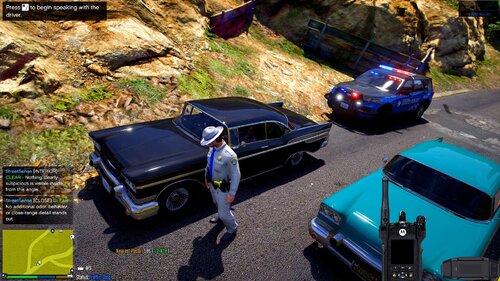
1 Screenshot

Ticket Time

By FinKone

CURRENT SUPPORTED RESOLUTIONS

1920x1080 (download TicketTime(hotfix 1.01)

1600x900 (download TicketTime1600x900 v1.01)

If you are running a lower resolution, it will not work correctly.

What is Ticket Time? Ticket Time expands on the mechanics of LCPDFR (and requires LCPDFR) to work. It was made to work with 1.0d, and 1.1.

It gives the player more options in terms of collecting information from the driver of a vehicle. It does not generate it owns "persons" names, or wanted status.

It works in conjunction with LCPDFR.

Completing the form is not required - but adds that extra detail for players that want it.

Install - throw Ticket Time in your scripts folder.

Use - pull a vehicle over using LCPDFR. Once they've come to a stop, and you are behind them, press Z.

Follow the prompts from there...

Known issues of 1.01

  • Issues giving the suspect orders using LCPDFR once asked to step out of the vehicle (use other methods until I fix this if you want.)
  • Having another unit can sometimes (rarely) make the game crash. Still checking into this one.

Feel free to track me on youtube.

What's New in Version 1.01

Released

  • 1.01
  • Hotfix addresses minor errors in code which ruined the entire experience.

User Feedback

Recommended Comments

DWIceWolf

Members

Question. I've put the script in the scripts folder as it said to do.. However, in game when I pull over a vehicle, when I press "Z" nothing indicates it started.. I've tried scroll lock prior to pressing "Z", in addition I've tried variations of CTRL and ALT as Shift cancels the pull over. Thank you for the assistance as I'm rather stumped.

FinKone

Members Author

Check your log in game to see if its loaded - press "~" then type "reloadscripts" and you should see TicketTime loaded at some point, to check to see what you've currently got running... I think thats... scriptsrunning or something like that I aint sure to be honest. off hand.

DWIceWolf

Members

2015-06-01 12:00:02 - Initializing ScriptHookDotNet v1.7.1.7 BETA (on GTA IV version 1.0.7.0 with C++ Hook version 0.5.1)
2015-06-01 12:00:32 - Direct3D device created!

2015-06-01 12:00:33 - SEARCHING FOR SCRIPTS...
2015-06-01 12:00:33 - Loading scripts in Assembly 'scripts\LCPDFR Loader.net.dll' ...
2015-06-01 12:00:33 -  ...found script 'LCPDFR_Loader.Loader'!
2015-06-01 12:00:33 -  ...found script 'LCPDFR_Loader.PublicScript'!
2015-06-01 12:00:33 - Unable to load Assembly 'scripts\TicketTime.net.dll':
                      System.BadImageFormatException: Could not load file or assembly '1 bytes loaded from ScriptHookDotNet, Version=0.0.0.0, Culture=neutral, PublicKeyToken=null' or one of its dependencies. An attempt was made to load a program with an incorrect format.
                      File name: '1 bytes loaded from ScriptHookDotNet, Version=0.0.0.0, Culture=neutral, PublicKeyToken=null' ---> System.BadImageFormatException: Bad IL format.
                         at System.Reflection.RuntimeAssembly.nLoadImage(Byte[] rawAssembly, Byte[] rawSymbolStore, Evidence evidence, StackCrawlMark& stackMark, Boolean fIntrospection, SecurityContextSource securityContextSource)
                         at System.Reflection.Assembly.Load(Byte[] rawAssembly)
                         at GTA.RemoteScriptDomain.LoadAssembly(String Filename)

FinKone

Members Author

(edited)

Thats pretty odd - you are the first person to get a BadImageFormatExpection.  Hmm.  I'll have to look into it.  Most likely a x64 / x86 issue I'd assume at this point.

Edited by FinKone

ChiefHaynesPD1

Members

will you ever have it ready for low end running pc like the lowest resolution for the game 


DWIceWolf

Members

(edited)

Thank you for the help FinKone.

Edited by MichaelV

DWIceWolf

Members

I was on the windows 10 preview during the las error post.. however I'm back to 8.1 now and still getting an error loading it. 


2015-06-11 09:55:12 - Initializing ScriptHookDotNet v1.7.1.7 BETA (on GTA IV version 1.0.7.0 with C++ Hook version 0.5.1)
2015-06-11 09:57:24 - Direct3D device created!

2015-06-11 09:57:24 - SEARCHING FOR SCRIPTS...
2015-06-11 09:57:24 - Loading scripts in Assembly 'scripts\LCPDFR Loader.net.dll' ...
2015-06-11 09:57:24 -  ...found script 'LCPDFR_Loader.Loader'!
2015-06-11 09:57:24 -  ...found script 'LCPDFR_Loader.PublicScript'!
2015-06-11 09:57:24 - Unable to load Assembly 'scripts\TicketTime.net.dll':
                      System.BadImageFormatException: Could not load file or assembly '1 bytes loaded from ScriptHookDotNet, Version=0.0.0.0, Culture=neutral, PublicKeyToken=null' or one of its dependencies. An attempt was made to load a program with an incorrect format.
                      File name: '1 bytes loaded from ScriptHookDotNet, Version=0.0.0.0, Culture=neutral, PublicKeyToken=null' ---> System.BadImageFormatException: Bad IL format.
                         at System.Reflection.RuntimeAssembly.nLoadImage(Byte[] rawAssembly, Byte[] rawSymbolStore, Evidence evidence, StackCrawlMark& stackMark, Boolean fIntrospection, SecurityContextSource securityContextSource)
                         at System.Reflection.Assembly.Load(Byte[] rawAssembly)
                         at GTA.RemoteScriptDomain.LoadAssembly(String Filename)
                      
                      
2015-06-11 09:57:24 -  -> InnerException:
                      System.BadImageFormatException: Bad IL format.
2015-06-11 09:57:24 - Unable to load Assembly 'scripts\TurnTires.net.dll':
                      System.BadImageFormatException: Could not load file or assembly '1 bytes loaded from ScriptHookDotNet, Version=0.0.0.0, Culture=neutral, PublicKeyToken=null' or one of its dependencies. An attempt was made to load a program with an incorrect format.
                      File name: '1 bytes loaded from ScriptHookDotNet, Version=0.0.0.0, Culture=neutral, PublicKeyToken=null' ---> System.BadImageFormatException: Bad IL format.
                         at System.Reflection.RuntimeAssembly.nLoadImage(Byte[] rawAssembly, Byte[] rawSymbolStore, Evidence evidence, StackCrawlMark& stackMark, Boolean fIntrospection, SecurityContextSource securityContextSource)
                         at System.Reflection.Assembly.Load(Byte[] rawAssembly)
                         at GTA.RemoteScriptDomain.LoadAssembly(String Filename)
                      
                      
2015-06-11 09:57:24 -  -> InnerException:
                      System.BadImageFormatException: Bad IL format.
2015-06-11 09:57:24 - DONE! 2 valid scripts found!

2015-06-11 09:57:24 - STARTING SCRIPTS...
2015-06-11 09:57:24 - INFO: Phone number checks are not available!
2015-06-11 09:57:24 -  ...successfully started script 'LCPDFR_Loader.PublicScript'!
2015-06-11 09:57:24 -  ...successfully started script 'LCPDFR_Loader.Loader'!
2015-06-11 10:35:24 - Direct3D device lost!
2015-06-11 10:35:24 - SCRIPTS TERMINATED!

Polarstar

Members

so im too lazy to read through all of these comments and see if this has been answered (lol sorry). I am really loving it and think you did an excellent job but one of the things that bugs me is that when you are looking through all the options the camera is following it and it looked still on your video. Does anyone know how to fix this? Thanks for the help


jack44465

Members

Will it work on 1440 x 900?

BigB79

Members

nice work, I just wish there was a line on the ticket to show how much over the speed limit they were going

BigB79

Members

also is there was a way to check for warrants  while using ticket time?


supergrunt

Members

(edited)

Question. I've put the script in the scripts folder as it said to do.. However, in game when I pull over a vehicle, when I press "Z" nothing indicates it started.. I've tried scroll lock prior to pressing "Z", in addition I've tried variations of CTRL and ALT as Shift cancels the pull over. Thank you for the assistance as I'm rather stumped.

Got the same problem  it will not start when pressing Z

here is my scripthook log  

at the end it reports  scripts terminated ??  but yet everything seems to be working only ticket time seems not to be working :(  


(PS. reloadscripts command seems to fix the problem)  


Windows 8.1  LCPDFR 1.1 

2015-08-15 20:10:26 - Initializing ScriptHookDotNet v1.7.1.7 BETA (on GTA IV version 1.0.7.0 with C++ Hook version 0.5.1)
2015-08-15 20:12:15 - Direct3D device created!

2015-08-15 20:12:15 - SEARCHING FOR SCRIPTS...
2015-08-15 20:12:15 - Loading scripts in Assembly 'scripts\IV-CopManager.net.dll' ...
2015-08-15 20:12:15 -  ...found script 'IV_CopManager.net.Main'!
2015-08-15 20:12:15 - Loading scripts in Assembly 'scripts\LCPDFR Loader.net.dll' ...
2015-08-15 20:12:15 -  ...found script 'LCPDFR_Loader.Loader'!
2015-08-15 20:12:15 -  ...found script 'LCPDFR_Loader.PublicScript'!
2015-08-15 20:12:15 - Loading scripts in Assembly 'scripts\LessOvertake.net.dll' ...
2015-08-15 20:12:15 -  ...found script 'trafficruleCS.lessovertake'!
2015-08-15 20:12:15 - Loading scripts in Assembly 'scripts\LiveryChanger.net.dll' ...
2015-08-15 20:12:15 -  ...found script 'LiveryChanger.LiveryChanger'!
2015-08-15 20:12:15 - Loading scripts in Assembly 'scripts\PSS.net.dll' ...
2015-08-15 20:12:15 -  ...found script 'PSS.SpeedReader'!
2015-08-15 20:12:15 -  ...found script 'PSS.PSSGeneral'!
2015-08-15 20:12:15 - Loading scripts in Assembly 'scripts\TicketTime.net.dll' ...
2015-08-15 20:12:15 -  ...found script 'TicketTime.MainScript'!
2015-08-15 20:12:15 - Loading scripts in Assembly 'scripts\TrafficFlow.net.dll' ...
2015-08-15 20:12:15 -  ...found script 'TrafficFlow.Taxi'!
2015-08-15 20:12:15 - Loading scripts in Assembly 'scripts\trafficMaker.net.dll' ...
2015-08-15 20:12:15 -  ...found script 'trafficMaker.trafficMaker'!
2015-08-15 20:12:15 - Loading scripts in Assembly 'scripts\vdH_MedicalExaminer.net.dll' ...
2015-08-15 20:12:15 -  ...found script 'vdH.MedicalExaminer'!
2015-08-15 20:12:15 - Loading scripts in Assembly 'scripts\vdH_PoliceHelper.net.dll' ...
2015-08-15 20:12:15 -  ...found script 'vdH.PHelper'!
2015-08-15 20:12:15 - DONE! 12 valid scripts found!

2015-08-15 20:12:15 - STARTING SCRIPTS...
2015-08-15 20:12:15 - INFO: Phone number checks are not available!
2015-08-15 20:12:16 -  ...successfully started script 'vdH.PHelper'!
2015-08-15 20:12:16 -  ...successfully started script 'vdH.MedicalExaminer'!
2015-08-15 20:12:16 -  ...successfully started script 'trafficMaker.trafficMaker'!
2015-08-15 20:12:16 -  ...successfully started script 'TrafficFlow.Taxi'!
2015-08-15 20:12:16 -  ...successfully started script 'TicketTime.MainScript'!
2015-08-15 20:12:16 -  ...successfully started script 'PSS.PSSGeneral'!
2015-08-15 20:12:16 -  ...successfully started script 'PSS.SpeedReader'!
2015-08-15 20:12:16 -  ...successfully started script 'LiveryChanger.LiveryChanger'!
2015-08-15 20:12:16 -  ...successfully started script 'trafficruleCS.lessovertake'!
2015-08-15 20:12:16 -  ...successfully started script 'LCPDFR_Loader.PublicScript'!
2015-08-15 20:12:16 -  ...successfully started script 'LCPDFR_Loader.Loader'!
2015-08-15 20:12:16 -  ...successfully started script 'IV_CopManager.net.Main'!
2015-08-15 20:19:37 - Direct3D device lost!
2015-08-15 20:19:37 - SCRIPTS TERMINATED!


Edited by supergrunt

supergrunt

Members

it seems something else was the problem (don't know what ??? )  but somehow it seems to be fixed (probably just a small load error in GTA4 or something ;) ) 


weatherman45

Members

I found a way to make it work in lower resolution, the script works great and is a great job, i run it in 1400X900 and works fine

Deputy Tahoe

Members

How ??????????/

weatherman45

Members

Set your mointer resolution to one thing and then go in the game and set the display to 1440x900 and it works

Deputy Tahoe

Members

Thanks !!!!! That worked, but now after viewing the documents I go to close the window but the background closes, but the documents are stuck on screen and only way to get rid of is to quit the game. Any help with that part?

weatherman45

Members

I know they will go away when you get back in your car. That has worked for me. I'm re-installing becasue i tried back to the future mod and my keyboard is mac book pro and can't use the minus key. But try getting back in the car. 

Deputy Tahoe

Members

okay will try again. also does it matter which file to download?

weatherman45

Members

yeah download the 1400x900 one


i mean 1600x900, i'll try mine and let you know it might have been the hotfix one


Deputy Tahoe

Members

okay. thanks!!!!

Formulka1

Members

distinction 1280x1024?

cathalgall

Members

On 4/10/2015 at 4:46 PM, FinKone said:

Yea some users are reporting forms not cleaning up well - you might have gotten unlucky and got the same rolls - I'll have to check into this to make sure its changing.

hey by any chance do u have the file that worked for lcpd 0.9 

Create an account or sign in to comment

Account

Navigation

Search

Search

Configure browser push notifications

Chrome (Android)
  1. Tap the lock icon next to the address bar.
  2. Tap Permissions → Notifications.
  3. Adjust your preference.
Chrome (Desktop)
  1. Click the padlock icon in the address bar.
  2. Select Site settings.
  3. Find Notifications and adjust your preference.